Pro Tools Reference Guide200
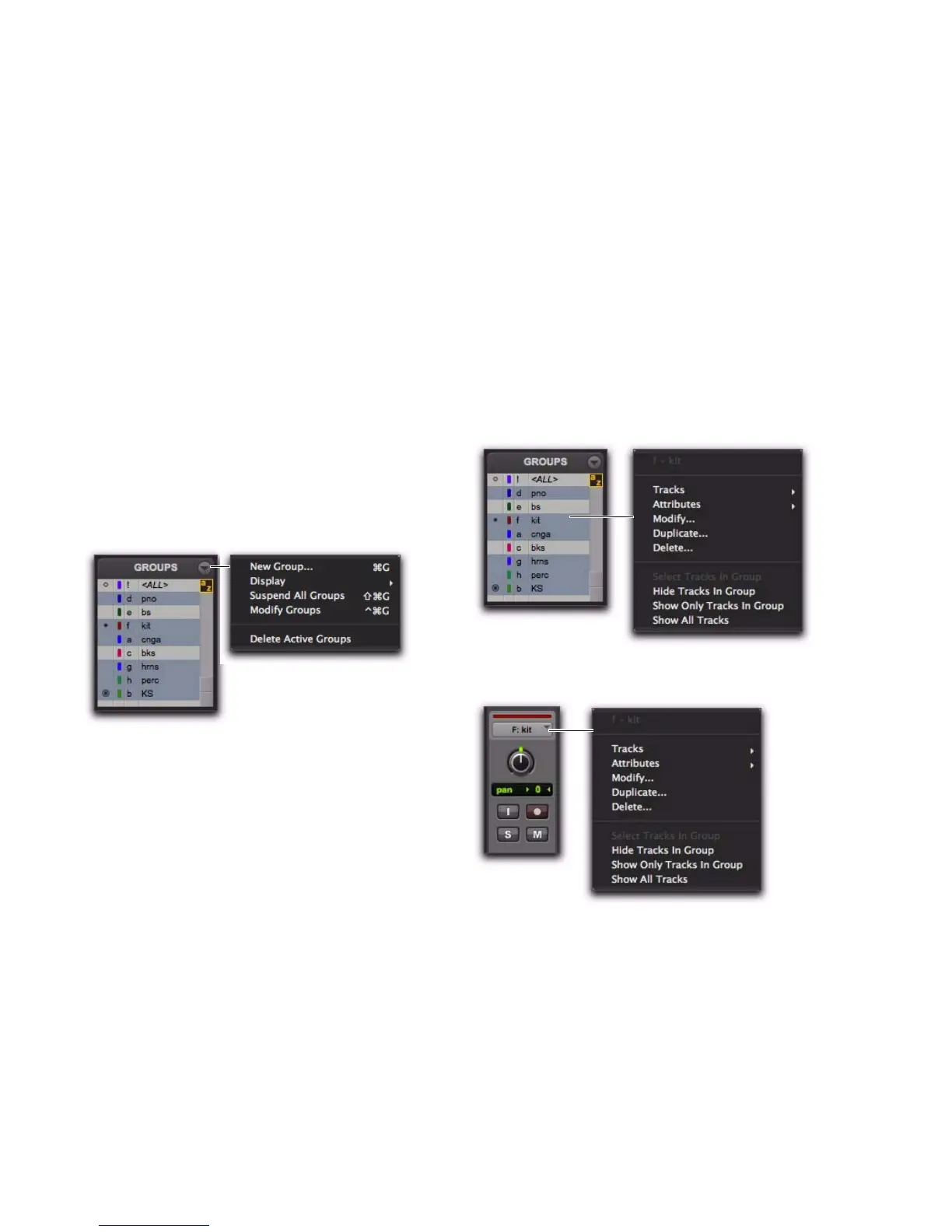
Group List Menu
The pop-up menu at the top of the Group List
provides the following commands:
New Group Executes the Track > Group com-
mand.
Display Provides commands to show Edit groups
only, Mix groups only, or all groups (Edit, Mix,
and Mix/Edit).
Suspend All Groups Suspends group behavior for
all Mix and Edit groups.
Modify Groups Opens Group dialog to modify
existing groups only.
Delete Active Groups Deletes only currently ac-
tive groups.
Group Name and Track Group ID
Indicator Pop-Up Menus
When you click and hold on a group name in
the Group List (or Right-click), or click a Group
ID indicator in a track, a pop-up menu provides
the following commands:
Tracks Displays track membership in group.
Attributes Displays attributes of group.
Modify Opens Group dialog to modify existing
groups only.
Duplicate Opens Group dialog for duplicated
group.
Delete Deletes a single group.
Select Tracks in Group Selects tracks in the
group.
Show/Hide Tracks in Group Shows or hides
tracks in the current group.
Show Only Tracks in Group Shows only the tracks
in the group and hides all other tracks.
Show All Tracks Shows all tracks in the session.
Group List menu
Group Name pop-up menu
Group ID indicator pop-up menu



 To Next Page