Pro Tools Reference Guide66
7 Map the path to a specific audio interface, or
bus channel in the Grid column. See “Channel
Mapping” on page 70
8 Repeat the previous steps to configure all path
types (Input, Output, Insert, or Bus).
9 Click OK to save changes and close the I/O
Setup dialog. If there are any overlapping or
identically named paths, you will be instructed
to correct them before the I/O Setup dialog will
close. For more information, see “Valid Paths
and Requirements” on page 71.
Editing Paths
The I/O Setup dialog lets you edit or customize
signal path definitions.
Paths can be:
• Restored to default configurations
• Renamed, for easier identification after
changing or renaming audio interfaces
• Selected and reordered to change menu or-
der in track selectors
• Selected and deleted
• Remapped to or from different sources or
destinations
• Deactivated (or reactivated) to manage un-
available or unnecessary I/O resources
In addition, you can import and export your
I/O Setup configurations as I/O Settings files, as
well as set default path parameters. See “Work-
ing with I/O Settings Files” on page 71.
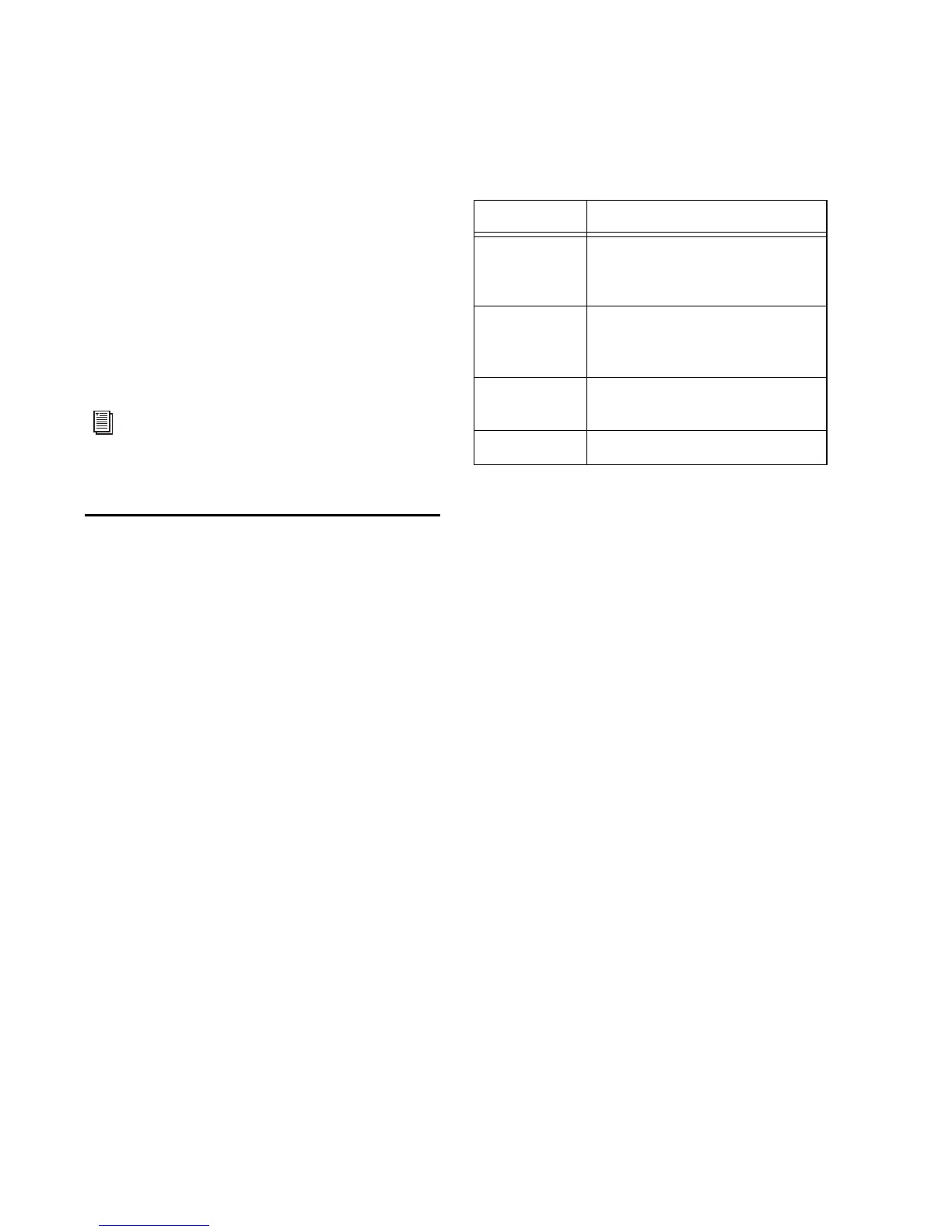
The following table lists the available path at-
tributes for each path type.
Path interface names can also be renamed and
configured as defaults, which can be restored.
Restoring Default Paths and Path
Names
You can set an I/O Setup path type to its default
path configuration at any time. When restoring
the default path, Pro Tools does the following:
• Creates new default paths up to the capacity
of your system’s available audio interfaces and
resources.
• Resets selected path names to matching or
corresponding paths in the current I/O Setup
configuration. For example, if you replace an
audio interface on a Pro Tools|HD system, you
can click the Default button to update your
I/O Setup definitions with the new hardware
configuration.
If there are matching paths available with the
new system configuration, existing paths will be
updated to include new audio interfaces
(Pro Tools|HD systems).
Multichannel paths and mixing are ex-
plained in Chapter 44, “Pro Tools Setup for
Surround.”
Path options by type
Path Type Path Options (Attributes)
Input Names, formats, and source
channel (analog or digital audio
interface)
Output Names, formats, and destination
(audio interface output channel or
internal send bus)
Insert Names, formats and destination
(audio interface channels)
Bus Names and formats


 To Next Page
 Loading...