DIGISYSTEM LABORATORY INSTRUMENTS INC. www.digisystemlab.com REV.1-2017
Other functions:
Note: Before executing other functions , please make sure that the continuous mode is selected.
If you see OUT2 indicator on the screen, please press to set Continouos mode.
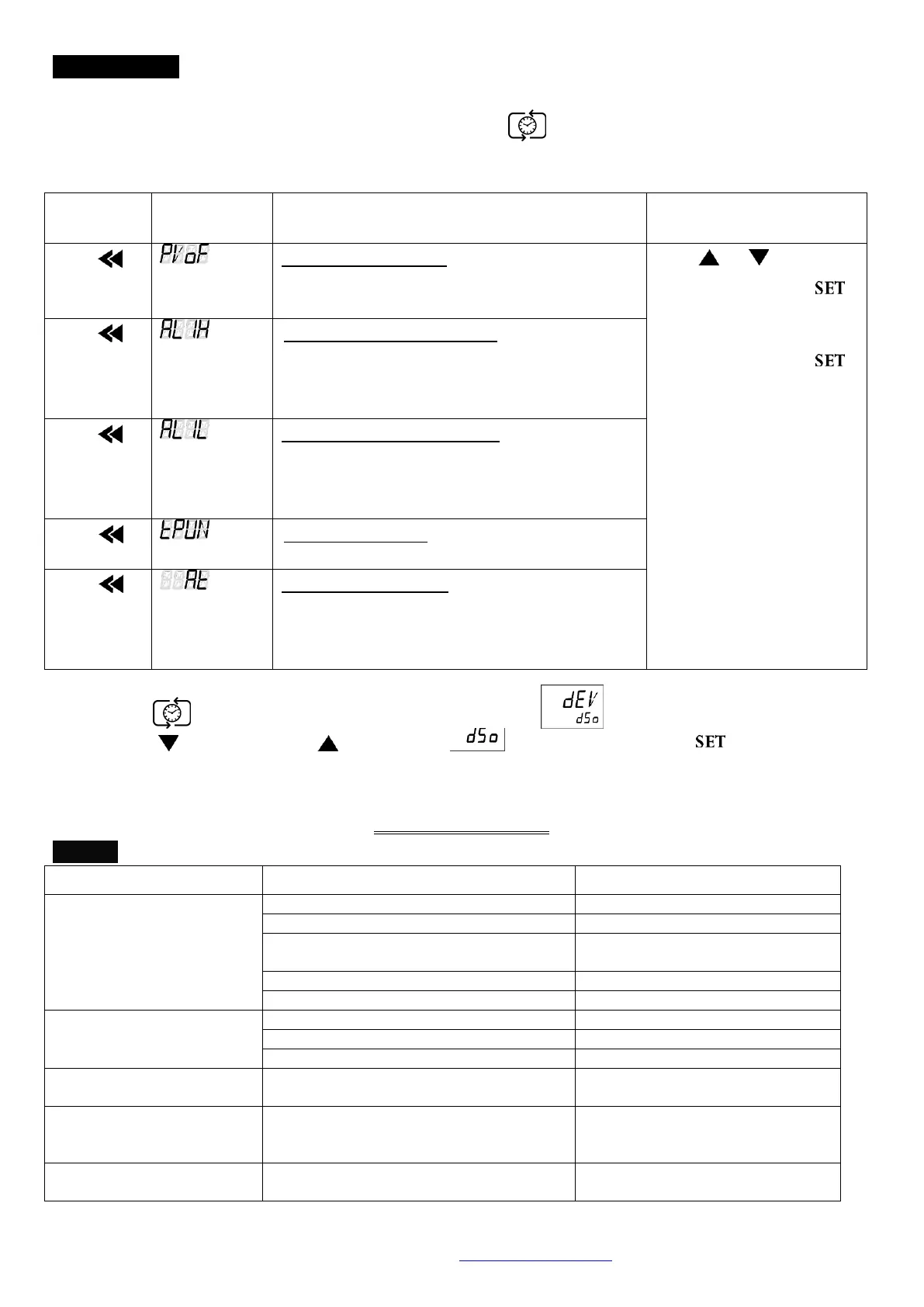
1. Other functions include PV shift (offset) value, setting alarm point, setting temperature unit, auto
tuning function.
PV shift (offset) value. If PV value is not
correct, you can use this function to calibrate
by your own thermometer.
Press or to adjust
the value. Then press
to enter the value.
If you want to go back to
PV/SV display, press
again.
Upper-limit point for alarm. When the
difference between PV and SV is over
upper-limit, the alarm indicator (ALM1) on
display screen will be flashing.
Lower-limit point for alarm. When the
difference between SV and PV is over
upper-limit, the alarm indicator (ALM1) on
display screen will be flashing.
Temperature unit. C or F.
Auto-tuning function. When auto-tuning
function is on, the “AT” indicator” on display
screen is flashing. When the function is off, the
light of the “AT” indicator” is extinguish.
2. Restore default value:
2.1 Press more than 3 seconds, and then you will see 。
2.2 Press and then press , you will see is flashing. Please press to enter the value.
Then the default value is restored.
Service Manual
Troubleshooting Guide
Caution: Always disconnect the power cord before troubleshooting.
Power cord not connected to outlet.
Change to different output.
Press the breaker back of the machine, and
check if the current is overload.
Electronic element broken
Contact your distributor for repair.
Contact your distributor for repair.
Controller can’t control the
temperature
Contact your distributor for repair.
Contact your distributor for repair.
Contact your distributor for repair.
The key of PID controller can’t
work
Please refer to the other function to release
the lock status.
Temperature is not stable
The initial setting value is not suitable for the
ambient air temperature where the machine is
located
Refer to the other functions, execute the
Auto-tuning function.
User’s calibration thermometer is different
from the factory’s calibration thermometer
Refer to the other functions, execute the
function for PV shift (offset) value.


 To Previous Page
 Loading...