Using the Digitarium
®
Remote Control to do a Basic Night Sky Show
The Digitarium
®
remote control is backlit. To backlight the remote for a few seconds, push the
button at lower left. You must release the button before you push another button.
For best reception, point the remote at the zenith while pressing buttons.
In a typical night sky show, audiences learn about a few constellations as well as what other objects
(planets, the moon, deep space objects, etc.) will be visible that evening. This document will show you
which Digitarium
®
remote control buttons to press in order to present a basic night sky show.
Below is an image of the Digitarium
®
remote control:
1

 Need help?
 General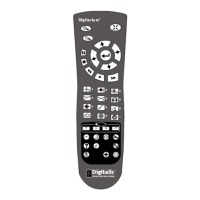

 To Next Page