EasyManua.ls Logo

DigitalLife U2AUDIO7-1 - User Manual

DigitalLife U2AUDIO7-1
16 pages
Print Icon
To Next Page IconTo Next Page
Loading...
USB 7.1 EXTERNAL SOUND BOX
Version:v1
U2AUDIO7-1
Copying or reproduction of this doc-
ument in whole or in part without
permission is prohibited.
User Guidance

Other manuals for DigitalLife U2AUDIO7-1

Question and Answer IconNeed help?

Do you have a question about the DigitalLife U2AUDIO7-1 and is the answer not in the manual?

Summary

Introduction

Minimum System Requirements

Lists hardware and software prerequisites for the device, including processor, RAM, storage, and connectivity.

Software Download or Updates

Instructions on obtaining the latest drivers and software from the official website for optimal performance.

Hardware Interfaces

Front Panel Controls and Indicators

Details the function of volume controls, mute buttons, and status LEDs located on the front panel of the device.

Audio Output Connectors

Explains connections for headphones and various speaker configurations such as Front, Surround, Center/Bass, and Back.

Digital and Input Ports

Details S/PDIF input/output connectors and the USB/Mic input ports for versatile connectivity options.

Installing and Uninstalling Software

Installing Drivers and Applications

Guide to installing necessary drivers and software for full device functionality and advanced features.

Uninstalling Drivers and Applications

Steps for removing audio applications and device drivers to correct problems or upgrade configurations.

How to Use the U2 AUDIO7-1

Playing Music

Instructions for connecting headphones or stereo/2.1 channel speakers for audio playback.

Recording Music

Connect external sources and a microphone to the Line In and Mic In jacks for audio recording.

Creating Music

Connect instruments or microphones to compose and record music using the device's input jacks.

Watching DVDs

Connect to a Dolby Digital decoder or AV amplifier via S/PDIF Out for home theater audio playback.

Connecting Speakers

Connecting 2.1 Channel Analog Speakers

Connect stereo speakers to the front output for a 2.1 audio setup.

Connecting 5.1 Channel Analog Speakers

Connect 5.1 surround sound speakers using multiple audio outputs on the device.

Connecting 7.1 Channel Analog Speakers

Connect 7.1 surround sound speakers using all available audio outputs for immersive sound.

Connecting Home Theatre Systems

Connect the device to a home theater system via the Optical S/PDIF Out connector.

Connecting Your A;V Receiver Using Line Level Inputs

Connect to an A/V receiver using line-level inputs for multichannel audio, bypassing S/PDIF.

Technical Specifications

Troubleshooting

Problems with Sound

Solutions for common audio issues such as no sound from headphones or incorrect audio output.

Problems with Simultaneous Playback;Recording

Addresses issues with recording and playback, often related to USB bandwidth or driver configuration.

License and Copyright

Overview

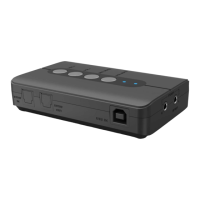
The DigitalLife USB 7.1 External Sound Box (U2AUDIO7-1) is an external USB sound card designed to upgrade desktop/laptop audio to a home theater-ready solution, supporting analog and digital audio for 2 to 7.1 channel applications. It provides a cost-saving alternative to built-in or on-board sound cards.

Function Description:

The U2AUDIO7-1 serves as a versatile audio interface, enabling users to connect various audio peripherals and manage audio input/output. It supports both playback and recording functionalities, making it suitable for music listening, content creation, and home entertainment. The device features multiple input and output jacks for headphones, microphones, line-in sources, and multi-channel speaker systems. It also includes S/PDIF optical input and output for digital audio connections.

Important Technical Specifications:

  • Audio Channels: 8CH 16-bit DAC Channels (7.1 Surround Sound).
  • Sampling Rates: Supports 44.1 and 48 KHz sampling rates for analog playback and recording, or 48 KHz for S/PDIF.
  • Output Connectors: 3.5mm output connectors for Front, Surround, Rear, Centre/Bass.
  • Connector Type(s): 1 - USB B (4 pin) Female.
  • External Ports: 2 - Toslink (S/PDIF, Optical) Female; 8 - 3.5 mm Mini-Jack (3 Position) Female.
  • OS Compatibility: Windows® 11 / 10 / 8.x / 7 (32-bit/64-bit).
  • LED Indicators: 1 - Microphone Mute, 1 - Power / Activity.
  • Color: Black.
  • Dimensions: 100 x 65 x 22mm.
  • Product Weight: 85g.
  • Power: USB powered.
  • SPDIF Optical Port Note: The audio adapter's S/PDIF optical pass-through port supports 2-channel audio only; it does not support 5.1 or 7.1 audio.
  • Microphone Compatibility Note: Designed for common headsets with 3.5mm TRS headphone and microphone jacks. XLR-based microphones (even with adapters) will not work as the U2AUDIO7-1 does not provide 48V Phantom Power.

Usage Features:

The device offers a range of features for controlling and monitoring audio:

  • Volume Control: Dedicated dials for increasing/decreasing audio output volume (VOL+ / VOL-) and muting/un-muting the microphone (MIC MUTE) and audio outputs (VOL MUTE).
  • Status Indicators: An LED for Mic Mute (turns on when microphone inputs are muted) and a Power/Activity LED (lights blue when USB power is detected, blinks intermittently when audio is muted).
  • Headphone Connection: A 3.5mm (1/8-inch) stereo jack for connecting stereo headphones.
  • Line-In Connection: Connects to the line output of external stereo sources.
  • Microphone Input: A 3.5mm (1/8-inch) mono jack for microphones (Mic 1 + Mic 2). Note: Mic In overrides Line In if both are connected simultaneously.
  • Speaker Connections:
    • FRONT: Connects to amplified stereo or multi-channel speaker systems, or an external amplifier.
    • SURROUND: Connects to Surround speakers in 4/6/8 channel modes (via external amplifier).
    • CENTER/BASS: Connects to Center/Bass speakers in 6/8 channel modes (via external amplifier).
    • BACK: Connects to Rear speakers in 8 channel mode (via external amplifier).
  • Digital Audio Connections:
    • S/PDIF IN: Connects to the digital optical output of an external audio device via a Toslink cable.
    • S/PDIF OUT: Connects to the digital optical input of an external audio device via a Toslink cable. The signal from S/PDIF IN only passes through to S/PDIF OUT.
  • USB Connector: Connects the device to the computer using a USB cable.
  • Software Control: Requires driver and application installation from the DigitalLife website (digitallife.shop/pages/faq-u2audio7-1) to access advanced features and control settings via the Entertainment Console. This software allows users to manage mixer selections, un-mute inputs, and configure speaker settings.
  • Music Playback: Supports connecting stereo headphones or analog stereo/2.1/5.1/7.1 channel speakers for music listening.
  • Music Recording: Enables recording audio from external sources (MP3/CD players) via the Line In jack and microphones via the Mic In jack. Users can un-mute Line In/Mic In inputs in the Mixer selection of the Entertainment Console to listen to the source audio.
  • Music Creation: Facilitates creating compositions by connecting audio inputs from electric guitars, synthesizers, or microphones. A Pre-amp FX Box for an electric guitar can also be connected to the Line In jack.
  • DVD Watching: Can be integrated into a PC home entertainment system to decode Dolby Digital signals from DVDs through an external Dolby Digital decoder or AV Amplifier via the Optical S/PDIF Out connector. For multichannel line-level inputs, the device can connect directly to an A/V receiver's Line Out jacks.

Maintenance Features:

  • Driver and Software Updates: Users are advised to visit www.digitallife.shop for the latest Sound Blaster news, products, technical help, and driver updates to ensure optimal performance and compatibility.
  • Troubleshooting: The user guidance provides solutions for common issues such as no sound from headphones, no audio output from digital files, and inability to hear audio from Line In/Mic In during recording.
  • Simultaneous Playback/Recording Issues: Addresses potential data transfer limitations with USB 1.1 connections, suggesting lower bit depth and sampling rates to reduce CPU consumption and USB bandwidth requirements. This issue is generally not expected with USB 2.0 connections.
  • Installation/Uninstallation: Clear instructions are provided for installing and uninstalling drivers and applications, including the recommendation to close all audio applications before uninstallation.

DigitalLife U2AUDIO7-1 Specifications

General IconGeneral
BrandDigitalLife
ModelU2AUDIO7-1
CategorySpeaker System
LanguageEnglish