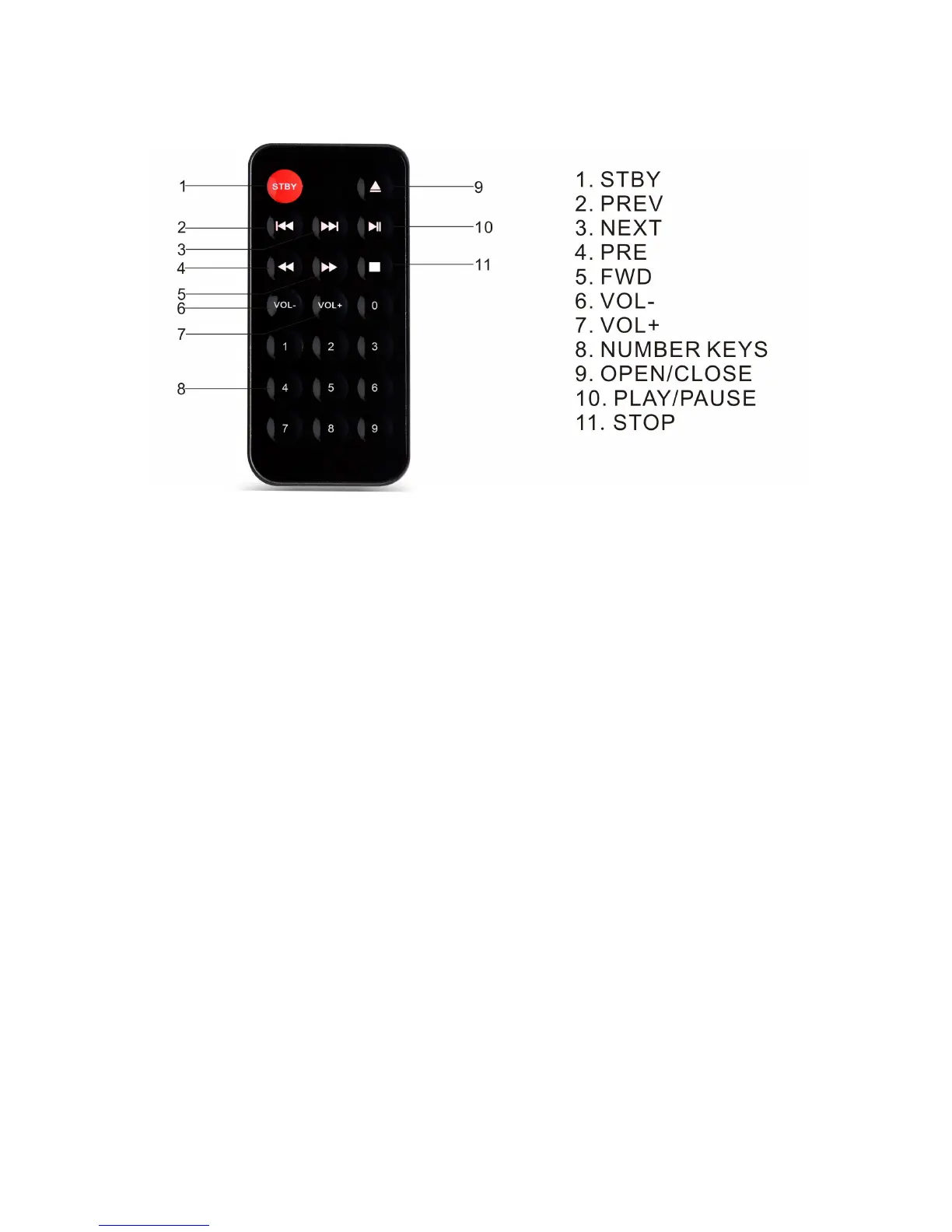
REMOTE CONTROL
STBY (STANDBY)
• Press this button, the speaker will set to stand-by mode.
• Press again to return its power on state.
PREV
• Press this button, the system will choose previous song.
NEXT
• Press this button, the system will choose next song.
PRE
• Fast reverse playback under CD Mode.
• The available speed is 2X, 4X, 8X and normal speed.
FWD
• Fast forward playback under CD Mode.
• The available speed is 2X, 4X, 8X and normal speed.
VOL-
• To control volume down.
VOL+
• To control volume up.
NUMBER KEYS
• When in CD/USB mode, press the number to choose the number of the songs in the
CD/USB device.
PLAY/PAUSE
• Press this button, the system will play or pause.
OPEN/CLOSE
• Press this button to open or close the CD tray when under CD mode.
STOP
• Press this button to stop playing under CD/USB modes.
4


 To Next Page