6
Modes:
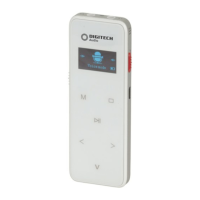
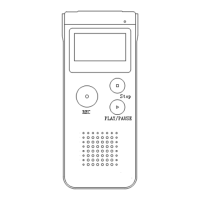
1. Voice Mode: In any state including being powered o, slide the Red “REC”
recording switch from “STOP” to “REC”; the device will start recording.
Press the Play/Pause button to pause recording, press the “ ” button again to
resume recording. Slide the record switch to Stop to end the recording and the
device will return to the stopped playing interface of the current recorded file.
Delete File:
In voice mode; press the “M” Menu button, then press the left “>” or “<” right
arrow buttons to select “Delete file” or “Delete All”. Press the ”M” Menu button
again to confirm., Press the right “>” and “<” Left arrow buttons to choose “YES”
for confirmation of deleting the file.
Press the “M” Menu button again to select,“NO” for cancelling the file deletion.
Press the “M” Menu or Stop button to return to standby mode.
Record Type:
In the Voice standby mode; press the “M” Menu button, right“>” and “<” Left
arrow buttons to select “PCM” (Pulse Code Modulation) and “HP” (High Quality)
recording. Press the “M” button again to select your required recording type and
then the Stop button to exit.
Recording Format & File Save Locations:
REC Format File Format REC Quality Save Location Default Name
Stereo Record MP3 HP /DVR/ST REC***. MP3
Phone Record MP3 HP /DVR/ST LIN***. MP3
FM Record MP3 HP /DVR/ST RFM***. MP3
Noise C REC WAV HP /DVR/PCM RNC***. WAV
PCM REC WAV HP /DVR/PCM PCM***. WAV
NOTE: Up to 200 recorded files can be stored on this device, if the number
reaches 200 then the recordings will stop. Please delete the recordings or
save them on your computer.
NOTE: For the highest quality recording, please choose the PCM recording
type.


 To Next Page