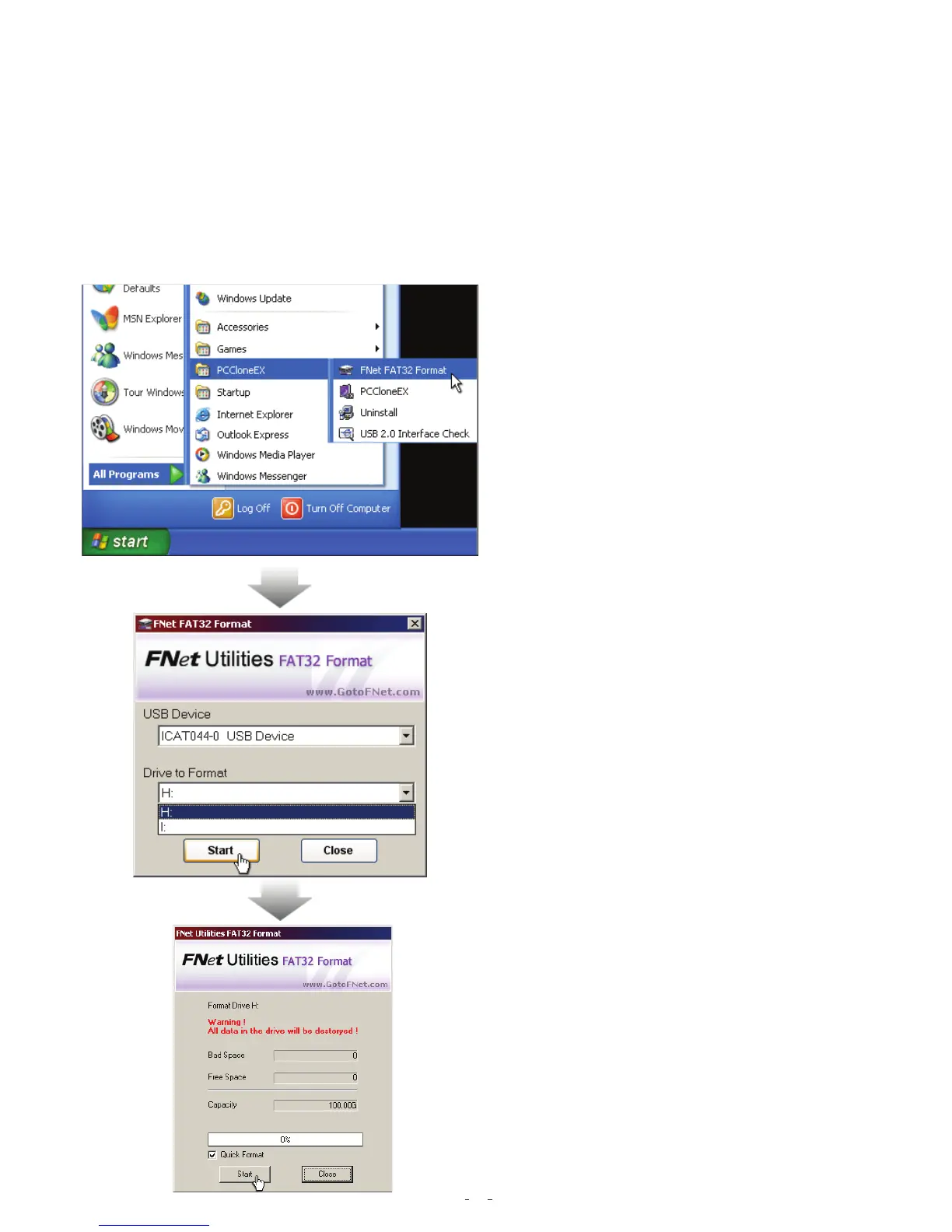
1. Please plug USB HDD, and turn
on the computer.
2. Click "Start" -> "All programs" -> "
PCClone EX" -> "FNet FAT32 Format
FAT32 Format Utility
For the current HDD capacity is getting bigger, the Fat32 Format Utility in Windows
2000 / XP is not able to support the HDD size exceeding 32GB;FNet recommends
FNet Fat 32 Format Utility, which can format the large capacity to be FAT32 Format
rapidly and fully, the size even maximums up to 4 TB (4000GB).
(Attention: all data in USB HDD will be deleted if you use this function)
Step
-------------------------------------------------------------------------------------------------------------------
3. Confirm the “ USB Device” and “Drive
to Format” in the FAT32 Format Utility,
and then press “start”.
4. Tick “ Quick Format” and click “Start”
for executing.
(Attention: all data in USB HDD will be
deleted if you use this function)
9


 To Next Page
 Loading...