Setup
File Backup
--------------------------------------------------------------------------------
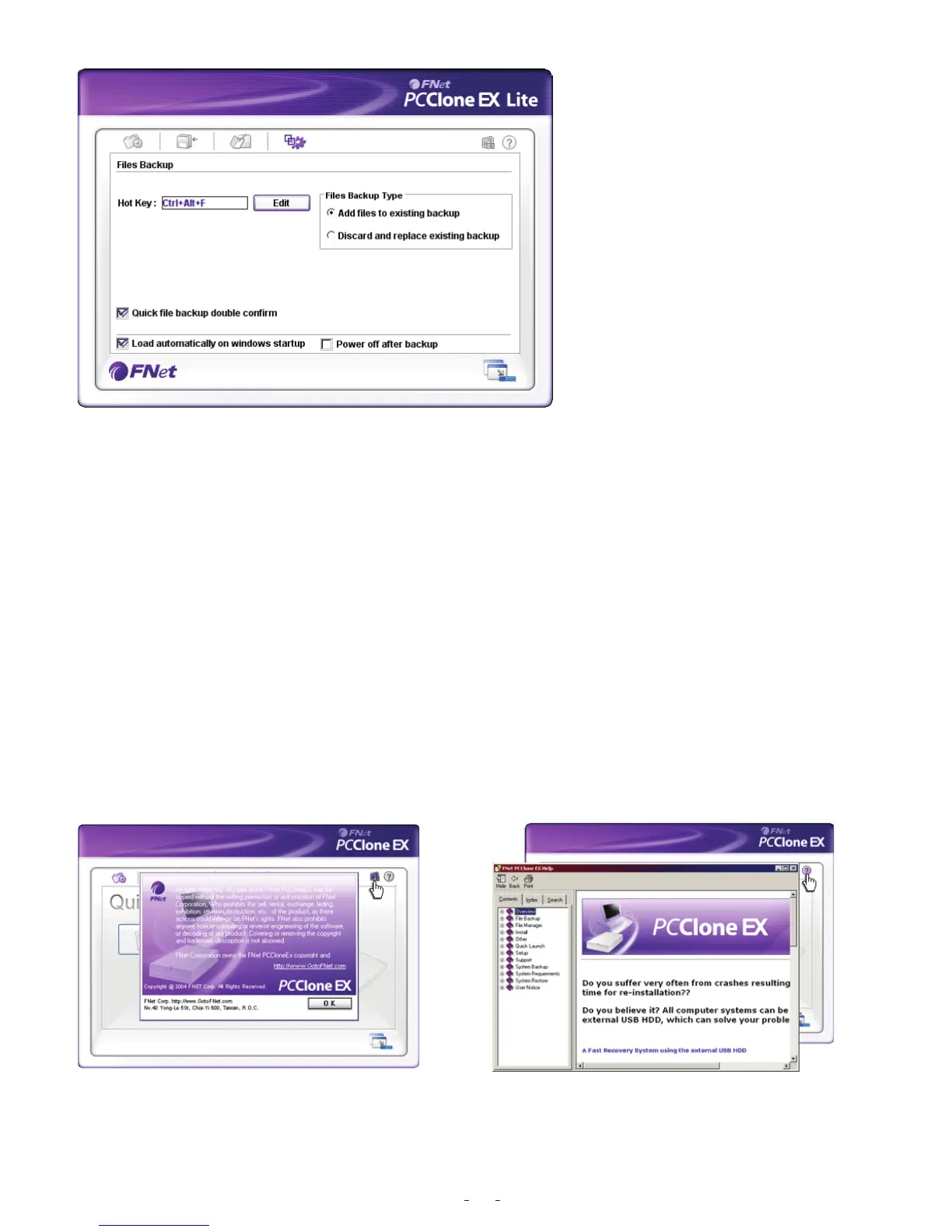
Hot Key setup
When users click “ Edit”, which can be made up of their own hot key by choosing
“Ctrl”, “shift”, “Alt” and Added a number, or a letter, or function key, or whatever they
want to consist of a hot key. Thus, every user has their own edited key to do file backup.
File backup mode
There are two modes for file backups; one is “Add~”, this function only backs up
additional files to the external USB HDD; the other one is “Discard~”, this function
reduplicates all data from your PC to the external USB HDD.
Confirmation
When users back up using their hot key, a default dialog box will pop up to asking for
confirmation. If users want to backup directly, please cancel the default.
Other
Concerning PCClone Ex spec, please
click the icon of “PCClone EX” on the
right side of upper corner of the screen ,
or right click the icon of “PCCloneEX” in
the notification area.
Please click the icon of “PCClone EX”on
the right side of upper corner of screen,
“About PCClone EX ”dialog will display
and assist to recognize PCCloneEX.
18


 To Previous Page
 Loading...