Create Partition
If your USB HDD has managed already, please skip this part and move on next context.
Steps
-------------------------------------------------------------------------------------------------------------------
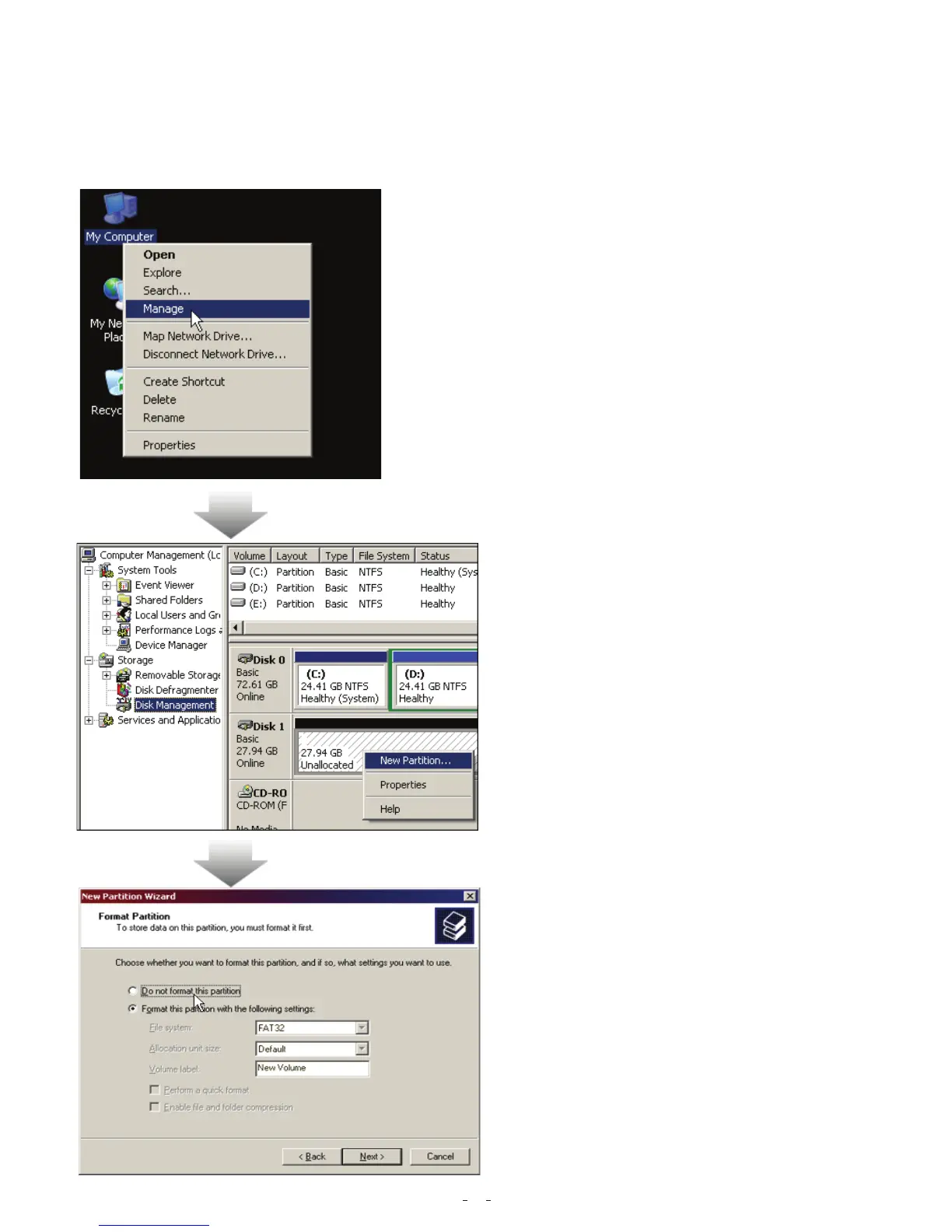
1. Please plug USB HDD. (Turn on the USB power.)
2. Please right click "My computer", and point
"manage".(It also can click in succession as"
Start"->"Control Panel"-> "Administrative Tools"->
"Computer management")
(If your USB HDD has managed already, please skip
this part and move on next context.)
3. Please click "disk management"
as the left window, and then find
the disk management as the right
window.
4. Please right click the disk of "
unallocated", and point the "new
Partition".
( In order to make sure the disk of "
Unallocated" whether the USB disk
uses this area or not, users can find
out by removing and plugging the
port of USB connection.)
5. Follow up the installation of "Partition
Wizard" to operate the disk of partition
and format.
7


 To Next Page
 Loading...