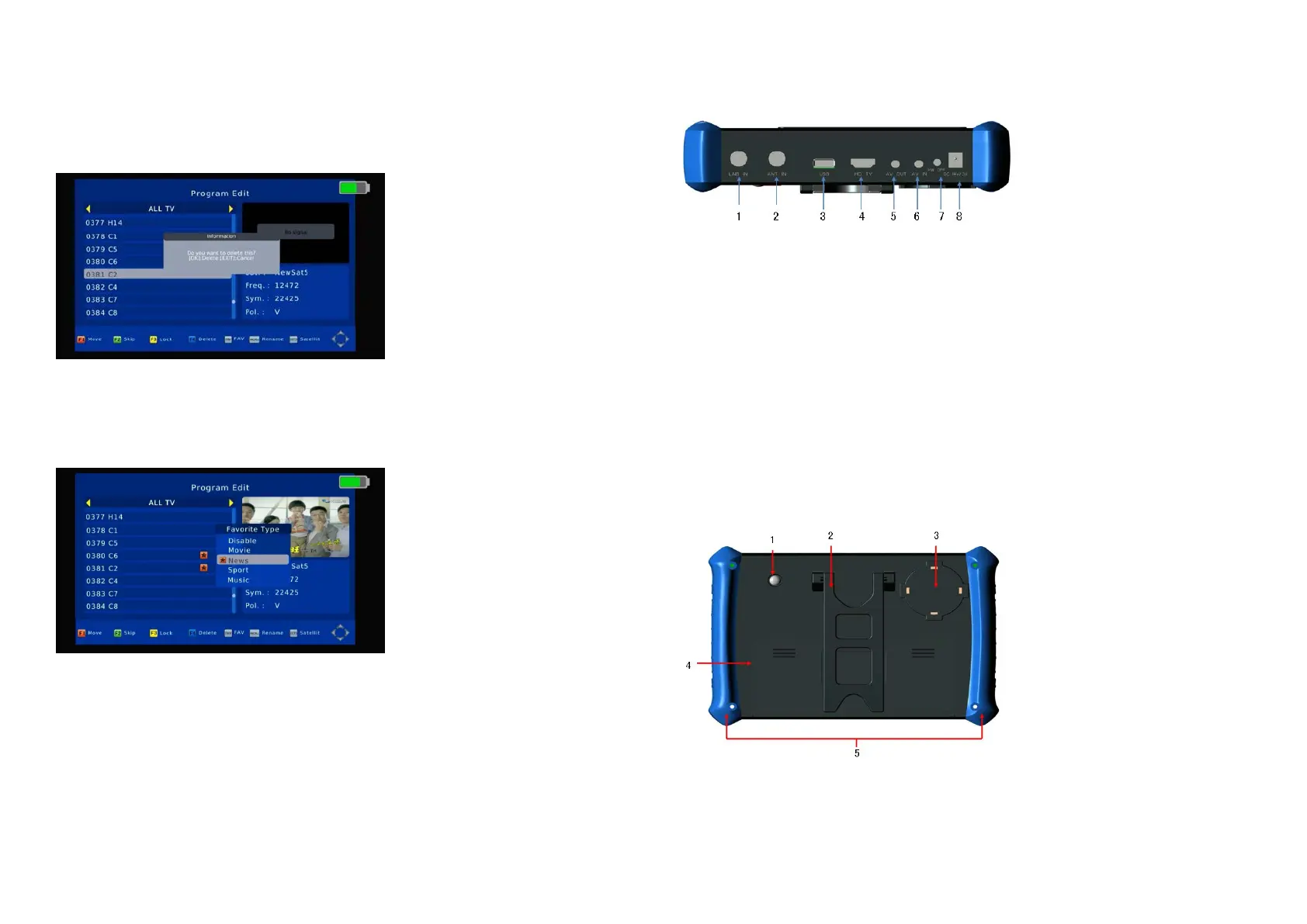
Delete
1. Press [▲/▼] on channel list, select the channels which you want to edit in channel list by press [Blue/F4] Key.
2. Press the [OK] key to sure delete the channel.
3. Press [EXIT] Key to save the settings.
Favorite
2. Press [▲/▼] on channel list, select the channels which you want to edit in channel list by press [FAV] Key.
3. Press [▲/▼] choose what you want “Favourite Type” and press the [OK] key.
4. Press [EXIT] Key to save the settings.
Skip and rename
Follow the same way you can set the channel’s Skip or give the new name.
2.3 Top panel introduction
1. F connector male for LNB IN
2. F connector male for ANT IN
3. USB connector
4. HD TV connector (HDMI)
5. AV OUT connector (3.5mm PHONE JACK)
6. AV IN connector (3.5mm PHONE JACK)
7. Reset key
8. DC jack (for charger)
2.4 Rear panel introduction
1. LED floodlight
2. Holder
3. Loudspeaker
4. Battery
5. Bumper



 To Next Page