The DIGITNOW! M504 is an automatic stereo turntable system designed for versatile audio playback and recording. It integrates multiple audio sources into a single unit, offering a comprehensive solution for music enthusiasts.
Function Description:
The M504 serves as a multi-functional audio system, capable of playing and recording from various sources. Its primary function is a 3-speed turntable, supporting vinyl records at 33 1/3, 45, and 78 RPM. It features a belt-drive mechanism and a semi-automatic play tone arm with a ceramic stereo cartridge and jewel stylus. A built-in 45 RPM adapter is included for convenience.
Beyond vinyl, the device incorporates a CD player with CD record and playback capabilities. It also includes a cassette tape player for playback of audio cassettes. For radio enthusiasts, an analog AM/FM stereo radio is integrated.
Modern connectivity is provided through a Bluetooth function, allowing wireless streaming from compatible devices. The unit also features slot-in USB/SD/MMC for encoding and decoding audio, enabling users to record from vinyl, CD, cassette, FM/AM radio, or Aux-in directly to a USB flash disk or SD/MMC card in MP3 format (192kbps). Conversely, it can play MP3 and WMA files stored on these memory devices.
The M504 is equipped with full-range stereo speakers for direct audio output. It also includes Aux-in and headphone sockets, offering options for external audio input and private listening. A removable semi-transparent plastic dust cover protects the turntable components. The system can be operated via a remote control, enhancing user convenience.
Important Technical Specifications:
- Turntable Speeds: 33 1/3, 45, 78 RPM
- Drive Type: Belt-drive
- Cartridge Type: Ceramic stereo cartridge with jewel stylus
- Recording Format: MP3 (192kbps) to USB/SD/MMC
- Playback Formats (USB/SD/MMC): MP3, WMA
- Radio: Analog AM/FM stereo
- Connectivity: Bluetooth, USB, SD/MMC, Aux-in (3.5mm), Headphone jack (3.5mm), Speaker box sockets
- Power Supply: AC outlet (110V for U.S., Canada, Japan; 220-240V for Europe, Australia)
- Maximum Ambient Temperature: 35°C
Usage Features:
- Power On/Off: Press the "Power/Volume" knob for about 5 seconds.
- Mode Selection: Use the "MODE" key to switch between FM/AM, USB/SD, CD, BLUETOOTH, TAPE, PHONO, and AUX IN functions.
- FM/AM Operation:
- Station Search: Rotate the "TUNING" knob.
- Manual Save: Press "PROG" on the remote.
- Auto Search/Save: Press "PLAY/PAUSE" for about 5 seconds.
- Recording: Insert a memory device, press "REC", select USB/SD (if both are inserted), press "REC" again, then "PLAY/PAUSE" to start. Press "STOP" then "REC" to end.
- Phono Operation:
- Place a record, select speed (33 1/3, 45, 78 RPM).
- Remove stylus guard, use lift lever to position tone arm.
- Auto/Manual Stop: Turntable stops automatically at the end of a record in "ON" position; continues playing in "OFF" position for longer vinyl.
- Recording: Similar to FM/AM recording process, but from vinyl source. Default priority for recorded files is USB flash disk if both USB and SD are inserted.
- Cassette Tape Operation:
- Insert tape into the slot (exposed side facing right). Playback starts automatically.
- Fast Forward: Press the eject button halfway.
- Eject: Depress the eject button completely.
- Recording: Similar to FM/AM recording process, but from cassette source.
- Aux-in Operation:
- Connect external audio player via 3.5mm audio cable to the AUX in jack.
- Recording: Similar to FM/AM recording process, but from Aux-in source.
- USB/SD Playing:
- Insert USB flash disk or SD/MMC card with MP3/WMA files.
- Press "PLAY/PAUSE" to play/pause.
- Navigation: "PREV" and "NEXT" keys for track selection and fast backward/forward.
- Delete Function: Press "STOP", then "PREV/NEXT" to select track, then "DELETE" to remove.
- Folder+: Switch between stored music files and recorded music files.
- Repeat Play: Press "REPEAT" on the remote for continuous loop ("ALL" on screen). Press again to disable.
- Recording: Press "STOP", then "REC", use "PREV/NEXT" to select songs to record, press "REC" again, then "PLAY/PAUSE" to start.
- Bluetooth Operation:
- Switch to BLUE (Bluetooth) mode.
- Enable Bluetooth on your smart device, search for "M50", and pair.
- Recording: Similar to FM/AM recording process, but from Bluetooth source.
- CD Player Operation:
- Press "CD Open/Close" to open/close the CD door.
- Unit automatically plays the first song after reading the disc.
- Play/Pause: "PLAY/PAUSE" key.
- Navigation: "PREV" and "NEXT" keys for track selection and fast backward/forward.
- Repeat Play: Similar to USB/SD repeat function.
- CD Recording: Press "STOP", then "REC", select USB/SD, press "REC" again, use "PREV/NEXT" to choose songs to record, press "REC" again, then "PLAY/PAUSE" to start.
Maintenance Features:
- Installation Location: Choose a location away from direct sunlight, heat sources, vibrations, excessive dust, heat, cold, or moisture. Ensure adequate ventilation (about 4 cm space around the amplifier/receiver).
- Cabinet: Do not open the cabinet to avoid damage or electrical shock. Contact a dealer if a foreign object enters.
- Power Cord: Always pull the plug, not the cord, when disconnecting.
- Cleaning: Use a clean, dry cloth for the finish. Avoid chemical solvents. Mild soap and a damp cloth can be used on the front panel. Use caution when cleaning plastic parts.
- Stylus Care:
- Avoid touching the stylus tip with fingers.
- Clean frequently with a soft brush (back-to-front motion). Use stylus cleaning fluid sparingly.
- Replacing the Needle:
- Place a screwdriver at the tip of the needle head shell and push downwards (sketch "A").
- Remove the needle head shell by pulling it forwards and pushing downwards.
- To insert, hold the tip of the needle head shell and press in (sketch "B").
- Push the needle head shell upwards (sketch "C") until it locks into position.
- Dust Cover: Wipe gently with a soft cloth and mild detergent solution.
- Moving the Turntable: Unplug from AC outlet and fasten the tone arm with the vinyl twist-tie.
- Condensation: If moving from a cold to warm location, wait 30 minutes before operating.
- Long-term Storage: Disconnect the player from the AC power source if not used for a long time.
- Safety: Do not expose the appliance to dripping or splashing. No objects filled with liquids (e.g., vases) should be placed on the apparatus. If anything falls into the cabinet, unplug and have it checked by qualified personnel.
- Disposal: Packaging is widely recycled (card) or not currently recycled (plastic).

 Need help?
 General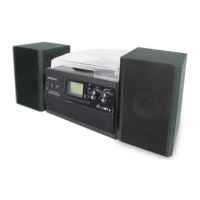

 To Next Page