The brightness of the indicator can be selected from nine values -
“br.1” - “br.9”.
The device can operate with voltage sources with unstable
frequency, such as generators. For this purpose, there is a function for
selecting the frequency control mode: “50.Н” or “Auto”. The “50.H”
mode is intended for operation in a household electrical network, the
“Auto” mode is an automatic adjustment of voltage measurement
when operating from sources with an unstable frequency. However,
stable operation is not guaranteed with significant deviations (below
45 Hz or above 65 Hz) frequency.
In “Auto” mode, you can set the disconnect delay time “Fr.d”:
“000"-"900". This may be necessary when operating with generators,
where large differences in engine speed occur when switching large
loads. When set to “000” there is no delay (off time 20 ms).
The device has automatic button locking, which locks the buttons
30 seconds after the last push of the button: “Loc. On" - blocking is
enabled, "Loc. OFF" - blocking is disabled. Removing the lock is a
long press on the button.
The device has a memory function for the last event (load
disconnection). Its value can be viewed in the menu.
In the next menu item you can see the current temperature inside
the device in the format “r.13 in_28ºC”, where r.13 is the firmware
version, in_28ºC is the internal temperature of the device.
Resetting values to factory settings is performed by the “rESEt”
function, you need to press and hold the button in this menu item
until the device reboots (the indicator will display a countdown).
5. Device installation and configuration
The device is mounted on the TS-35 mounting profile (DIN rail).
The device body occupies two 17.5 mm modules. Connect the wires
according to the diagram (see below). When using stranded wire,
cable lugs must be used.
When installing the device in wet areas (bathroom, sauna,
swimming pool, etc.), it is necessary to place it in a mounting box with
a degree of protection of at least IP55 (partial protection against dust
and protection against splashing in any direction).
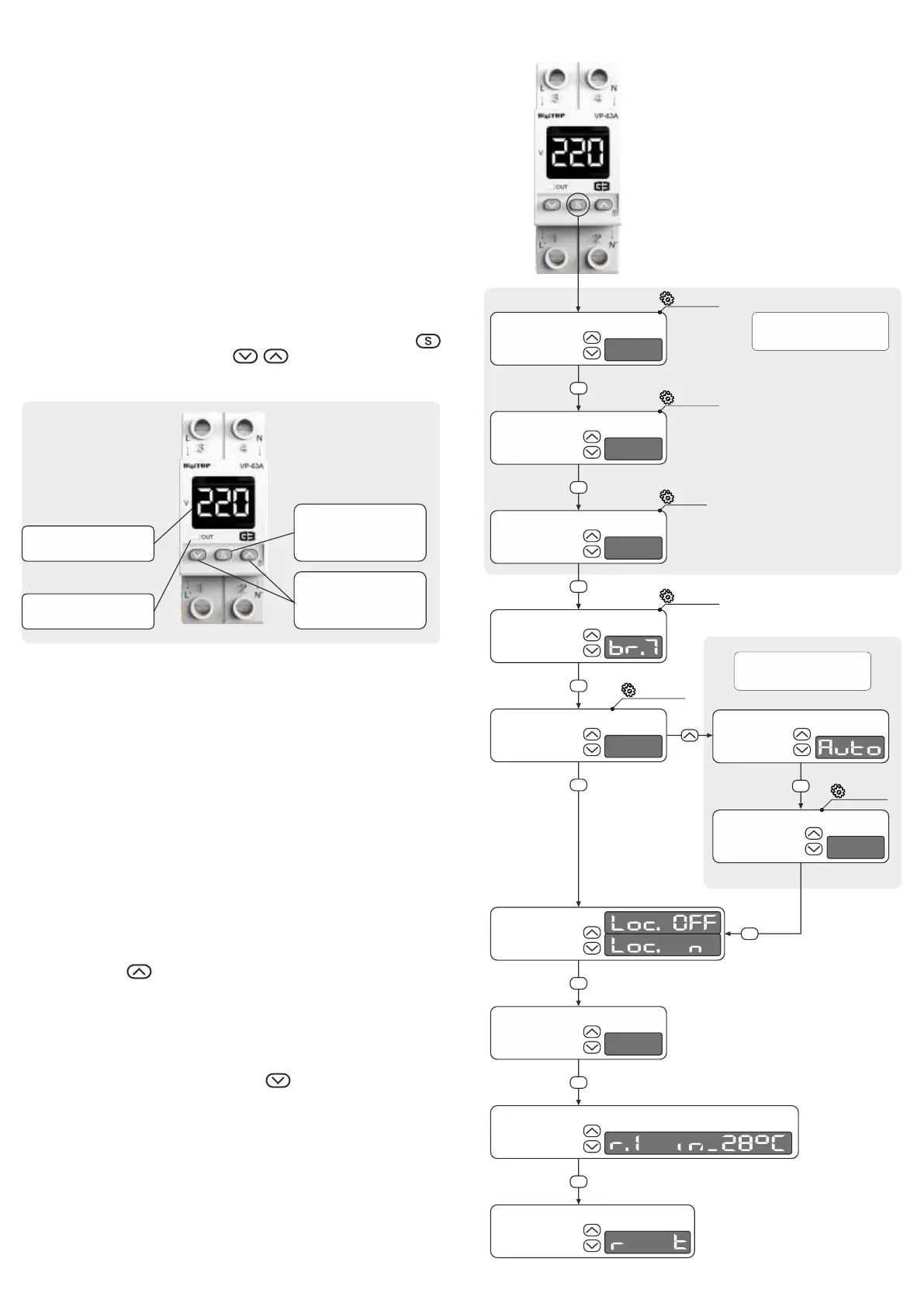
To change the default parameters, select the appropriate
parameter in the menu using the buttons located on the front panel of
the device.
The sequence of parameter setting is shown in the figure below.
The selection of the parameter for setting is carried out by the .
button , changing the value - by the buttons.
In the setting mode the set value flashes.All set values are stored
in the non-volatile memory of the instrument.
Parameter setting sequence
The device has an internal temperature control function that
protects against overheating. The load is switched off when it reaches
70°C and the indicator shows "Hot". The load is automatically
switched on when the device cools down to 60°C.
The manufacturer has the right to make changes in the design and
wiring diagrams of the device that do not deteriorate its metrological
and technical characteristics.
Buttons for changing
value of the selected
parameter
Menu entry/
parameter
selection button
Voltage indicator
Output LED
Configuring
protection settings
Generator mode
50.H/Auto
To configure protection against voltage surges, you need to set
the values of the upper and lower voltage thresholds and the switch-
on delay time.
Upper
voltage
threshold
250
Lower
voltage
threshold
170
Switch-on
delay time
15
Automatic
button lock
Indicator
brightness
level
Frequency
control mode
selection
5o.h
Frequency
control mode
selection
Disconnect
delay time
Firmware version
and internal
temperature
s
s
s
s
s
s
s
s
s
200
o
Last
event
Factory
reset
ese
s
br.1-br.9
210-270
120-200
5-600
100-900
2.5.4.
3
6. Safety precautions
Installation and maintenance of the device must be carried out by
qualified specialists who have studied this operating manual. During
operation and maintenance, it is necessary to adhere to the
requirements of regulatory documents:
- Rules for the technical operation of users' electrical installations.
- Safety rules for the operation of electrical installations of users.
- Occupational safety during the operation of electrical
installations.
The device uses dangerous voltage -
DO NOT CONNECT THE DEVICE DISASSEMBLED!!!
Menu entry


 To Previous Page
 Loading...