Need help?
Do you have a question about the Diivoo WT-03 and is the answer not in the manual?
Remove the battery tray, insert two AA (1.5V) alkaline batteries, and replace the tray.
Connect the timer to an outdoor hose faucet and ensure it is not obstructed.
The water must remain on for the timer to work properly.
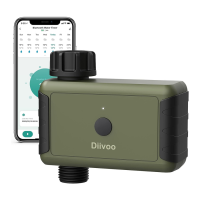
Scan QR code, download and install the free Android or iOS app.
Long press the ON/OFF button for 6 seconds until the green light flashes quickly.
Create an account or log in with an existing account to begin timer setup.
Tap 'Add device' or '+', select 'Water valve controller(BLE)' to add the device.
Water for a particular period in a day, specifying start time, duration, and days.
Water for a certain period for several times a day, including cycle and pause durations.
Manually water without disturbing the programmed schedule for testing or extra watering.
Allows stopping the water flow at any time, during manual or programmed watering.
Postpone watering for 24h, 48h, or 72h due to rain or wet ground.
 General
| Brand | Diivoo |
|---|---|
| Model | WT-03 |
| Category | Lawn and Garden Equipment |
| Language | English |

 To Next Page