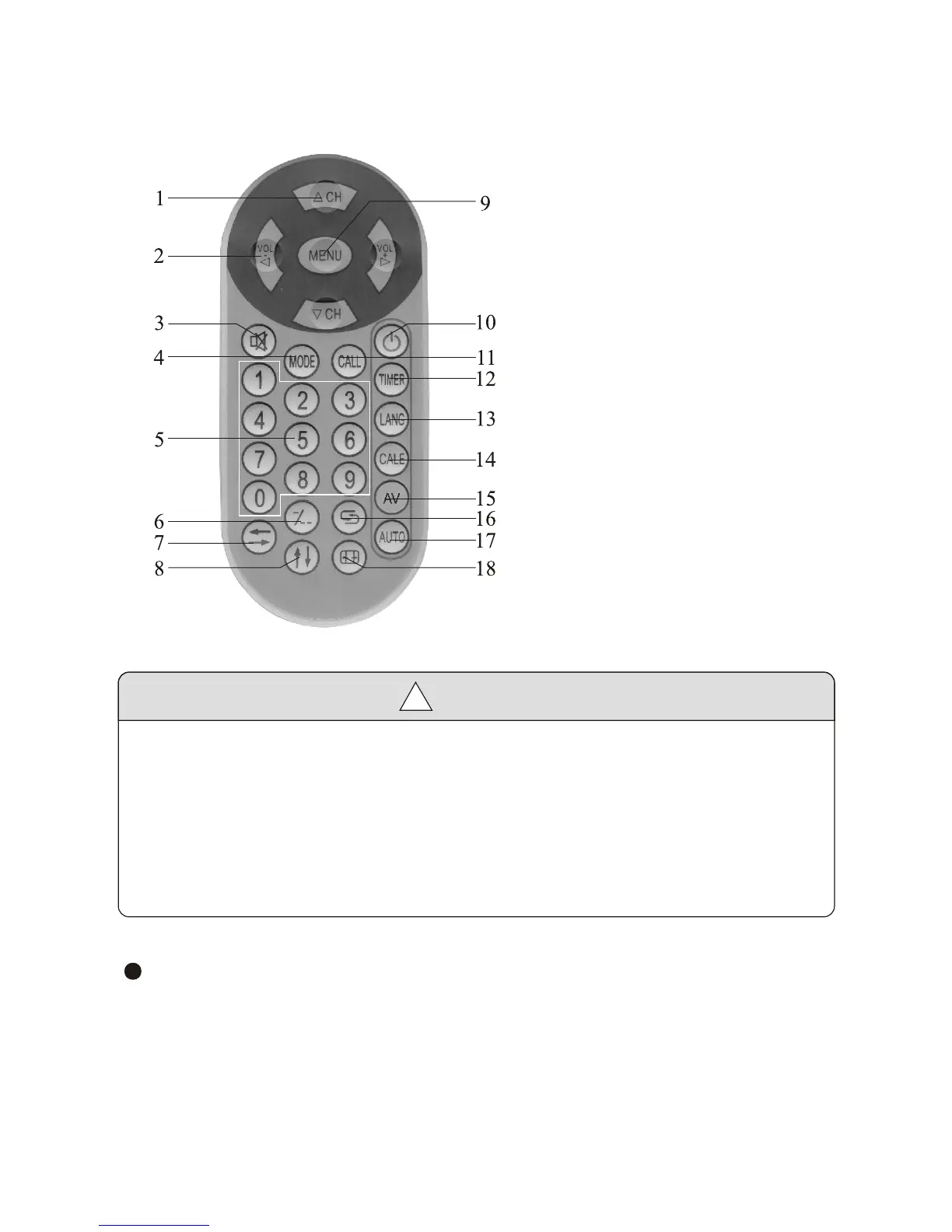
4. Remote Control Operation
Caution
!
1. Please align the remote control with the infrared-receiving window on
TV set in operation.
2. Never oppress, drop, wet or disassembly the remote control.
3. Never press any button continuously and swiftly. Operation interval is at
least 3 seconds.
4. Press Power to turn on the machine before pressing CH+, CH- for
channel selection.
Channel keys (digit keys (0-9) and - / - - ): There are 0 ~ 255 in total of
256channels available on the remote controller for your option by the
11 buttons of 0-9 and - / - - on the remote control. When the channel
is a one-digit figure, just press the corresponding digit key. If the channel
is a two-digit figure, you should press - / - - first to show - - on the
display screen before further pressing the corresponding digit keys.
1. Programmauswahl
2. Lautstärkeregulierung
3. Mute
4. Mode
5. Zifferntasten zur Programmwahl
6. Umschalttaste einstellig/mehrstellig
7. Horizontal
8. Vertikal
9. Menü
10. EIN/AUS Taste
Exit Spiel
11. Call
12. Timer
13. Sprache
14. Kalender
15. AV / TV umschalten
16. Zurück
17. automatische Programmsuche
-5-


 To Next Page