READ AND FOLLOW THIS SAFETY INFORMATION CAREFULLY
SAVE THESE INSTRUCTIONS
Use the dishwasher only for its intended function.
During installation, the power supply must not be excessively or dangerously bent or flattened.
Do not tamper with controls.
The appliance is to be connected to the water mains using new hose sets, and the old hose-sets
should not be reused.
Make sure that the carpet must not obstruct the openings at the bottom base.
Indoor use only.
2.Disposal
Packaging material could be dangerous for children!
For disposing of package and the appliance please go to a recycling centre. Cut off the power
supply cable and make the door closing device unusable.
Cardboard packaging is manufactured from recycled paper and should be disposed in the waste
paper collection for recycling.
By ensuring this product is disposed of correctly, you will help prevent potential negative
consequences for the environment and human health, which could otherwise be caused by
inappropriate waste handling of this product.
For more detailed information about recycling of this product, please contact your local city office
and your household waste disposal service.
IMPORTANT!
To get the best performance from your dishwasher, read all
operating instructions before using it for the first time.
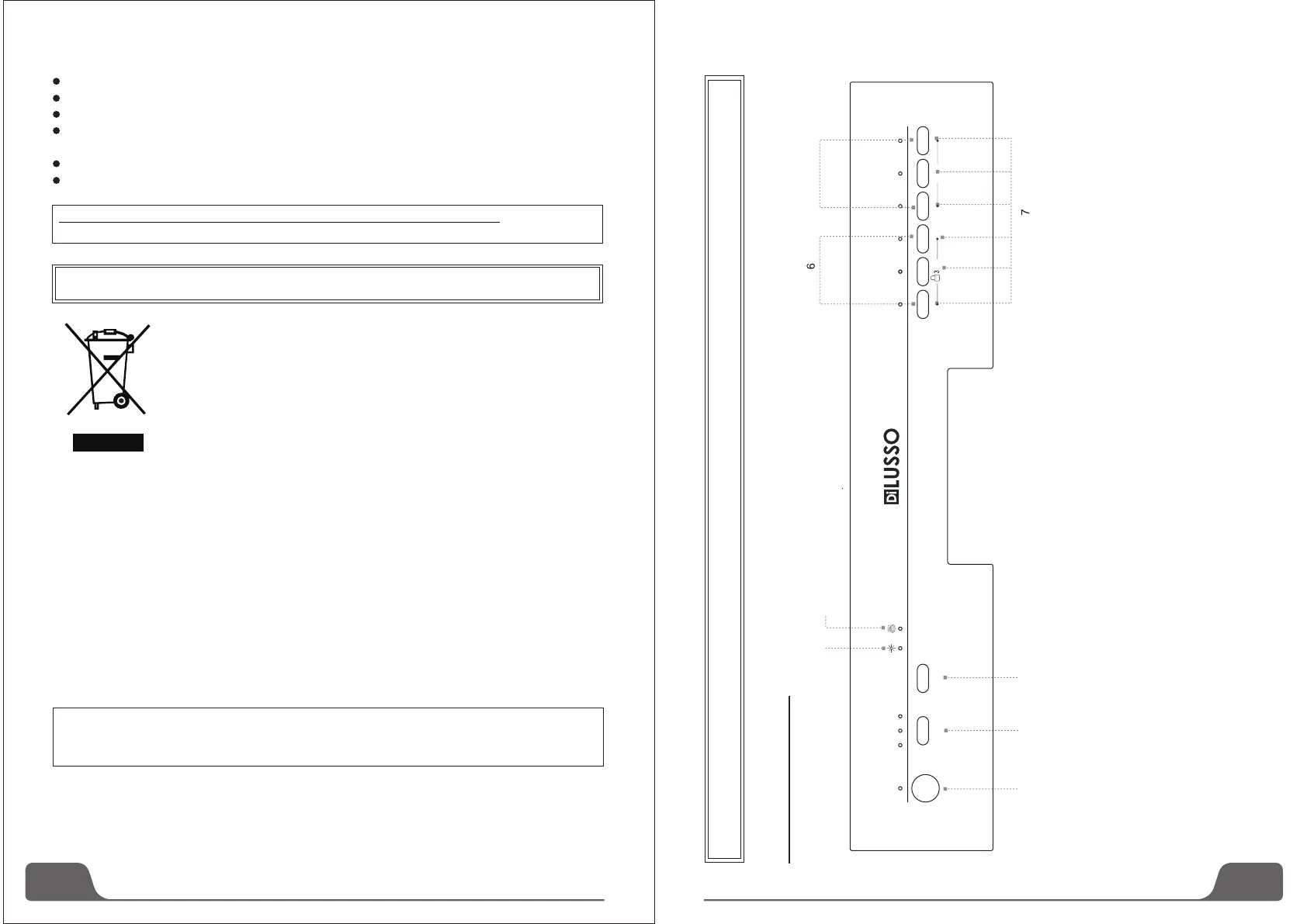
Control Panel
3. Operation Instruction
3
2
Dispose of the dishwasher packaging material correctly.
All packaging materials can be recycled.
Plastic parts are marked with the standard international abbreviations:
(e.g.PS for polystyrene, padding material)
This appliance is identified according to the European guideline
2002/96/EC on waste electrical and electronic equipment -WEEE. The
guideline specifies the framework for an EU-wide valid return and re-use of
old appliances.
WARNING!
1、Power switch: To control the power supply.
2、Delay time: Pressing the DELAY pad one time can select
3h delay time, continuous pressing second time will
increase the delay hours to 6h, third time increase to 9h.
Continuous pressing the fourth time can cancel the delay
selection.
3、Start/Pause Button: Press this button to start or pause
the dishwasher, the light will come when starting.
4、Rinse Aid Light: To come on when dispenser
needs to be refilled.
Indicator
5、
6、Child lock: Press and hold the Intensive & Normal button at the
same time for 3 seconds, the Intensive & Normal lights will flash
6 times , and "Child Lock" will be activated. To unlock the
dishwasher controls, Press the same button in the same way,
the "Child Lock" will be inactivated.
7、Program Button: To select washing program when press the
button
8、Dry+ Function: Press and hold the RINSE & SOAK button at
the same time for 3 seconds. The Dry+ indicator will be
Dry+ Indicator Light: An increased temperature will improve the
drying process during the final rinse stage
4
5
1 2 3
Power
3H
6H 9H
Delay Start/Pause
Intensive Heavy
Normal Rinse Rapid Soak
sec
Dry+
8


 To Next Page