E-4
English
4
4 Operation
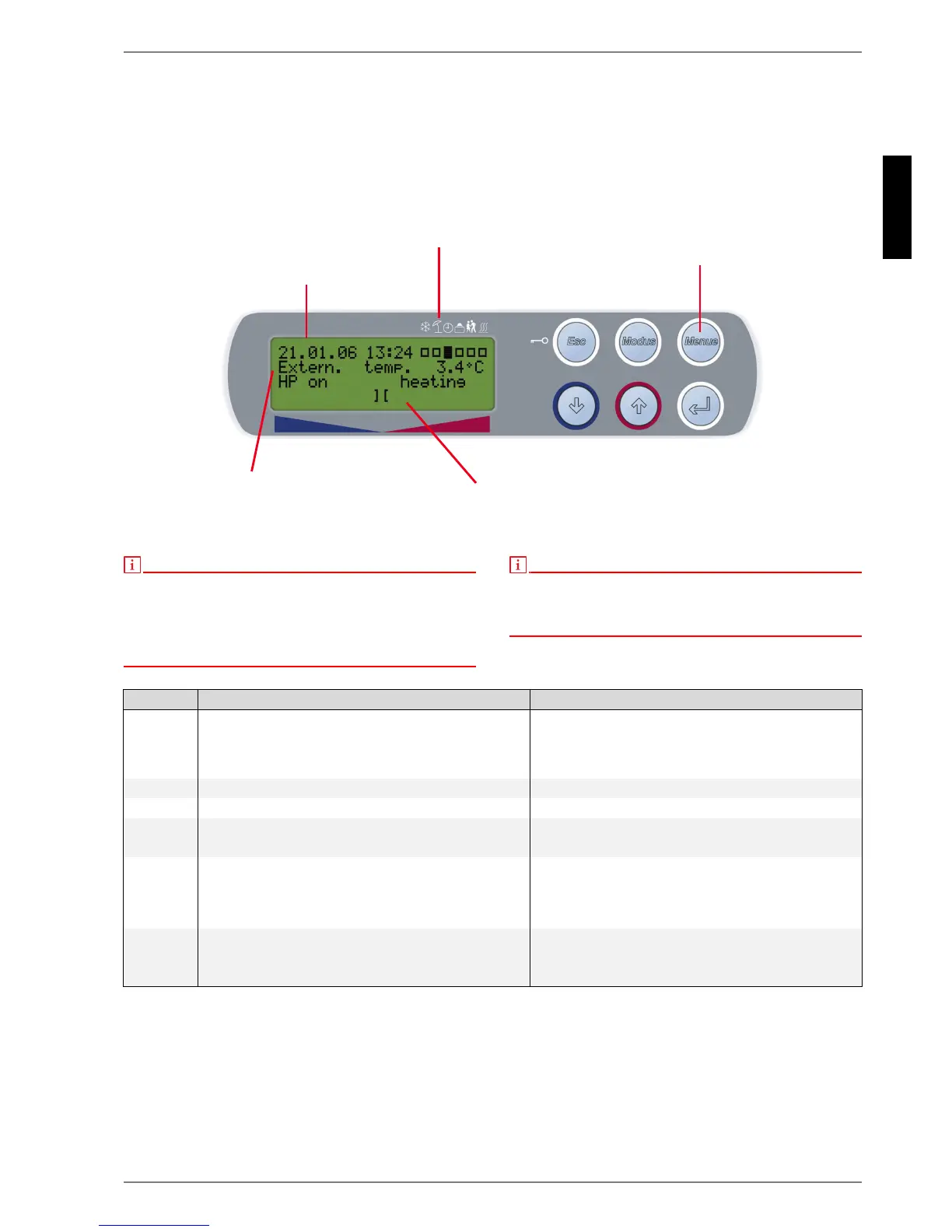
The heat pump manager is operated using 6 pushbuttons:
Esc, Modus, Menue,
⇓, ⇑, ↵. Different functions are assigned
to these buttons according to the current display (Standard
or Menu).
The operating status of the heat pump and the heating
system is indicated in plain text on a 4 x 20 character LC
display (see Chap. 9 on p. 13).
6 different operating modes can be selected:
Cooling, Summer, Auto, Party, Vacation, 2nd heat
generator.
The menu consists of 3 main levels:
Settings, Operating data, History
(see Chap. 6 on p. 5)
Fig. 4.1: Standard LC display - main display with operator buttons
NOTE
Contrast:
The display can be adjusted for contrast. Do this by depressing the
buttons (MENUE) and (
↵) at the same time until adjustment process has
been completed.
Increase the contrast by simultaneously pressing the button (×). Reduce
the contrast by pressing the button (Ø).
NOTE
Keyboard block, child lock!
To prevent unintentional adjustment of the heat pump manager, press the
button (Esc) for approx. 5 seconds until KEY BLOCK ACTIVE appears on
the display. Cancel the keyboard block using the same procedure.
Tab. 4.1: Operator button functions
FKDUDFWHUGLVSOD\
ZLWKEDFNOLJKWLQJ
2SHUDWLQJPRGH
V\PEROV
&RQWURONH\V
+3VWDWXVGLVSOD\
OLQHV
+HDWLQJZDUPHUFROGHU
3URJUHVVEDUOLQH
Button Standard display (Fig. 4.1 on p. 4) Change of setting (Chap. 8 on p. 7)
Esc Activates or deactivates the keyboard block
Acknowledges a fault
Exits the menu and returns to the main display
Returns from a submenu
Exits a setting without saving changes
Modus Selects the operating mode (see Chap. 5 on p. 5) No action
Menue Jumps to menu No action
⇓ Shifts the heating curve downwards (colder) Scrolls downwards between menu items on one level
Changes a setting in a downward direction
⇑ Shifts the heating curve upwards (warmer) Scrolls upwards between menu items on one level
Changes a setting in an upwards direction
↵ No action Selects a setting in the corresponding menu item
Exits a setting and saves changes
Jumps to a submenu



 To Next Page