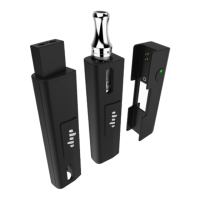
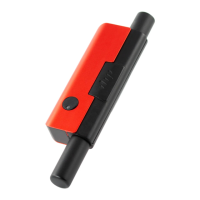
The Little Dipper is a compact and portable device designed for consuming concentrates directly from their container. It utilizes Dip Devices' signature Vapor Tip technology, allowing users to enjoy concentrates anytime and anywhere. The device is equipped with a reliable battery that boasts twice the capacity of competitors, ensuring extended use without frequent recharging.
Function Description
The Little Dipper functions as a direct-to-concentrate vaporizer. Users can simply touch the heated Vapor Tip to the surface of their concentrate and inhale through the mouthpiece. The device features adjustable power settings, allowing users to customize their experience based on their preference for heat and vapor production. An indicator light provides visual feedback on the current power setting and battery level.
Usage Features
To begin using the Little Dipper, first remove the magnetic cap. The device is turned on by pressing the power button five times quickly. Before initial use, it's recommended to ensure the Little Dipper is fully charged using a micro-USB cable (not included).
Once powered on, the user holds the power button for approximately five seconds to allow the Vapor Tip to heat up. After heating, the Vapor Tip is gently touched to the surface of the concentrate. While maintaining contact with the concentrate, the user lightly draws through the mouthpiece. It's important not to pull too hard to ensure a solid hit. To keep the Vapor Tip clean and prevent residual stickiness, users should continue holding the button as they remove the Vapor Tip from the concentrate. This ensures the concentrate is fully vaporized and the tip remains clear.
The Little Dipper offers three distinct power settings, each indicated by a different color:
- Green: Low heat (2.6V), ideal for a milder taste and cloud.
- Yellow: Medium heat (3.4V), offering a balanced experience.
- Red: High heat (3.8V), for those who prefer a more intense hit and larger cloud.
To change the power setting, the user presses the power button three times quickly while the device is on. The indicator light will blink three times in the new setting's color to confirm the change. The device's temperature range typically falls between 400-600°F, with the actual temperature influenced by the user's inhalation strength (lighter draws are generally recommended).
The indicator light also provides information on the device's status:
- Solid Color: While in use, a solid color indicates the current power setting.
- Flash 8X (Red): Eight red flashes signify that the battery is completely depleted and requires charging.
- Battery Level: When the Little Dipper is turned on, the indicator flashes its current setting color three times, followed by a single flash to indicate battery level. A green flash means the battery is over 50%, while a red flash indicates it is under 50%.
Maintenance Features
Regular cleaning is essential for maintaining the performance and longevity of the Little Dipper. Before cleaning, ensure the device has completely cooled off.
The cleaning process involves several steps:
- Disassembly: Unscrew the Vapor Tip, and then remove the reclaim chambers and the mouthpiece. If the Vapor Tip is difficult to unscrew, it may be due to concentrate in the threading. In such cases, gripping the Vapor Tip with pliers can help get it started.
- Soaking: Place the Vapor Tip, mouthpiece, and reclaim chambers into a small cup. Pour enough 90+% isopropyl alcohol to fully submerge these components. Allow them to soak for at least 30 minutes.
- Cleaning the Device Body: While the components are soaking, use a cotton swab soaked in isopropyl alcohol to clean the Vapor Tip connection point and the airway on the device body.
- Rinsing and Drying: After soaking, remove the pieces from the alcohol. Rinse them thoroughly with warm soapy water and ensure they are completely dry before reassembly. It is crucial NOT to rinse or soak the battery portion of the device, as this can cause damage.
- Reassembly: Reattach the reclaim chambers, ensuring that the piece with the larger hole is placed on the Vapor Tip side. Then, reattach the Vapor Tip and the mouthpiece. The Little Dipper should be fully reassembled before attempting to use it again.
Safety Recommendations
Several safety precautions should be observed when using the Little Dipper:
- The Vapor Tip becomes extremely hot during use and for at least three minutes afterward. Avoid touching it during this period.
- Do not use the Little Dipper while it is charging.
- Only use legal, safe, and natural concentrates with this vaporizer.
- Never allow the Vapor Tip to come into contact with anything other than concentrate, especially individuals, flammable surfaces, or your concentrate container.
- Do not expose the Little Dipper's body to water or other liquids.
- If the battery has been exposed to water, do NOT attempt to use the device.
- Always turn off the Little Dipper (five quick button clicks) when you are finished using it.
- Improper use, alterations, or modifications to the device could result in damage to the unit or cause physical harm.
Troubleshooting
- Clogged Little Dipper: If the device clogs, the easiest method to clear the Vapor Tip is to set the power to red (press the button three times while on). Then, while holding the Little Dipper Vapor Tip over your concentrate container, hold the button for 10-15 seconds to allow the coil to heat up and melt any residue blocking the airflow. Immediately after, continue holding the button down while pulling air through the mouthpiece to clear any remaining residue. This process may need to be repeated. Alternatively, a thorough cleaning as described in the maintenance section can resolve clogging. If these steps fail, it may be time to replace the Little Dipper Vapor Tip. Remember not to touch the Vapor Tip until it has cooled.
- Little Dipper Won't Fire: If the Little Dipper does not fire, first ensure both the device and Vapor Tip are thoroughly cleaned and the battery is charged. On a clean device, this issue can sometimes be caused by a Vapor Tip that is either too loose or too tight. Try gently loosening or tightening the Vapor Tip in small increments. Turning the device off and then on again might also help. If these troubleshooting steps do not resolve the issue, users are advised to contact customer support via email, phone, or the chat feature on the manufacturer's website.

 Need help?
 General

 To Next Page