15
1-800-634-7328 DirectSupply.com
Unit Installation (cont.)
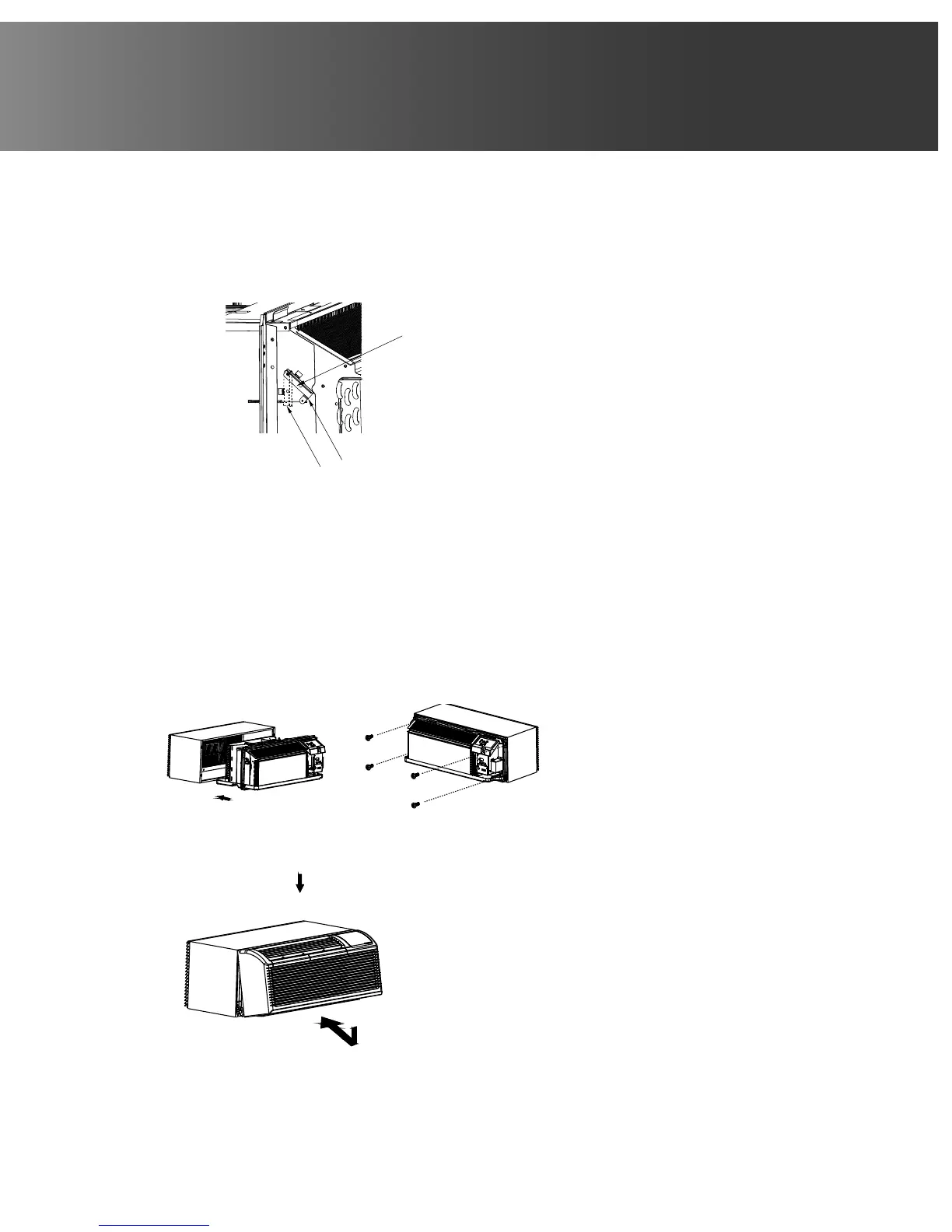
• Rotate the vent control lever to either open or close
the vent door. (See Fig.6)
Vent control lever
Vent open
Vent closed
Fig.6
Fig.7
Fig.8
1
2
NOTE: When vent control lever is set to CLOSE, only
the air inside the room is circulated and filtered. When
set to OPEN, some outdoor air will be drawn into
room. This will reduce heating or cooling efficiency.
Lift unit level and slide unit into wall sleeve until
firmly against front of wall sleeve and secure with
four screws and washers (supplied in the SLEEVE
ASSEMBLY) through the unit flange holes. (See Fig.7
and Fig.8)
Vent control lever
Vent open
Vent closed
Fig.6
• Reinstall front panel. (See Fig.9)
Vent control lever
Vent open
Vent closed
Fig.6
Fig.7
• CAUTION: Do not put obstacles
around air-inlet or inside of air-outlet
of the unit, such as window curtain,
etc. Always insert the filter securely,
and clean filter once every two weeks
as required.
Vent control lever
Vent open
Vent closed
Fig.6
Fig.7
Fig.8
Place tabs over top rail 1.
Push inward at bottom until panel snaps into place 2.



 To Next Page