© 2005 Directed Electronics, Inc.
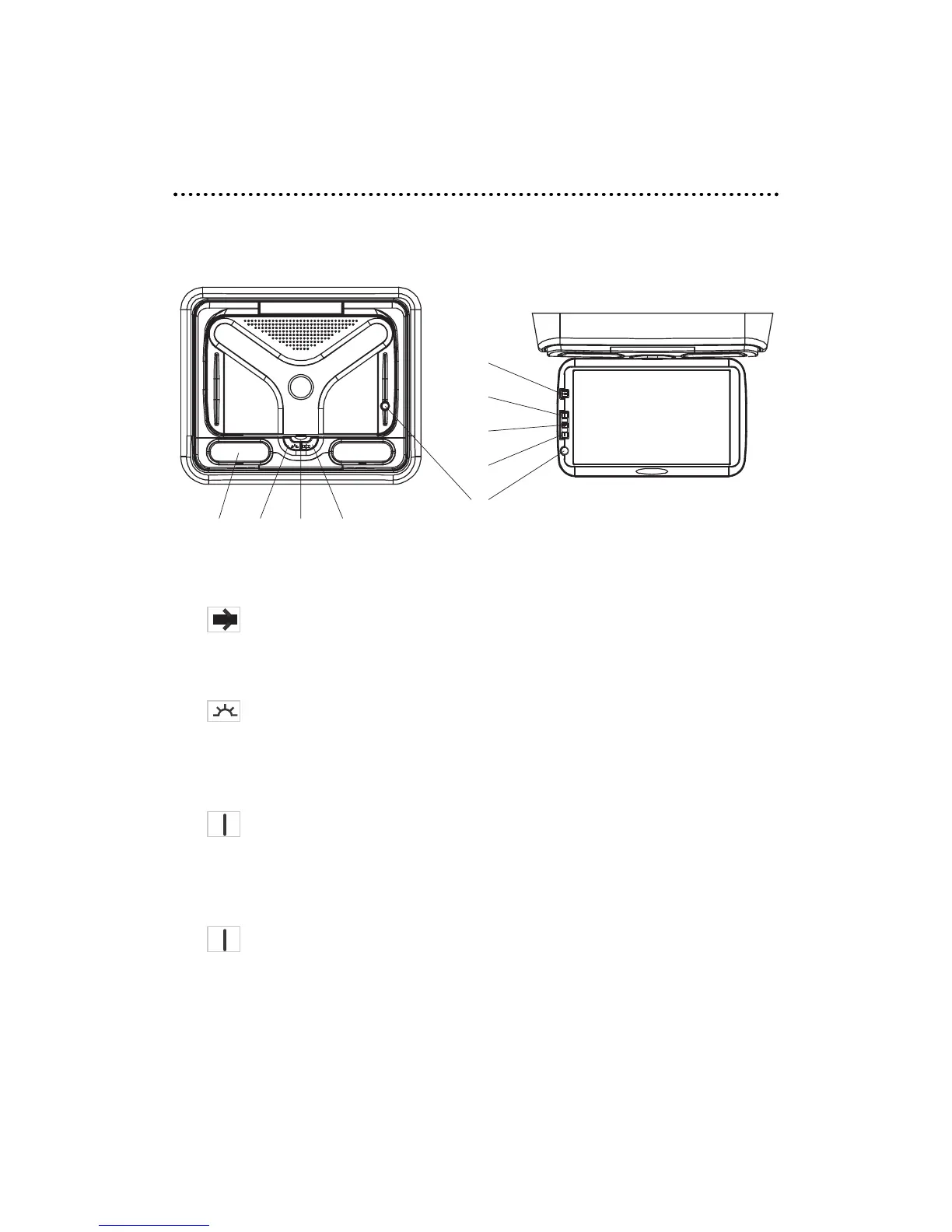
CCoonnttrroollss
MMOONNIITTOORR
1. DOME LIGHTS—Quantity 2.
2. DOOR LIGHT On/Off—Engage this switch to have the door open switch activate
the dome lights.
3. OPEN/CLOSE—The latch to open or close the LCD screen.
4. COURTESY LIGHT—Activate this switch to "ON/OFF" to activate the dome lights on the
monitor.
5. POWER—Power On/Off button, Source Select button. Hold for 3-seconds to turn power off.
Each press of this button cycles through sources DVD, AV1, or AV2.
6. UP Button—Used in conjunction with the MENU button to scroll up (or increase) the
menu setting.
7. MENU—Used to set FM Frequency, Brightness, Contrast, Saturation, Hue, or Reset (menu param-
eters). The menu will exit if no action is taken within a few seconds.
8. DOWN Button—Used in conjunction with the MENU button to scroll down (or decrease)
the menu setting.
9. IR Receiver—Infrared receiver which receives commands from the remote control.


 To Next Page