15
GB
5 Maintenance
5.3 Cleaning the hygienic exhaust filter
1. Switch off the appliance, Zchapter 4.3, „Switching off“
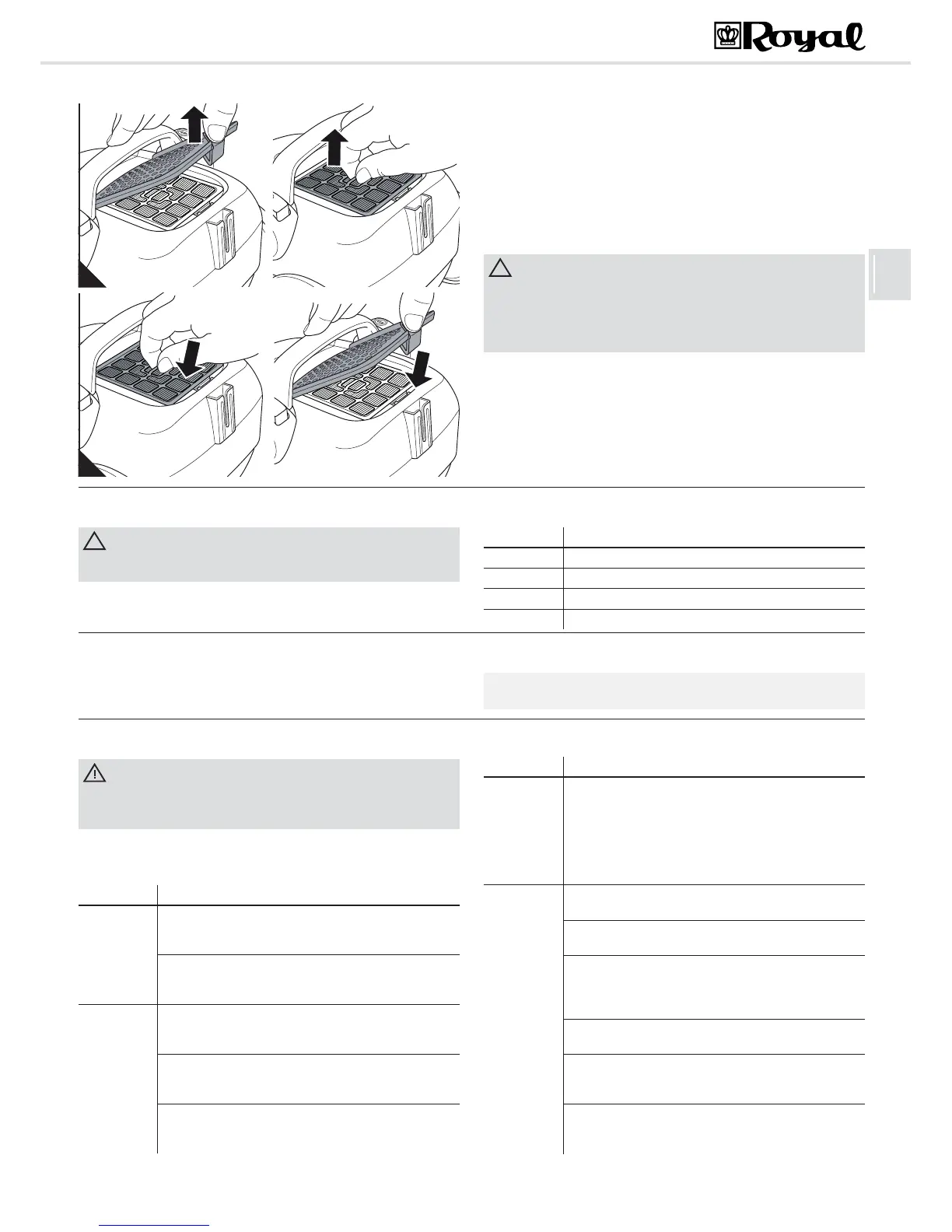
2. Push down the release catch of the exhaust filter cover and fold down
the cover (Fig. 13/A).
3. Pull the hygienic exhaust filter up out of its holder (Fig. 13/B) and tap
the dirt from it over a dust bin.
4. Should this be insufficient, remove the dirt from the filter with a soft
brush, e.g. the furniture brush supplied with the appliance.
5. If such dry cleaning is insufficient, thoroughly rinse the filter by hand in
running clear cold or hand-warm water.
6. If the filter is damaged or deformed, replace it (ordering information
Zchapter 5.4, „Spare parts and accessories“).
7. Place the clean/new exhaust filter back into its fitting (Fig. 14/A).
8. Fit the exhaust filter cover on the rear side first and then push it down
on the front side (Fig. 14/B).
5.4 Spare parts and accessories
Ordering address: Z see last page
Further information is available at: Z www.dirtdevil.de
5.5 Recommendation
We recommend:
Swirl
£
Y05 dust filter bags with MicroPor
£
filtration
Swirl
, MicroPor
and "Y05" are registered trade marks of a company of the Melitta group and used with their permission.
5.6 Before you send in the appliance
Before contacting your authorised Royal dealer, Royal service partner or
appliance market or sending in the appliance, first follow the procedure in
the following table to check if you can solve the problem yourself.
Danger of injury! Never use a defective appliance! Always switch off the
appliance and disconnect it from the mains before starting
troubleshooting Zchapter 4.3, „Switching off“.
Problem Possible cause / solution
The appli-
ance will not
start.
The socket does not carry current.
Test the vacuum cleaner at another socket which you are
sure carries current.
Power cord is damaged.
Have the power cord replaced by Royal Appliance Cus-
tomer Service, address, Z back page.
The dust filter
bag changing
indicator ap-
pears in the
viewing win-
dow.
The dust filter bag is full.
Change the dust filter bag Zchapter 5.1, „Changing the
dust filter bag“.
Nozzle, telescopic tube or suction hose are blocked.
Remove the obstacle. If necessary, use a long wooden
stick (e.g. a broomstick) to do this.
The filter is dirty. Clean the respective filter Zchapter 5.2,
„Cleaning the motor protection filter“ or Zchapter 5.3,
„Cleaning the hygienic exhaust filter“
The vacuum
cleaner stops
suddenly.
The overheating protection has tripped (possibly due to
blocked suction channels, filters, or similar). Switch the
appliance off and pull the plug out of the socket. Remove
the cause of overheating (e.g. by disassembling telescop-
ic tube and suction hose and removing the obstacle and/
or cleaning filters). Wait for about 45 minutes. After the
appliance has cooled off, you may switch it on again.
The cleaning
results are
unsatisfacto-
ry in spite of
the appli-
ance work-
ing correctly.
The bypass vent (Fig. 1/22) is open.Close the bypass
vent (Fig. 1/22).
The attached nozzle is unsuitable. Change the nozzle,
Zchapter 3.2, „Selecting the proper nozzle“
The position of the "carpet/hard floor" selector (Fig. 1/2) is
unsuitable. Set the "carpet/hard floor" selector (Fig. 1/2)
to the correct position for the type of floor, Zchapter 4.2,
„Vacuum cleaning“, step 4.
The dust filter bag is full. Change the dust filter bag
Zchapter 5.1, „Changing the dust filter bag“.
The filter is dirty. Clean the respective filter Zchapter 5.2,
„Cleaning the motor protection filter“ or Zchapter 5.3,
„Cleaning the hygienic exhaust filter“
Nozzle, telescopic tube or suction hose are blocked.
Remove the obstacle. If necessary, use a long wooden
stick (e.g. a broomstick) to do this.
Problem Possible cause / solution





 To Next Page