5
OPERATING INSTRUCTIONS
INITIAL SETUP
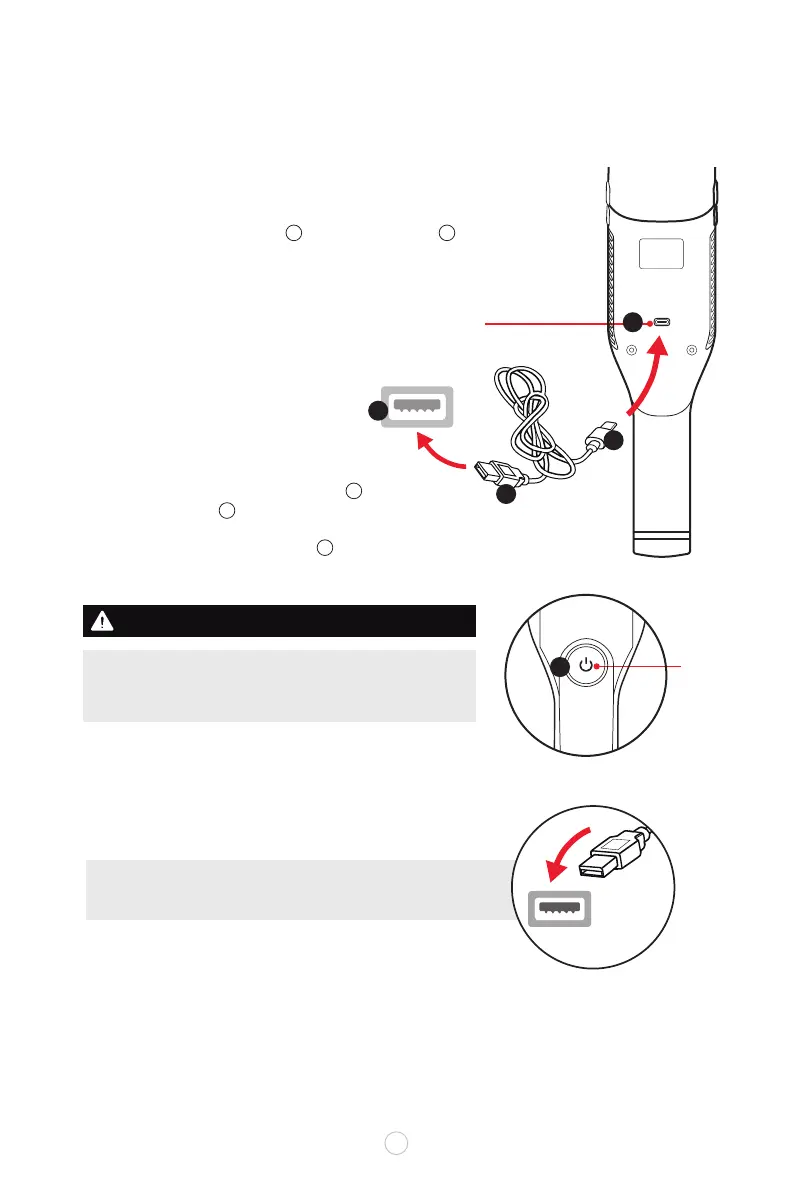
For first use, unit must be fully charged.
Before plugging in for charging, make sure the power switch
is in the OFF position.
Connect the USB-C cable end to the charging port
on the backside of the unit.
Connect the other end of the USB cable to a
powered USB outlet .
The CHARGING INDICATOR LIGHT will illuminate in RED
color while recharging and will change to BLUE light when
fully charged and during operation in about 3-3.5 hours.
u
v
w
x
NOTE: The hand vacuum can be charged with any USB port
that provides 2A power (USB charging cable included).
NOTE: Multi-colored LED light within power button icon will
illuminate in BLUE when fully charged/ and during operation.
The button will ash RED light when charging or low battery.
ALLOW BATTERY UP TO 3.5 HOURS TO FULLY RECHARGE.
Charging Port
(back of unit)
USB Cable
LED
Indicator
Light
USB port
2A USB
outlet
C
B
A
D
A
B
C
D
E
E



 To Next Page