2
M8 - Quick-Start Guide Dirtywave
Powering Up
Charging
The power button is located on the left
side of the unit. Press the button for 1
second to turn on, 2 seconds to turn
o. The button is slightly recessed by
design to prohibit unintentional power
cycles when stored.
Note: If a software crash occurs, you
can power down the unit by depressing
the button for 7 seconds. The unit can
be powered back on to continue nor-
mal operation. Please report crashes to
dirtywaveinstruments@gmail.com
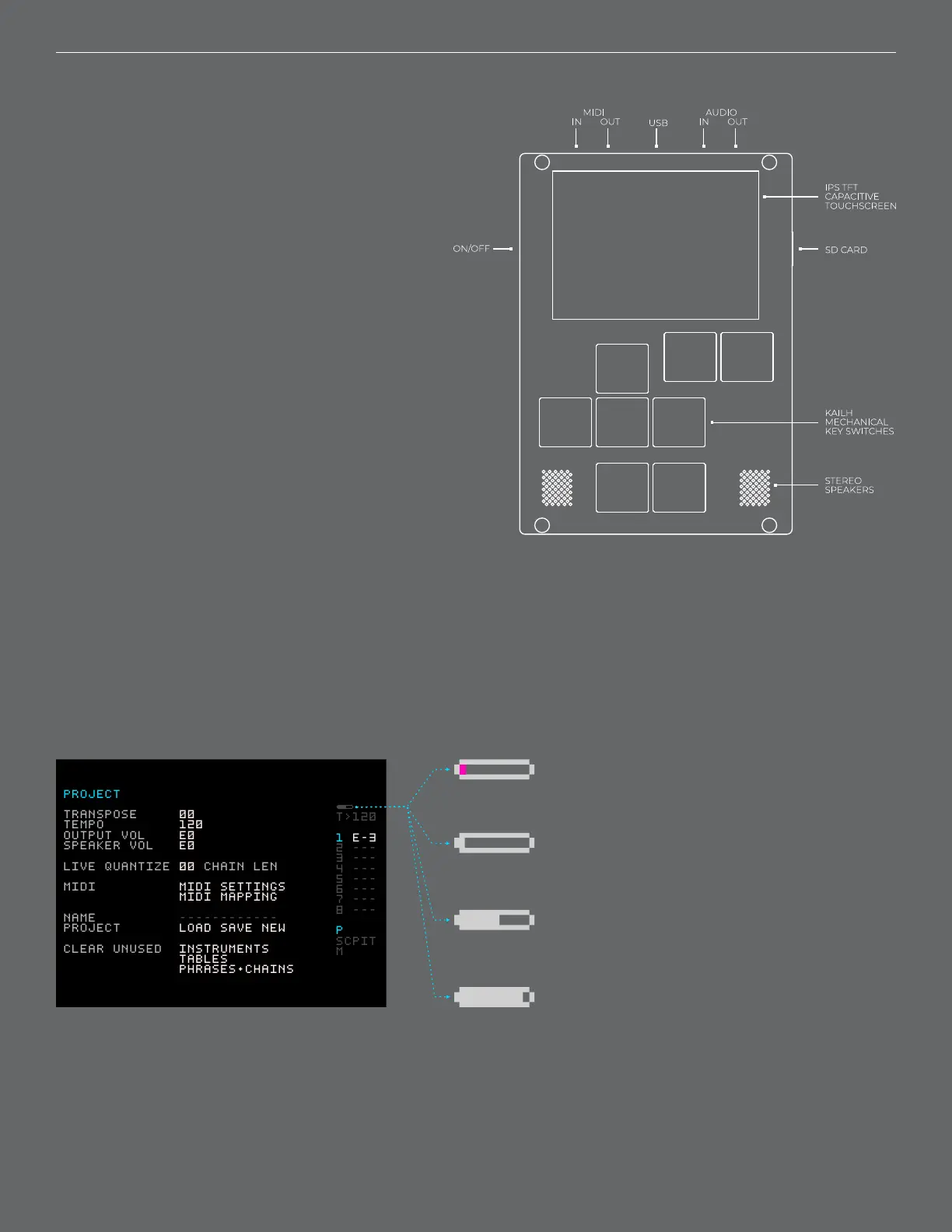
Use the Micro USB connector to charge the unit. Charge level and charging indication
status can be found at the top right of the display. M8 is charging when the icon is ani-
mating.
Very Low - Unit will save and power-down shortly.
PROJECT
TRANSPOSE 00
TEMPO 120
OUTPUT VOL E0
SPEAKER VOL E0
LIVE QUANTIZE 00 CHAIN LEN
MIDI MIDI SETTINGS
MIDI MAPPING
NAME ------------
PROJECT LOAD SAVE NEW
CLEAR UNUSED INSTRUMENTS
TABLES
PHRASES+CHAINS
T>120
1 E-3
2 ---
3 ---
4 ---
5 ---
6 ---
7 ---
8 ---
P
SCPIT
M
Low
Medium
Full / Charged



 To Next Page