MIDI)Programs)and)BPM)Presets)
!
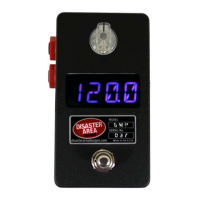
The! SMARTClock! is! designed! to! listen!for!incoming!MIDI! Program! Change! messages.!! Each! time! it!
receives! a! Program! Change! message,! the! controller! will! acc ess! the! tem po ! and! subdivision! settings!
saved!to!that!memory!location!and!start!its!internal!clock.!
!
If!an ! external! MID I! controller! is!used,!the!Tap!Tempo! mode! ma y! be! used! for ! editing ! and ! savin g! all!
presets.!!To!edit!a!BPM!preset!on!the!SMARTClock,!simply!s!
!
!+$#7.3$1$I6&$02#/#3$+<$3"#$%&'(!)*+,-O$
!
Send! a! Program! Change! message! from! your! external! controller! while! in! Tap! Tempo! mode.! ! The!
SMARTClock!display!will!show!the!preset!number!and!then!revert!to!the!tempo.!!
!
Tap!the!footswitch!or!turn!the!encoder!to!select!the!new!tempo.!
!
Tap!the!encoder!to!e dit! the! s ubd ivisions! for! e ach ! Tempo!Output.! ! If!th e! T em p o! O utpu ts! are ! set! to! O FF !
in! the! Setup! Menu,! they! will! b e! ON! /! closed! if! the! subdivision! is! set! to! any! value! other! than! Wh! /!
whole!note.!
!
Hold!the!footswitch!to!save!the!current!settings!to!the!current!preset.!
!
MIDI)Channels)
!
The! SMARTClock!sends!and! receives! by!default! on!MIDI!channel!16.!!This!value! m ay!be!edited!in!the!
Setup!Menu!if! desired.! !MIDI! Clock! messages!are!sent! on!ALL!MIDI! channels,! no!channel!assignment!
for!clock!sign als .!
!
Many!Disaster!Area!controllers!have!a!special!channel!designed!to!work!with!the!SMARTPedal!and!
EZ! series! units.! ! Setting! the! SM ARTClock! to! this! channel! allows! the! other! device! to! control! the!
SMARTClock!without!using!up!one!of!the!“mappable”!MIDI!channels.!
!
DPCY5! MIDI!Channel!1!
DMCY3XL!Gen2!/!DMCY4!Gen2!MIDI!Channel!16!(v2.00!firmware!an d!high er!only .)!
DMCY6D!MIDI!Channel!4!
DMCY8D!MIDI!Channel!5!


 To Previous Page
 Loading...