Intro-4
External view
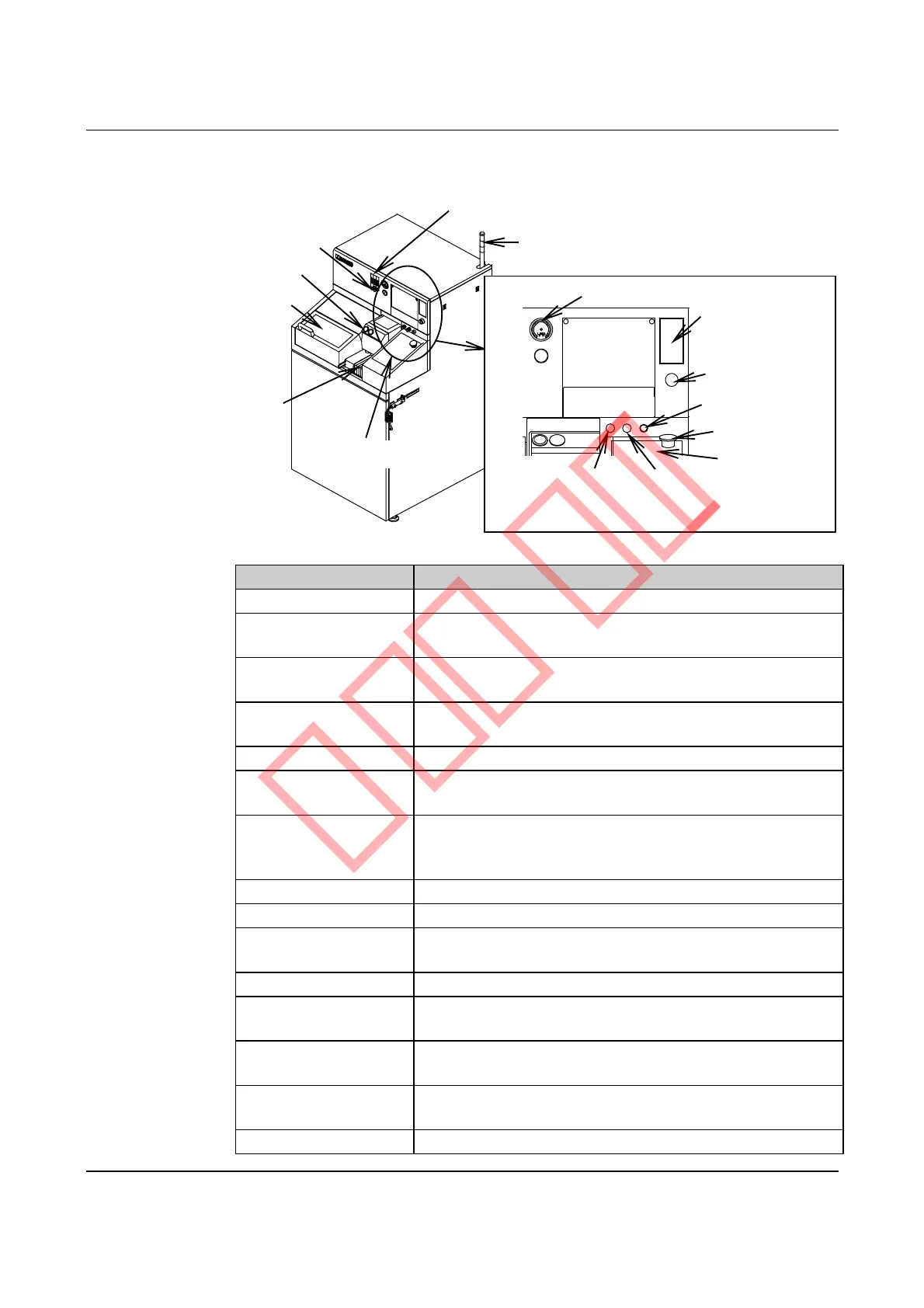
The diagram and the table below show the external view, names and functions
of main constituents.
Pilot lamp [Optional accessory]
Waterproof cover
Microscope
Spindle coolant water
flow rate sensor
[Optional accessory]
Wheel coolant water flowmeter
Monitor
EMO switch
Direct light intensity
adjustment dial
Power switch
Maintenance
switch
Floppy disk drive
[Optional accessory]
POWER lamp
Vacuum gauge
Oblique light intensity
adjustment dial
[Optional accessory]
Operation panel
Slide cover
Name Function
Operation panel Consists of operation control keys.
Waterproof cover Prevents water from splashing around during spindle
rotation and functions as a safety device.
Slide cover Prevents water from splashing around during spindle
rotation and functions as a safety device.
Vacuum gauge Indicates the chuck table vacuum pressure to attract the
workpiece to the chuck table.
Flowmeter Indicates the flow rate of the wheel coolant water.
Floppy disk drive Functions as an external storage device.
[Optional accessory]
Pilot lamp Indicates the machine operating status with the blue, green
and yellow lamps. If an error occurs, the red lamp flashes on
and off. [Optional accessory]
Monitor Displays operating information and microscope images.
POWER lamp Lights while the power is ON.
POWER switch Used to turn ON and OFF the machine by inserting and
rotating the key.
Maintenance switch Used by the maintenance personnel.
Direct light intensity
adjustment dial
Adjusts the microscope image light intensity for direct
lighting.
Oblique light intensity
adjustment dial
Adjusts the microscope image light intensity for oblique
lighting. [Optional accessory]
EMO switch Functions as the emergency stop switch. When pressed,
shuts off the electrical power supply.
Microscope Used to view workpieces for alignment or other purposes.



 To Next Page