EasyManua.ls Logo

Discovery Telecom RC T-REX - User Manual

Discovery Telecom RC T-REX
2 pages
Print Icon
To Next Page IconTo Next Page
Loading...
• Use a soft and damp sponge only. Never drop water or
any other liquid onto the Dinosaur.
• Do not immerse the product into water for cleaning.
• Locate the battery compartment located on the
side of the tail.
• Using a screwdriver, remove the screw from
battery compartment.
• Open the battery compartment door and insert
3 “AA” batteries (Fig. 2).
• Using a screwdriver, attach the battery
compartment door back onto the dinosaur’s tail.
WARNING:
CHOKING HAZARD - Small Balls.
Not for Children under 3 years.
SAFETY WARNINGS: PLEASE READ BEFORE USE
• Never aim or shoot the balls at other people.
• Adult supervision required.
BATTERY WARNING:
• Do not mix old and new batteries.
• Do not mix alkaline, standard (carbon-zinc), or rechargeable batteries.
• Alkaline batteries are recommended. Use only the specified voltage.
• Insert batteries using the correct polarity. Always use, replace, and
recharge (if applicable) batteries under adult supervision.
• Do not charge with non-rechargeable batteries.
• Do not short-circuit the battery supply terminals.
• Do not dispose of batteries in a fire, batteries may explode or leak.
• Remove batteries before storing.
• Recycle or dispose of batteries according to federal, state, and local laws.
• Keep this package for future reference.
AGES
6
+
CLEANING
STORAGE
© 2020 Discovery Communications, LLC. DISCOVERY™ and the
related logos are trademarks of Discovery Communications, LLC,
used under license. All rights reserved.
Distributed by and © 2020 MerchSource, LLC. Irvine, CA, 92618.
All rights reserved.
For technical support, please call 1-800-374-2744
Printed in China
KEEP THIS INSTRUCTION MANUAL AS IT CONTAINS IMPORTANT
INFORMATION FOR FUTURE REFERENCE.
Due to continuous product improvements, the pictures on this
manual may differ slightly from the actual product.
BATTERY INSTALLATION
This device complies with Part 15 of the FCC Rules. Operation is subject to the following two conditions: (1) this
device may not cause harmful interference, and (2) this device must accept any interference received, Including
Interference that may cause undesired operation.
Warning: Changes or modifications to this unit not expressly approved by the party responsible for compliance
could void the user's authority to operate the equipment.
NOTE: This equipment has been tested and found to comply with the limits for a Class B digital device, pursuant to
Part 15 of the FCC Rules. These limits are designed to provide reasonable protection against harmful interference
in a residential installation. This equipment generates, uses, and can radiate radio frequency energy and, if not
installed and used in accordance with the instructions, may cause harmful interference to radio communications.
However, there is no guarantee that interference will not occur in a particular installation. If this equipment does
cause harmful interference to radio or television reception, which can be determined by turning the equipment off
and on, the user is encouraged to try to correct the interference by one or more of the following measures:
• Reorient or relocate the receiving antenna.
• Increase the separation between the equipment and receiver.
• Connect the equipment into an outlet on a circuit different from that to which the receiver is connected.
• Consult the dealer or an experienced radio TV technician for help.
The T-Rex uses 3 “AA” 1.5V batteries(included) and the Remote
Control uses 2 “AAA” 1.5V batteries(not included). You will need
to use a Phillips or Cross screwdriver to open the battery
compartments.
WARNING:
Changes or modifications to this unit not expressly approved by the
party responsible for compliance could void the user’s authority to
operate the equipment.
Inspect the product before every use. If the product appears damaged
in any manner, discontinue use and discard immediately.
Model NO: 1012362
• Remove the batteries when the product is not in use
for a long period of time.
• Put the product into its package when not in use and
store neatly in a dry, cool location protected from
direct sunlight.
Fig. 1
INSERT 2 “AAA” BATTERIES
Fig. 2
INSERT 3 “AA” BATTERIES
• Using a screwdriver, remove the screw from the
battery compartment.
• Open the battery compartment door and insert
2 “AAA” batteries (Fig. 1).
• Using a screwdriver, attach the battery
compartment door back onto the remote.
INSTALLING THE DINOSAUR’S
BATTERIES
NOTE: FOR BEST RESULTS, REPLACE DINOSAUR
BATTERIES UPON PURCHASE.

Question and Answer IconNeed help?

Do you have a question about the Discovery Telecom RC T-REX and is the answer not in the manual?

Summary

Battery Installation

Installing Dinosaur Batteries

Instructions for installing batteries in the dinosaur, requiring a screwdriver and specific battery types.

Battery Warnings

Important warnings regarding battery usage, mixing, charging, and disposal for safe operation.

Cleaning and Storage

Cleaning Instructions

Guide on how to clean the product using a damp sponge and avoiding immersion in water.

Storage Recommendations

Recommendations for storing the product when not in use, emphasizing battery removal and dry conditions.

Safety Precautions

General Safety Guidelines

Crucial safety precautions to follow before using the product, including aiming and supervision.

Choking Hazard Warning

A critical warning about small parts, indicating the product is not suitable for children under three years old.

Product Features and Setup

Product Features

Highlights key functionalities and components of the RC T-Rex dinosaur toy.

Package Contents

Lists the items included in the product package.

Removing From Packaging

Instructions on how to safely remove the remote control and dinosaur from its packaging.

Attaching the Tail

Step-by-step guide on how to correctly attach the dinosaur's tail to the main body.

Overview

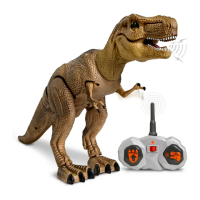
The Discovery RC T-Rex is a radio-controlled action dinosaur designed for ages 6 and up, offering an interactive play experience. This product includes the RC T-Rex dinosaur and an infrared remote control.

Function Description:

The primary function of the Discovery RC T-Rex is to provide remote-controlled movement and sound. Users can control the dinosaur's forward movement and activate its sound features using the infrared remote. The remote also includes a "Try Me" button for demonstration purposes.

Important Technical Specifications:

  • Dinosaur Power: The T-Rex requires three "AA" 1.5V batteries (included).
  • Remote Control Power: The remote control requires two "AAA" 1.5V batteries (not included).
  • Control Type: Infrared Remote Control.
  • Compliance: The device complies with Part 15 of the FCC Rules, indicating it meets standards for electromagnetic interference.
  • Safety: The product carries a "Choking Hazard - Small Balls" warning, making it unsuitable for children under 3 years.

Usage Features:

Battery Installation:

  • Remote Control:
    1. Locate the battery compartment on the remote.
    2. Use a Phillips or Cross screwdriver to remove the screw from the battery compartment door.
    3. Open the compartment door and insert two "AAA" batteries, ensuring correct polarity.
    4. Reattach the battery compartment door with the screw.
  • Dinosaur:
    1. Locate the battery compartment on the side of the dinosaur's tail.
    2. Use a Phillips or Cross screwdriver to remove the screw from the battery compartment door.
    3. Open the compartment door and insert three "AA" batteries, ensuring correct polarity.
    4. Reattach the battery compartment door with the screw. Note: For best results, it is recommended to replace the dinosaur batteries upon purchase.

Assembly (Attaching the Tail):

  1. Locate the white cord connected to the dinosaur's body.
  2. Identify the recessed area on the inside of the tail.
  3. Coil the white cord into the recessed area of the tail to allow the tail to close properly against the body.
  4. Align the recessed area of the tail with the body and press the tail into the body until it clicks securely into place.

Operation:

  • Power On/Off: Both the dinosaur and the remote control have separate On/Off switches.
  • Movement: Use the remote control to make the dinosaur move forward.
  • Sound: Use the remote control to activate or deactivate the dinosaur's sound features.
  • Try Me Button: The remote includes a "Try Me" button for quick demonstrations of the dinosaur's functions.
  • Environment: It is advised to use the product in a safe, traffic-free environment.
  • Adult Supervision: Adult supervision is required during play, especially concerning the "Small Balls" choking hazard. Never aim or shoot the balls at other people.

Battery Warnings and Safety:

  • Do not mix old and new batteries.
  • Do not mix alkaline, standard (carbon-zinc), or rechargeable batteries.
  • Alkaline batteries are recommended. Use only the specified voltage.
  • Insert batteries with correct polarity.
  • Always use, replace, and recharge (if applicable) batteries under adult supervision.
  • Do not charge non-rechargeable batteries.
  • Do not short-circuit the battery supply terminals.
  • Do not dispose of batteries in a fire, as they may explode or leak.
  • Remove batteries before storing the product for extended periods.
  • Recycle or dispose of batteries according to federal, state, and local laws.
  • Keep the product packaging for future reference.

Maintenance Features:

Cleaning:

  • Use a soft and damp sponge only to clean the dinosaur.
  • Never drop water or any other liquid onto the dinosaur.
  • Do not immerse the product in water for cleaning.

Storage:

  • Remove the batteries from the product when it is not in use for a long period of time.
  • Store the product in its original packaging when not in use.
  • Keep the product in a neat, dry, and cool location, protected from direct sunlight.

General Warnings:

  • Changes or modifications to the unit not expressly approved by the party responsible for compliance could void the user's authority to operate the equipment.
  • Inspect the product before every use. If the product appears damaged in any manner, discontinue use and discard immediately.
  • This equipment has been tested and found to comply with the limits for a Class B digital device, pursuant to Part 15 of the FCC Rules. These limits are designed to provide reasonable protection against harmful interference in a residential installation. If the equipment causes harmful interference to radio or television reception, users are encouraged to try to correct the interference by reorienting or relocating the receiving antenna, increasing the separation between the equipment and receiver, connecting the equipment to a different circuit outlet, or consulting a dealer or experienced radio/TV technician.

Technical Support:

For technical support, users can call 1-800-374-2744.

Manufacturing Information:

  • Model NO: 1012362
  • © 2020 Discovery Communications, LLC. DISCOVERY™ and related logos are trademarks of Discovery Communications, LLC, used under license. All rights reserved.
  • Distributed by and © 2020 MerchSource, LLC. Irvine, CA, 92918. All rights reserved.
  • Printed in China.
  • Due to continuous product improvements, the pictures in the manual may differ slightly from the actual product.

Discovery Telecom RC T-REX Specifications

General IconGeneral
BrandDiscovery Telecom
ModelRC T-REX
CategoryToy
LanguageEnglish

Related product manuals