EasyManua.ls Logo

Dishlex DSF6205W - Starting a Program; Adding Detergent and Multi-Tablets; Auto Off and Program Start

Dishlex DSF6205W
16 pages
Print Icon
To Next Page IconTo Next Page
To Previous Page IconTo Previous Page
Loading...
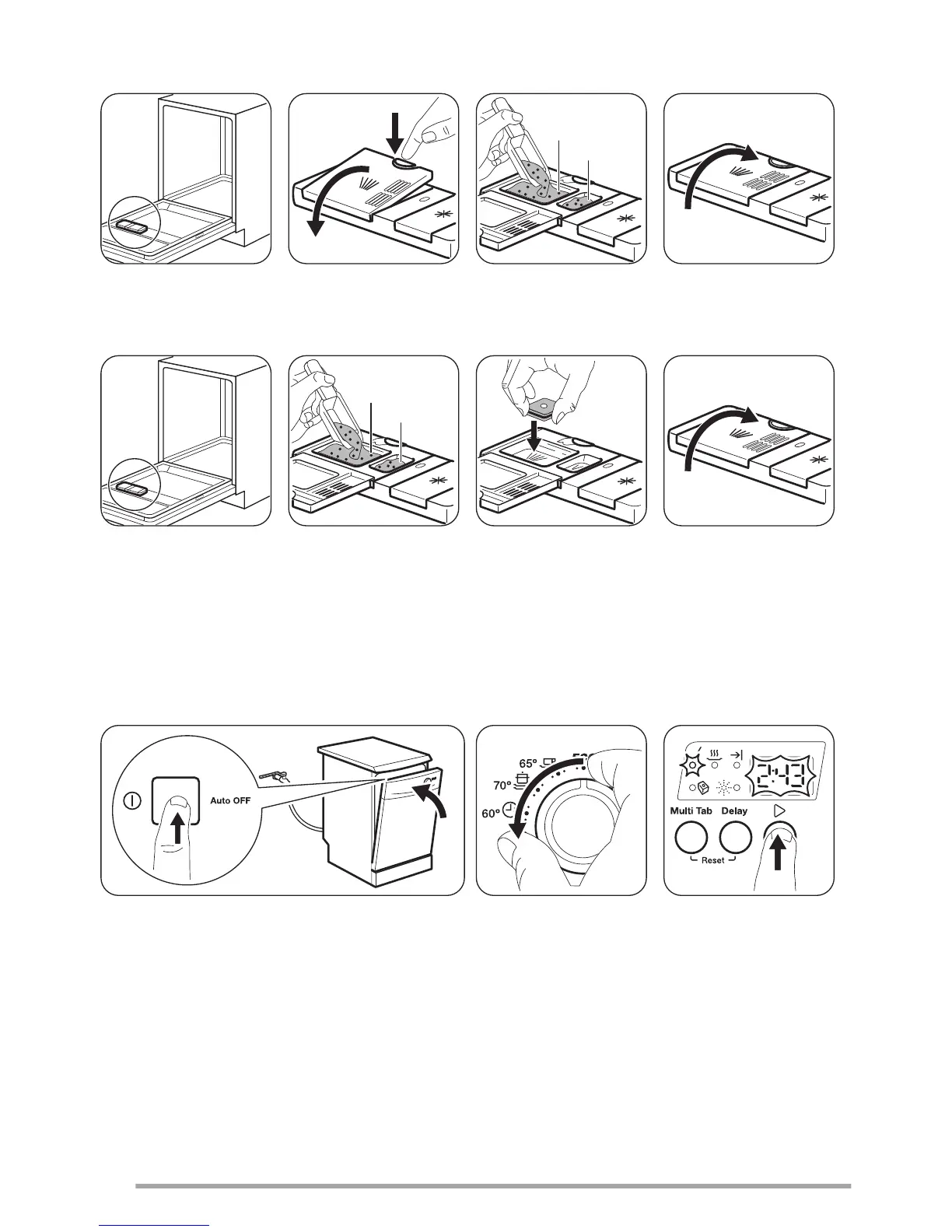
Adding detergent
2
1
2
0
3
0
A
B
If the program has a prewash phase, put a small quantity of detergent also in compartment B.
Adding multi-tablets
2
0
3
0
A
B
2
0
3
0
The Auto Off function
This function decreases energy consumption by deactivating automatically the appliance when it is not operating.
The function comes into operation:
5 minutes after the completion of the program.
After 5 minutes if the program has not started.
Starting a program
2
1
1. Press the on/off button to activate the appliance
2. Close the appliance door.
3. Turn the knob until the program marker is aligned with the program you want to set.
The duration of the program flashes in the display.
4. Press Start.
The program starts and the indicator of running phase is on. The program duration starts to decrease with steps of 1
minute.
8

Related product manuals