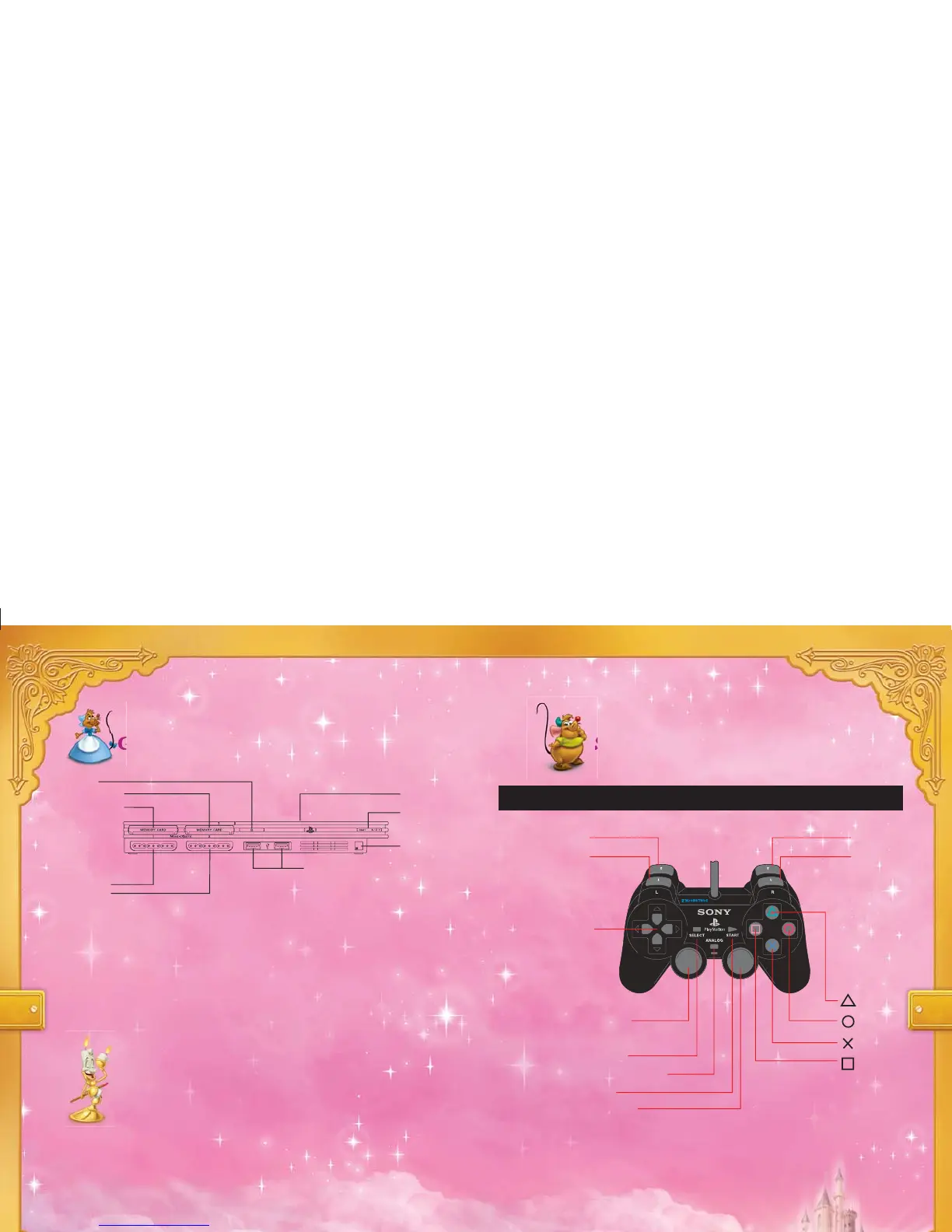
open button
on/standby/
reset button
IR receiver
USB connectors
disc cover
controller port 1
controller port 2
memory card slot 1
memory card slot 2
button
button
button
button
L2 button
L1 button
R2 button
R1 button
DUALSHOCK
®
2 ANALOG CONTROLLER CONFIGURATIONS
Starting UpGetting Started
Set up your PlayStation
®
2 computer entertainment system according
to the instructions supplied with your system. Check that the system
is turned on (the on/standby indicator is green). Insert the DISNEY
PRINCESS: ENCHANTED JOURNEY disc in the system with the
label side facing up. Attach game controllers and other peripherals as
appropriate. Follow the on-screen instructions and refer to this manual
for information on using the software.
Memory Card (8MB)
(for PlayStation
®
2)
To save game settings and progress, insert a memory card (8MB)
(for PlayStation
®
2) into MEMORY CARD slot 1 of your
PlayStation
®
2 system. You can load saved game data from the same
memory card or any memory card (8MB)(for PlayStation
®
2)
containing previously saved games.
left analog stick
(L3 button when pushed down)
SELECT button
ANALOG mode button
START button
right analog stick
(R3 button when pushed down)
2 3
directional
buttons




 To Next Page