8
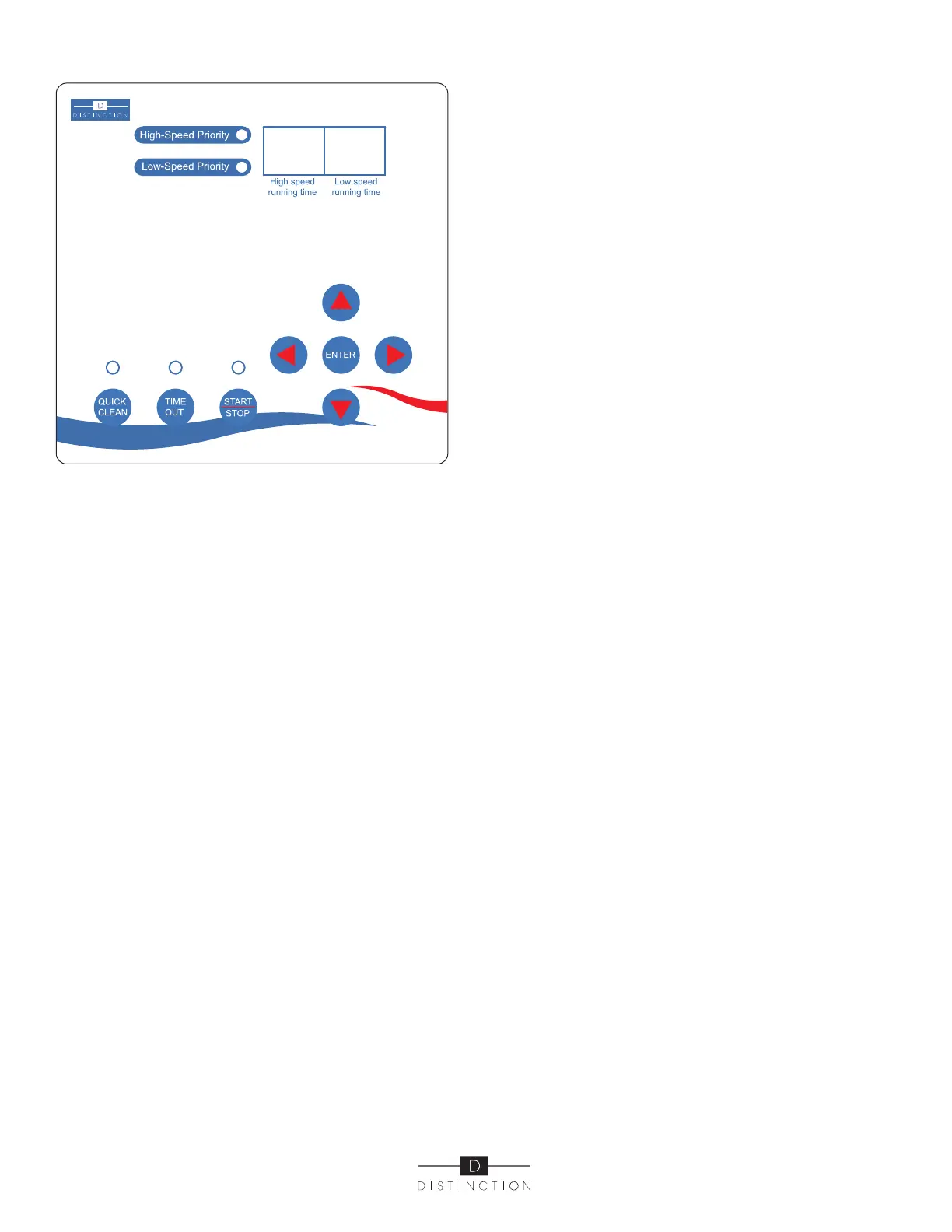
Operator Control Panel (Only available on 72736C models)
Pump must be stopped before programming. Light will be off.
PUSH-BUTTON AND FUNCTION
A. ENTER (set up/confirm key), press to enter in programmming
mode – press to save;
B. UP AND DOWN ARROW KEYS are for time settings and
location movement. When programming, the total hours ca not
exceed 24 hours but can be less. For example: 8 hours on high
speed and 12 hours on low speed. In this case, the pump will run
for a total of 20 hours (12 + 8) and will stop for 4. It completes the
full 24 hour cycle and will start the same cycle the next day unless
you stop the pump manually or change the programming.
C. LEFT AND RIGHT ARROW KEYS: are to move cursor, current
location will be flashing.
D. START/STOP: To start or stop the pump. Light is on when
pump is running. We recommend you start the pump at the time
you want the cycle to start. If we use the example given above,
8 hours on high speed and 12 hours on low speed and you wish
your pump would run on low speed at night, you start your pump at 8pm on low speed for 12 hours (low speed priority). Please
note that when starting on low speed, the pump will run on high speed for 5 minutes so it’s well primed.
If there is a power failure, the pump will start and continue the cycle. So if there was a 2 hours power failure your
programming will lag by 2 hours. To reset your cycle at the desired time, stop the pump and restart pressing on the stop/
start button at the right time.
E. TIME OUT: You press this button, when you wish to stop the pump for maintenance and do not want to disturb the programming.
F. QUICK CLEAN: When you use your automatic cleaner or wish to vacuum your pool and pump is on a low cycle or stopped,
you press Quick Clean to kick to high speed for a maximum of 3 hours. Light will be flashing. If you get done before 3 hours,
press the same button to come back to the original setting. Light will stop flashing.
G. NIXIE TUBE: flashes to show if pump is running on high or low speed. When screen is asleep, touching any key will light
up the screen. When pump is not running, light will shut off after 30 seconds.
SIMPLE FAILURE RECOVERY
1. Power LED does not light after power On, or pump does not start-up after being switched on. Please check wire connections
are properly connected, tighten and in good condition.
2. Power LED light is On, but pump doesn’t start, please contact your dealer.
3. When START/STOP button is pressed, screen will enter sleep mode
CHAPTER FIVE
MAINTENANCE
- Clean strainer basket regularly. Do NOT strike basket to clean. Inspect strainer cover gasket regularly and replace as necessary.
- Pumps have self-lubricating motor bearings and shaft seals. No lubrication is necessary.
- Keep motor clean. Insure air vents are free from obstruction to avoid damage. Do NOT use water to hose off motor.
- Occasionally, shaft seals must be replaced, due to wear or damage. Contact your dealer.


 To Next Page
 Loading...