EasyManua.ls Logo

Divoom BLUETUNE-1 - Page 4

Divoom BLUETUNE-1
32 pages
Print Icon
To Next Page IconTo Next Page
To Previous Page IconTo Previous Page
Loading...
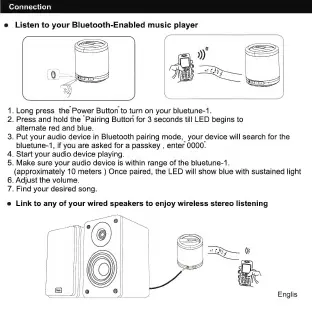
Connection
e
Listen
to
your
Bluetooth-Enabled
music
player
1.
Long
press
the
Power
Button
to
turn
on
your
bluetune-1.
2.
Press
and
hold
the
"Pairing
Button
for
3
seconds
till
LED
begins
to
alternate
red
and
blue.
3.
Put
your
audio
device
in
Bluetooth
pairing
mode,
your
device
will
search
for
the
bluetune-1,
if
you
are
asked
for
а
passkey
,
enter
0000.
4.
Start
your
audio
device
playing.
5.
Make
sure
your
audio
device
is
within
range
of
the
bluetune-1.
(approximately
10
meters
)
Once
paired,
the
LED
will
show
blue
with
sustained
light
6.
Adjust
the
volume.
7.
Find
your
desired
song.
e
Link
to
any
of
your
wired
speakers
to
enjoy
wireless
stereo
listening
Englis

Related product manuals