EasyManua.ls Logo

Divoom BLUETUNE-1 - Page 5

Divoom BLUETUNE-1
32 pages
Print Icon
To Next Page IconTo Next Page
To Previous Page IconTo Previous Page
Loading...
1.
Locate
а
3.5mm
stereo
cable
(not
included).
2.
Plug
one
end
of
the
stereo
cable
into
your
wired
speaker.
3.
Plug
the
other
end
of
the
stereo
cable
into
your
bluetune-1'
s
Audio
out
jack.
4.
Turn
on
your
wired
speaker.
5.
Turn
on
your
bluetune-1.
6.
Paring
with
your
Bluetooth-enabled
audio
device
(refer
the
above
operation
step:
7.
Enjoy
wireless
stereo
listening.
e
Listen
to
your
Non-Bluetooth-Enabled
audio
device
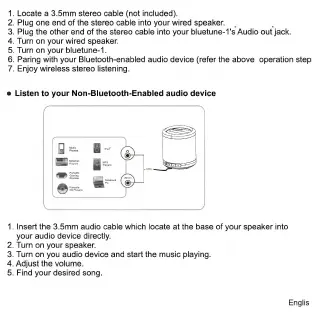
1.
Insert
the
3.5mm
audio
cable
which
locate
at
the
base
of
your
speaker
into
your
audio
device
directly.
2.
Turn
on
your
speaker.
3.
Turn
on
you
audio
device
and
start
the
music
playing.
4.
Adjust
the
volume.
5.
Find
your
desired
song.
Englis

Related product manuals