- 3 -
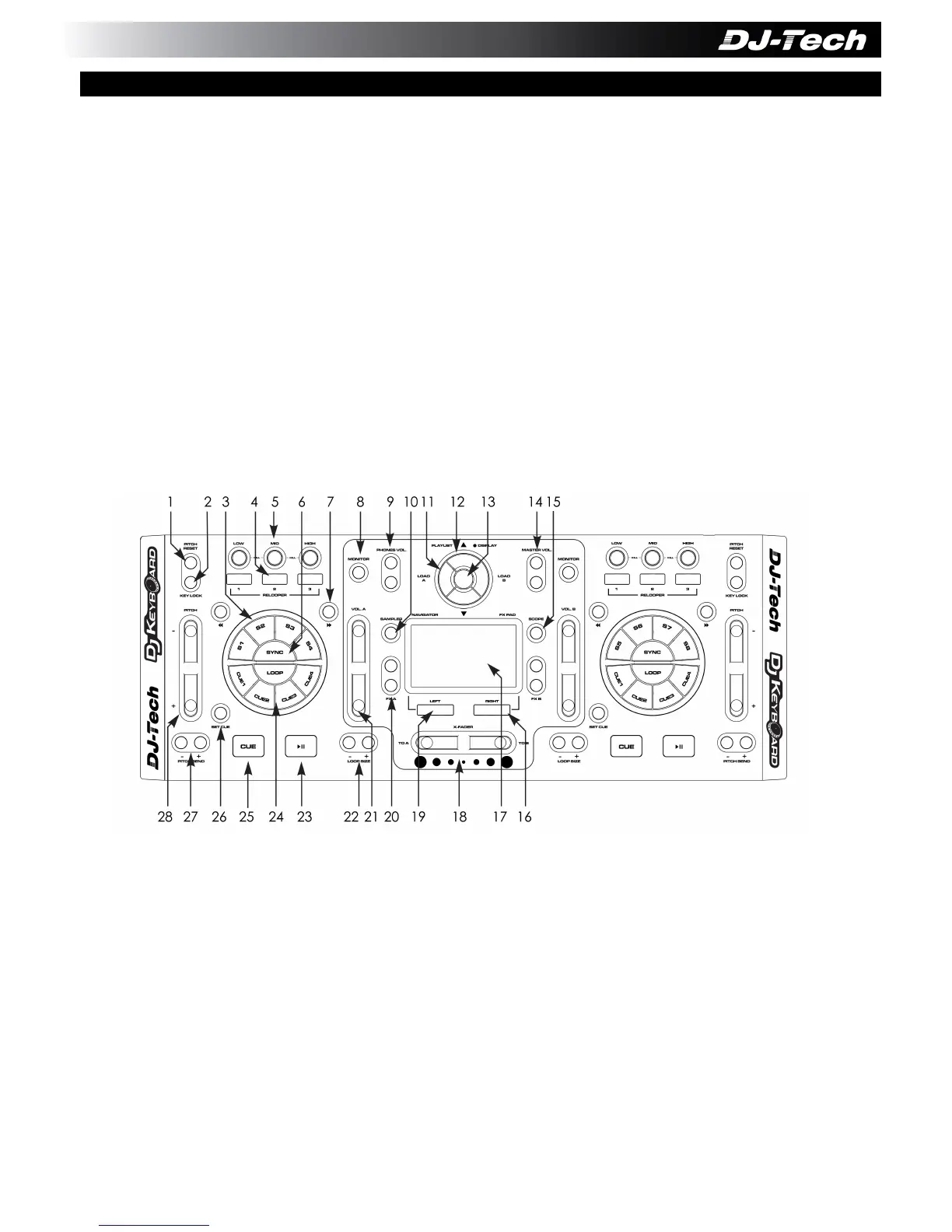
1. PITCH RESET – Press to reset the pitch for the deck.
2. KEY LOCK – Toggle Key Lock for the deck.
3. SAMPLERS (S1 to S8) – Play the samplers S1 to S4 on Deck A and S5 to S8 on Deck B.
4. RELOOPERS – Press and hold to enable the 3 RELOOPERS on the deck.
5. EQ KILL FILTERS – Toggle the High Mid Low Kill Filters for the deck.
6. SYNC – Press for deck synchronization function.
7. BEAT JUMP – Press to jump one beat forward or backward for the deck.
8. MONITOR – Toggle the monitor function for the deck.
9. PHONES VOLUME – Control the headphones volume.
10. SAMPLER VIEW – Press to switch to Sampler view.
11. LOAD A/B – Press to load the selected song to Deck A or Deck B.
12. PLAYLIST UP/DOWN – Press to scroll through the playlist.
13. PLAYLIST VIEW – Press to switch to Playlist view.
14. MASTER VOLUME – Control the master volume.
15. SCROPE – Press to switch different views for the middle panel.
16. MOUSE RIGHT BUTTON – Right button for the integrated mouse.
17. MOUSE PAD – Integrated multi-touch mouse pad.
18. CROSSFADER – Press to control the crossfader.
19. MOUSE LEFT BUTTON – Left button for the integrated mouse.
20. FX SELECT – Press to select the FX for the deck.
21. VOLUME FADER – Press to control the channel volume for the deck.
22. LOOP SIZE – Press to adjust the Auto Loop size.
23. PLAY – Toggle Play or Pause for the deck. (This button will be lightened in BLUE only when
external DC Adaptor is connected)
24. HOT CUE – Press to select and jump to the CUE for the deck.
25. CUE – CUE for the deck. (This button will be lightened in RED only when external DC
Adaptor is connected)
26. CUE IN – Press this button and the HOT CUE buttons to set the Hot Cue.
D. TOP PANEL FEATURES


 To Next Page
 Loading...