EN
4
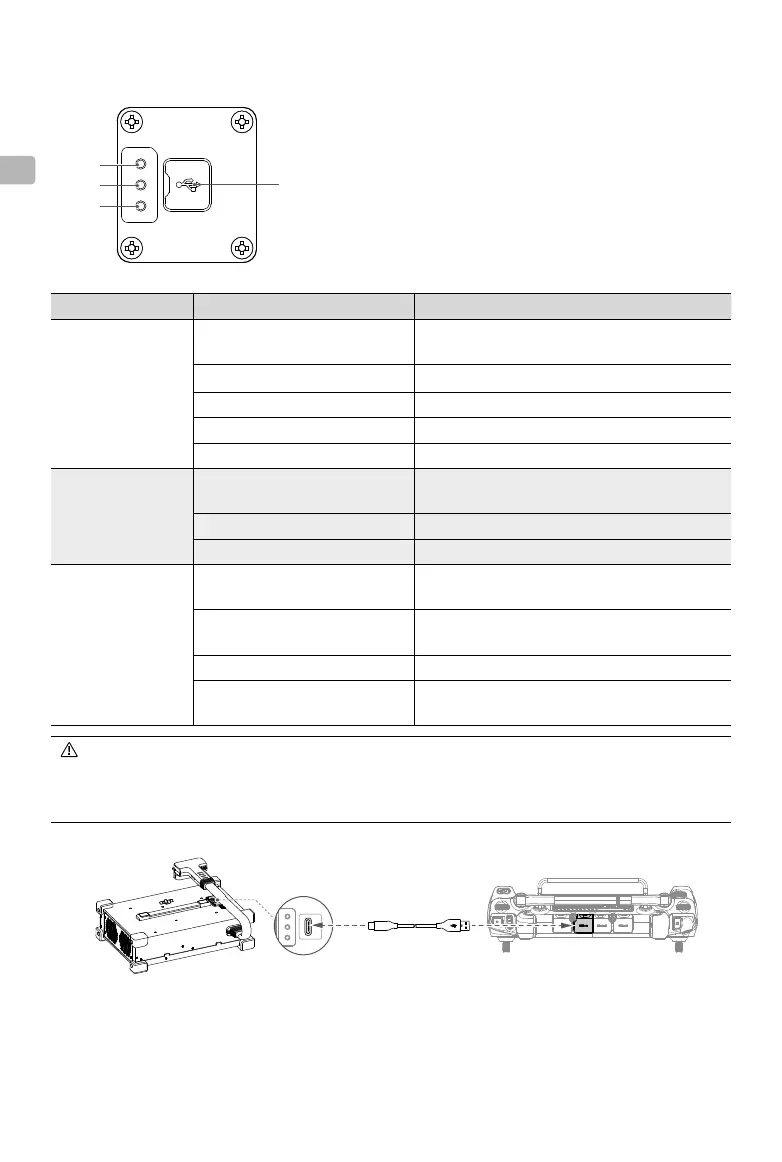
Status LEDs
1. Charging Channel Status LED
2. DC Module Status LED
3. Generator (excl. DC Module)/AC Module Status LED
4. USB-C Connector Cover
1
2
3
USB-A Connector on the
Remote Controller
USB-C Connector on the
Intelligent Power Supply
USB-C Cable
Status LED Blinking Pattern Description
Charging Channel
Status LED
Solid yellow
The power supply is ready to connect to a
battery
Blink green once continuously Charging
Solid green Fully charged
Blink yellow once continuously Warning for the battery/charging channel
Blink red once continuously Battery/charging channel error
DC Module Status
LED
Blink yellow four times
continuously
DC module is not activated
Blink yellow once continuously Warning for the DC module
Blink red once continuously DC module error
Generator (excl. DC
Module)/AC Module
Status LED
Blink yellow four times
continuously
Generator (excl. DC Module)/AC module is not
activated
Blink yellow once continuously
Warning for the generator (excl. DC Module)/
AC module
Blink red once continuously Generator (excl. DC Module)/AC module error
Blink red four times
continuously
Generator (excl. DC Module) maintenance is
required
• When the status LEDs blink for warning or error, connect the power supply to the remote
controller using a USB-C cable to see more information.
• If any part of the power supply is abnormal or damaged, it is recommended to contact a DJI-
authorized dealer or DJI Support to repair or replace the part.
4



 To Next Page