©
2019 DJI All Rights Reserved.
11
ROBOMASTER S1
User Manual
Connect
The S1 must be connected with the app. Tap to see a guide on how to connect via Wi-Fi or router.
Connection via Wi-Fi
Users can enter both Solo and Battle mode when connecting via Wi-Fi.
Follow the steps below to connect:
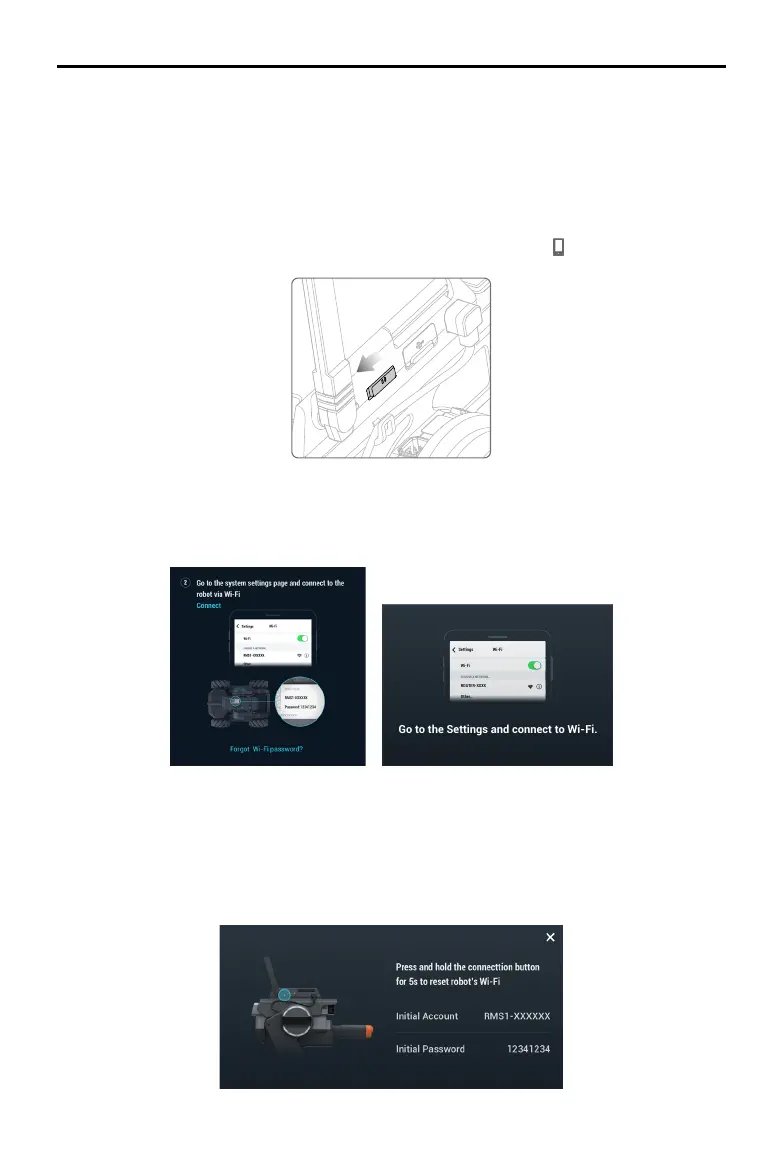
1. Power on the S1 and slide the mode switch on the intelligent controller to
.
2. Run the RoboMaster app, go to Wi-Fi settings on the mobile device, select the Wi-Fi name
(RMS1-XXXXXX) shown on the sticker on the body of the S1, and enter the password. The default
password is 12341234.
3. Wait for the S1 and the app to connect. The S1 will emit a sound once connected.
Reseting the Password
Make sure the mode switch on the intelligent controller is slid to the Connection via Wi-Fi position,
and press and hold the connect button for ve seconds to reset the password.
Wi-Fi
Settings
Wi-Fi
Other…
ROUTER-XXXX
CHOOSE A NETWORK…
Go to the Settings and connect to Wi-Fi.



 To Next Page