12
©
2019 DJI All Rights Reserved.
ROBOMASTER S1
User Manual
Connection via Router
Users can enter both Solo and Battle mode when connecting via router.
Follow the steps below to connect:
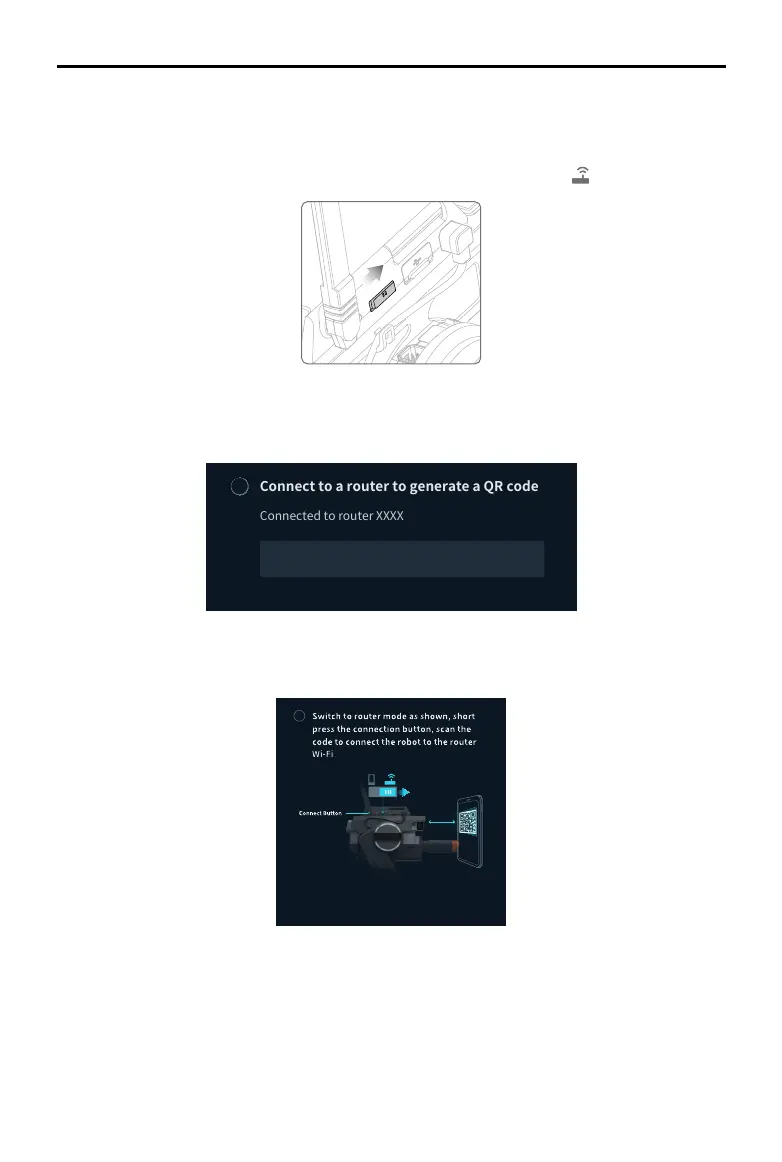
1. Power on the S1, and slide the mode switch on the Intelligent Controller to
.
3. Press the connect button on the intelligent controller and use the camera of the S1 to scan the
QR code. The S1 will connect to the router automatically.
Settings
Robot, Connect, Display, Control, and System can be found in the Settings page.
Robot
Users can check the status of each individual component of the S1. When a component is
abnormal, the corresponding part will be displayed in red with more detailed information provided
on the right side of the screen.
ConnecttoaroutertogenerateaQRcode
SwitchtoConnectionviaRoutermodeand
presstheconnectbutton.Afterscanning
theQRcode,therobotwillconnecttothe
Switch
1
2. Open the RoboMaster app, go to Wi-Fi settings on the mobile device, connect to a router, and
input the Wi-Fi password of the router to generate a QR code.
2
2
3
1



 To Next Page