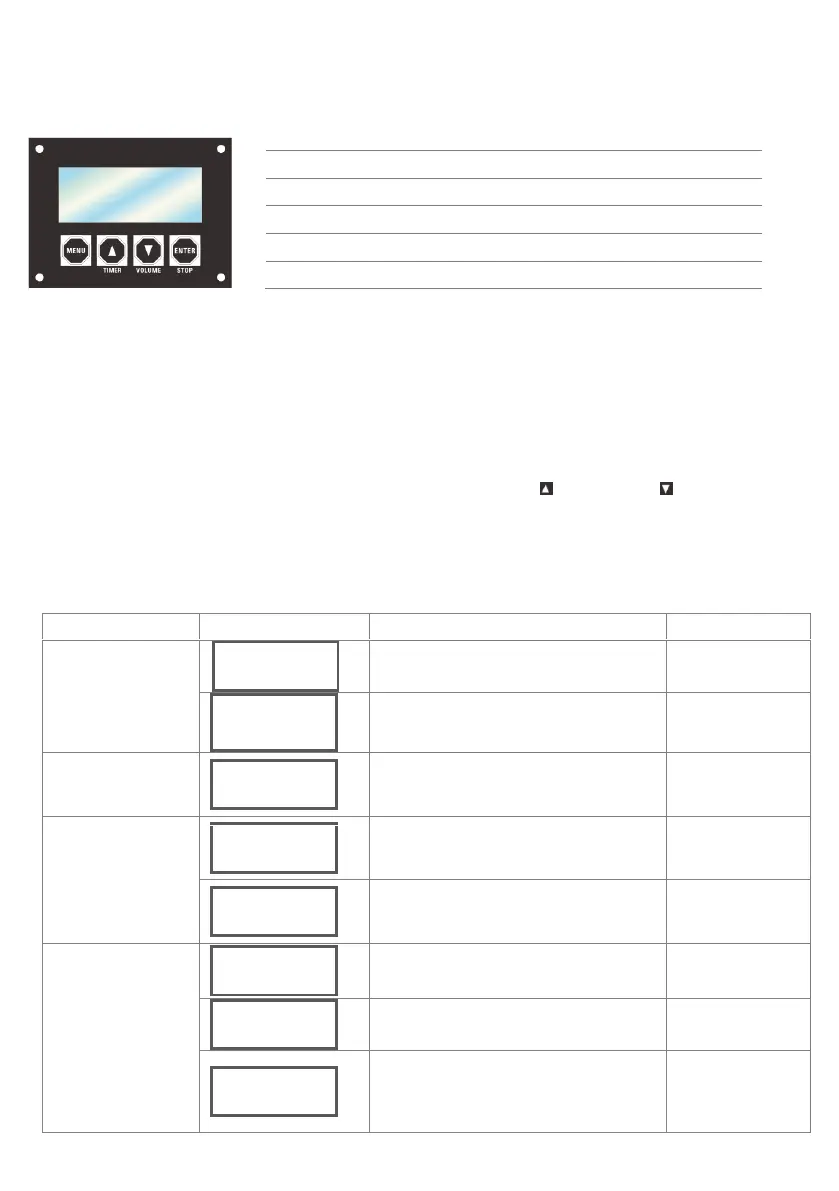
5.2. On-device Control Panel
To access the control panel functions, use the four buttons located underneath the LCD display.
5.3. On-device Control Mode & Operation
5.3.1. Programming
• Refer to the Menu Map to understand the menu options. The menu map shows the main level and a variable number of programming
levels for each option.
• To go to the desired main level, press <MENU> repeatedly until the option shows on the display. This will take you to the first
programming level for that option.
• To select an option or value within the current programming level, press <TIMER> < > or <VOLUME>< > until the option shows
on the display. If there is another programming level, you will see that first option, or you will see the selected value.
• Press <MENU> repeatedly to switch menu pages.
• Press <STOP> to return to the standby page.
5.3.2. Menu Map
When the external trigger function is ON, showing
this page.
When the external trigger function is OFF, to
connect to DMX control, showing this page
Under DMX control, showing the DMX address
setting.
When external trigger is ON and the unit is
connected to external trigger, after pressurization
is completed, it shows this page.
Setting External fireworks ignitor status
Please use 9-60V fireworks ignitor signal
Setting Preset sequence triggered by fireworks
ignitor
Switch menu pages to select a function
Increases the numeric value of current function
Decreases the numeric value of current function
Switch between current menu page and Standby Page


 To Next Page