. . . and on the rear panel
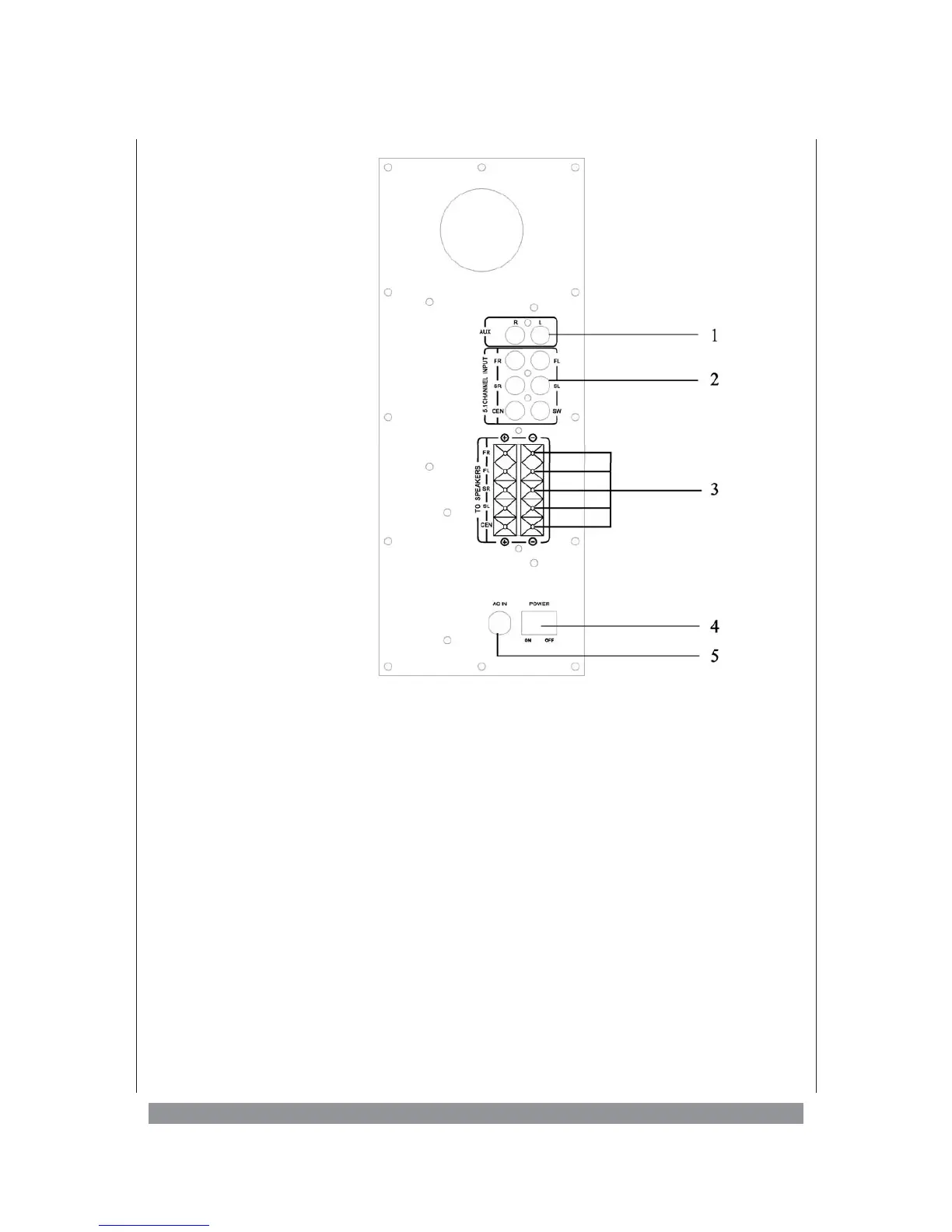
1) AUX INPUT
Here you can connect stereo audio signals to the STEREO input (e.g. the audio output of a
TV set or a CD player).
2) 5.1 CH INPUT
FL Please connect here the input signal for the left front speaker.
FR Please connect here the input signal for the right front speaker.
SL Please connect here the input signal for the left surround speaker.
SR Please connect here the input signal for the right surround speaker.
CE Please connect here the input signal for the centre speaker.
SW Please connect here the input signal for the subwoofer.
3) SPEAKER OUTPUTS
To connect the speaker boxes to the subwoofer’s output terminals we recommend using the
speaker cables enclosed.
Front Right - Connect the right front speaker to the +/- terminals.
Front Left - Connect the left front speaker to the +/- terminals.
Surround Right - Connect the right surround speaker to the +/- terminals.
Surround Left - Connect the left surround speaker to the +/- terminals.
CENTER - Connect the centre speaker to the +/- terminals.
6


 To Next Page