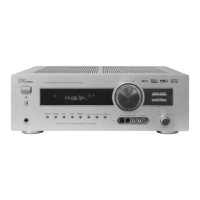
1. POWER - in standby, switches the device on and off
2. DISPLAY - shows information on the operation mode in the
display
3. Input selection keys - for selecting the desired input
4. MEMORY - calls the radio station memories
5. ST/MONO - Mono / Stereo changeover in radio operation
6. PTY SEARCH - Starts the RDS-Programme Type search
7. TUNING +/- - Station tuning
8. BAND - switches the frequency band during radio reception
9. AUTO / MANUAL - for switching from automatic to manual channel
search
10. APS - automatically searches and saves radio stations in
the station presets
11/15. PRESET +/- - for calling the presets in radio operation
12/13. VOL +/- - for controlling the volume
14. MUTE - mutes the speaker and switches it on again
16. DIMMER - for reducing the display brightness
17. CH SELECT - for selecting single speakers for the following fine
adjustment
18. SUBWOOFER - for switching the subwoofer on or off
ON /OFF
19. +/- - for changing the settings for bass, treble, delay
time and LFE adjustment
20. LFE TRIM - press this key in ProLogic 5.1 channel or DTS 5.1
operation in order to reduce the volume of the low
frequencies by a maximum of 10dB
21. BASS - calls the setting for the bass, the volume of which
you can then control using the +/- keys
22. Input Mode - switches the available operation modes
23. TREBLE - calls the setting for the treble, the volume of which
you can then control using the +/- keys
24. DELAY TIME - for setting the delay time in Dolby digital or Dolby
Pro Logic operation
25. BASS MODE - select one of the two speaker pre-settings
26. TEST TONE - for the fine adjustment of the volumes in Dolby
digital or Dolby Pro Logic operation
27. SURROUND MODE - for selecting the surround operation modes “Movie”
or “Music”
28. STEREO - for changing the operation mode to “Stereo”
29. DOLBY PL II - for changing the operation mode to “Dolby Pro
Logic II”
30. DYNAMIC - press this key repeatedly in order to set the
desired dynamic compression
31. DTS/DOLBY DIGITAL - for changing the operation mode to “DTS/Dolby
Digital”
9


 To Next Page