How Receiver Functions
1
2
3
4
5
6
7
8
B. Set Receiver to MicroPLUS
®
Mode (Factory Set)
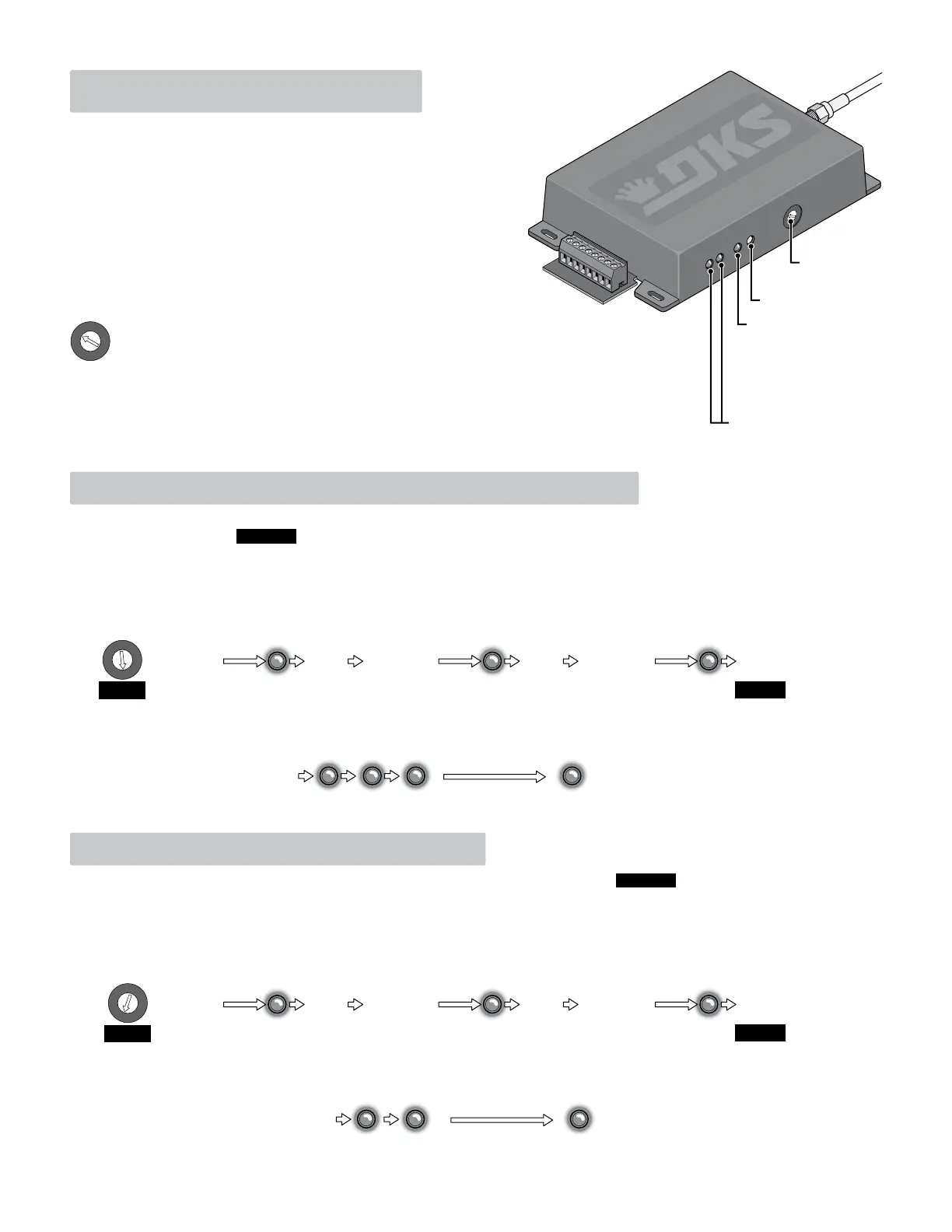
1. Turn the Programming Selector to Position B.
2. Press and hold Program Button until the Program LED flashes ONCE and receiver will BEEP once. Press and hold button again, LED will flash
and receiver will beep. Press and hold button a third time until LED continually flashes and beeps.
3. The receiver now needs to have its power turned OFF, then back ON. Receiver is now in MicroPLUS
®
mode.
The receiver comes from the factory already set in the MicroPLUS
®
mode. If you need to change the receiver from MicroCLIK™ to MicroPLUS
®
mode, follow the steps below. CAUTION: Changing an existing programmed receiver from MicroCLIK™ to MicroPLUS
®
mode will erase ALL
EXISTING MEMORY that has been previously programmed in the receiver.
Verify Receiver is in MicroPLUS
®
mode:
After power has been turned back ON to receiver. Receiver will emit 3-flashes and beeps, this indicates MicroPLUS
®
mode. Receiver may then emit
a long flash and beep ONLY if existing memory has been erased from the receiver.
FINISH
Programming Selector’s 12 functions:
1. Learn Transmitters
2. 26-bit Weigand Programming (Factory Set)
3. 31-bit Weigand Programming
4. 30-bit Weigand Programming
5. Match Facility Code
6. Ignore Facility Code (Factory Set)
7. Learn Master Transmitters (Up to 4)
8. Low Power Mode
9. Normal Power Mode (Factory Set)
A. Erase ALL Memory
B. Set Receiver to MicroPLUS
®
Mode (Factory Set)
C. Set Receiver to MicroCLIK™
Mode
D-F. Not Used
Weigand LED’s: Will blink
as Weigand data is being
transmitted.
Program LED: Will flash
sequences during
programming and
flashes during normal
operation or frequency
interference.
The 8040 receiver responds to the MicroPLUS
®
or MicroCLIK™ transmitter’s “Transmitter
Code” that is defined by “Transmitter Button Codes” and “Facility Codes”. For
example: an 8040 receiver can be programmed to respond to only the first button on a
multiple button MicroPLUS
®
or MicroCLIK™ transmitter while a second 8040
receiver can be programmed to respond to only the second button of the same
multiple button MicroPLUS
®
or MicroCLIK™ transmitter. Thus allowing a single
multiple button MicroPLUS
®
or MicroCLIK™ transmitter to activate two different
receivers without fear of both receivers responding to the same transmitter code.
In Weigand output mode, you have the option of having the receiver match or
ignore the facility code to allow the receiver to activate. One receiver can be
programmed to respond to a specific facility code while another receiver can be
programmed for a different facility code.
Program Button
Program
Selector
1
2
3
4
5
6
7
8
9
A
B
C
D
E
F
1
2
3
4
5
6
7
8
9
A
B
C
D
E
F
Release
Button
2 Sec.
Press and
Hold Program
Button
Press and
Hold Program
Button
Press and
Hold Program
Button
Press and
Hold Program
Button
Press and
Hold Program
Button
Press and
Hold Program
Button
START
1
2
3
4
5
6
7
8
9
A
B
C
D
E
F
Beep
Beep Beep Beep Long
Beep
Release
Button
2 Sec.
Beep
Release
Button
Receiver
power MUST be
turned OFF
then back ON
After
power has been
turned back ON
ALL Existing
Memory has
been ERASED
2 Sec.
If receiver has
existing
programming in
its memory
Beep
MicroPLUS
®
mode
C. Set Receiver to MicroCLIK
™
Mode
1. Turn the Programming Selector to Position C.
2. Press and hold Program Button until the Program LED flashes ONCE and receiver will BEEP once. Press and hold button again, LED will flash
and receiver will beep. Press and hold button a third time until LED continually flashes and beeps.
3. The receiver now needs to have its power turned OFF, then back ON. Receiver is now in MicroCLIK™
mode.
If you need to change the receiver from MicroPLUS
®
to MicroCLIK™
mode, follow the steps below. CAUTION: Changing an existing programmed
receiver from MicroPLUS
®
to MicroCLIK™
mode will erase ALL EXISTING MEMORY that has been previously programmed in the receiver.
Verify Receiver is in MicroCLIK™
mode:
After power has been turned back ON to receiver. Receiver will emit 2-flashes and beeps, this indicates MicroCLIK™
mode. Receiver may then emit
a long flash and beep ONLY if existing memory has been erased from the receiver.
FINISH
Release
Button
2 Sec.
START
1
2
3
4
5
6
7
8
9
A
B
C
D
E
F
Beep
Beep Beep Long
Beep
Release
Button
2 Sec.
Beep
Release
Button
Receiver
power MUST be
turned OFF
then back ON
After
power has been
turned back ON
ALL Existing
Memory has
been ERASED
2 Sec.
If receiver has
existing
programming in
its memory
Beep
MicroCLIK™
mode


 To Next Page
 Loading...