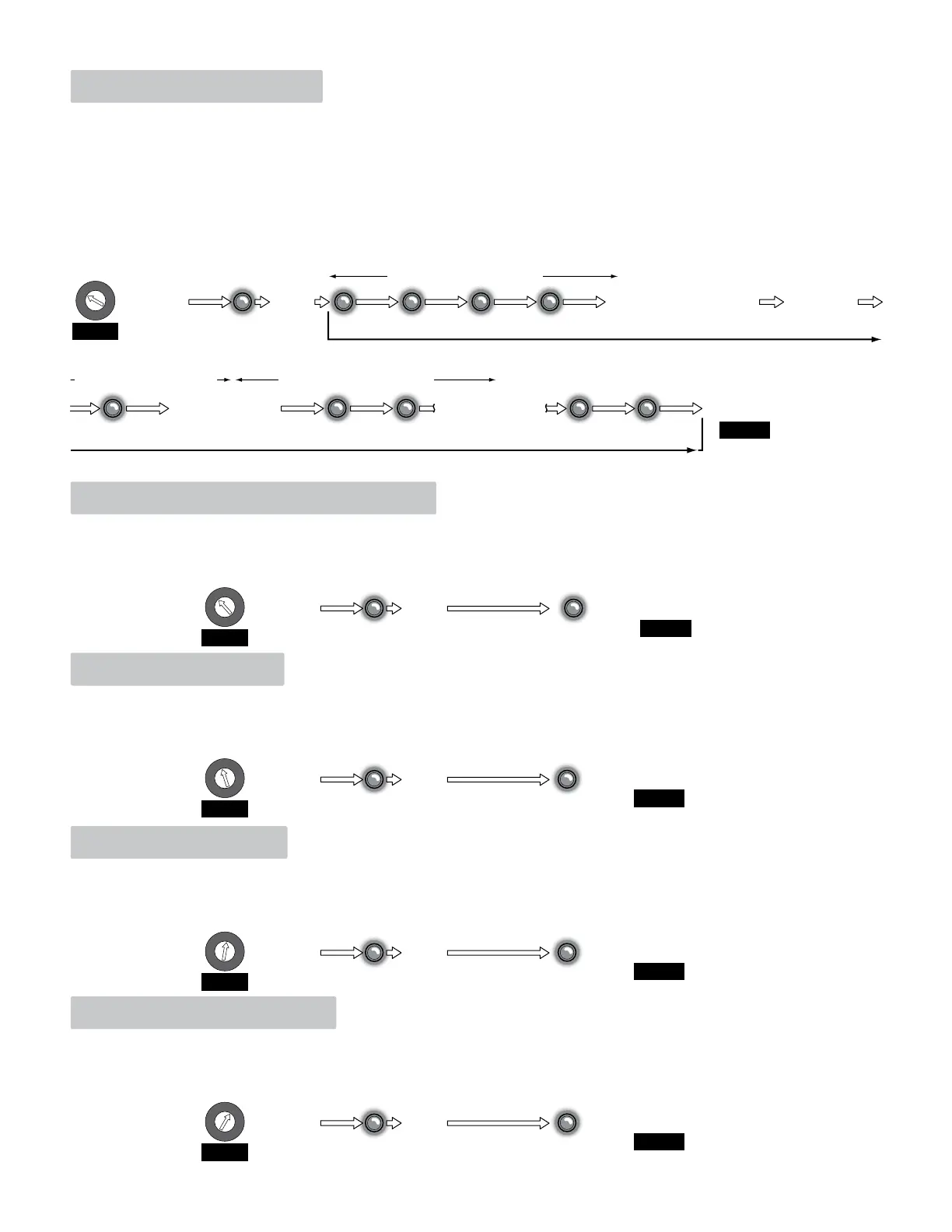
1. Learn Transmitters
1. Turn the Programming Selector to Position 1.
2. Press and hold Program Button until the Program LED flashes ONCE and receiver will BEEP once. Receiver is now in “Learn Mode” and will
flash and beep every second for 10 seconds.
3. Press a specific button on the desired transmitter to be “Learned” within 10 seconds. Receiver will reset 10 second timer after each transmitter
button has been pressed.
2. 26-Bit Weigand (Factory Set)
1. Turn the Programming Selector to Position 2.
2. Press and hold Program Button until the Program LED flashes ONCE and receiver will BEEP once.
3. Receiver LED will then give a long flash and beep.
4. This indicates receiver is now in “26-Bit Weigand Mode”.
2 and 3 Button Transmitters Note:
There are three (3) different “2-Button” transmitter button combinations that each receiver can be programmed to respond to: button-1,
button-2 and buttons 1&2 pressed at the same time.
There are six (6) different “3-Button” transmitter button combinations that each receiver can be programmed to respond to: button-1, button-2,
button-3, buttons 1&2 pressed at the same time, buttons 2&3 pressed at the same time and buttons 1&3 pressed at the same time.
4. Press other desired transmitter buttons to be learned, each within a 10 second time period.
5. After all desired transmitters have been learned by the receiver, wait for the receiver to time-out.
Timer is Reset
to 10 Sec.
After 10 Seconds
Timer Times-Out
Indicates 26-Bit Weigand Mode
Release
Button
One Quick Flash
and Beep
2 Sec.
1 Sec. 1 Sec. 1 Sec. 1 Sec.
Transmitter Programming Mode
Activate ONE MicroPLUS
®
or MicroCLIK™ Transmitter
Less than 10 Seconds Idle Time
Less than 10 Seconds Idle Time Less than 10 Seconds Idle Time
Activate another
desired Transmitter
1 Sec.1 Sec. 1 Sec. 1 Sec. 1 Sec.
Transmitter Programming Mode
FINISH
FINISH
FINISH
START
1
2
3
4
5
6
7
8
9
A
B
C
D
E
F
Release
Button
Quick Flash
and Beep
Long Flash
and Beep
2 Sec.
START
1
2
3
4
5
6
7
8
9
A
B
C
D
E
F
Beep Beep Beep
Beep
Beep Beep Beep Beep
Beep
Activate another
desired Transmitter
3. 31-Bit Weigand
1. Turn the Programming Selector to Position 3.
2. Press and hold Program Button until the Program LED flashes ONCE and receiver will BEEP once.
3. Receiver LED will then give a long flash and beep.
4. This indicates receiver is now in “31-Bit Weigand Mode”.
Indicates 31-Bit Weigand Mode
Release
Button
Quick Flash
and Beep
Long Flash
and Beep
2 Sec.
START
1
2
3
4
5
6
7
8
9
A
B
C
D
E
F
FINISH
4. 30-Bit Weigand
1. Turn the Programming Selector to Position 4.
2. Press and hold Program Button until the Program LED flashes ONCE and receiver will BEEP once.
3. Receiver LED will then give a long flash and beep.
4. This indicates receiver is now in “30-Bit Weigand Mode”.
Indicates 30-Bit Weigand Mode
Release
Button
Quick Flash
and Beep
Long Flash
and Beep
2 Sec.
START
1
2
3
4
5
6
7
8
9
A
B
C
D
E
F
FINISH
5. Match Facility Code
1. Turn the Programming Selector to Position 5.
2. Press and hold Program Button until the Program LED flashes ONCE and receiver will BEEP once.
3. Receiver LED will then give a long flash and beep.
4. This indicates receiver will check the facility code for a match before outputting the transmitter code.
Indicates receiver will check facility code for a MATCH
Release
Button
Quick Flash
and Beep
Long Flash
and Beep
2 Sec.
START
1
2
3
4
5
6
7
8
9
A
B
C
D
E
F
Press and
Hold Program
Button
Press and
Hold Program
Button
Press and
Hold Program
Button
Press and
Hold Program
Button
Press and
Hold Program
Button


 To Next Page
 Loading...