
EasyManua.ls Logo

DL4KA PA500 - User Manual

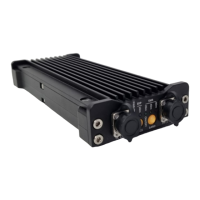
DL4KA PA500
16 pages
Print Icon
To Next Page IconTo Next Page
Loading...
1
DIY599.com
RF linear power amplifier with build-in antenna tuner (ATU)
PA500
INSTRUCTION MANUAL
Version 2
operating frequency range between 3.5MHz-30MHz
The device requires an amateur radio transceiver to operate.
This device is for use by licensed radio amateurs only
FCC-ID: 2A2IEPA500
© 2021 DL4KA

Questions and Answers

  • B
    Barbara RichardsAug 6, 2025
    What to do if DL4KA Tuner PA500 has no transmission?
    • C
      Christopher SimmonsAug 6, 2025
      If there's no transmission or amplification with your DL4KA Tuner PA500, here are a few things to check: * Ensure the device is not in BYPASS mode; set it to TX Mode. * Verify that the bandpass filter setting matches the TX frequency you're using. Adjust the filter if needed. * Check the transceiver and its connection to ensure it's transmitting power. * Confirm that the transceiver is not in SSB mode (no carrier).
  • R
    Rhonda MeyersAug 15, 2025
    Why is my DL4KA Tuner not tuning the antenna?
    • C
      Cassidy RobertsAug 15, 2025
      If the antenna tuning function isn't working on your DL4KA Tuner, consider these potential causes: * Make sure a proper antenna, suitable for the PA500's operating frequencies, is connected. * Check if the antenna tuner is in manual mode; if so, switch it to auto-mode or trigger a manual tuning event. * It's possible the antenna is already matched.
  • K
    Katie AllenAug 27, 2025
    How to fix DL4KA Tuner PA500 when it doesn't turn on?
    • M
      Matthew ReyesAug 27, 2025
      If your DL4KA Tuner PA500 is unable to turn on, consider the following: * Ensure the power cord is correctly connected and that the power source is active. * Verify that the power source can supply sufficient power to the device. * If the above steps don't work, the internal fuse might be open. In this case, the device needs repair.

Summary

Connectors Overview

Left Side Connectors

Details the connectors and their pinouts on the left side of the PA500 device.

Right Side Connectors

Details the connectors and their pinouts on the right side of the PA500 device.

Getting Started and Powering Up

Initial Powering Up Procedure

Instructions on connecting power and the sequence to turn on the PA500 amplifier.

LEDs and Button Functions

Left Panel Controls

Explains the function of LEDs and buttons on the left panel for power, bypass, and band selection.

Right Panel Controls

Explains the function of LEDs and buttons on the right panel for tuner control and RF signal status.

Device Configuration and Modes

Linking PA to Transceiver

Step-by-step guide for configuring the PA500 to work with a specific transceiver.

BYPASS Mode Explanation

Explains the functionality and implications of operating the PA500 in BYPASS mode.

Automatic Mode Explanation

Details how the PA500 operates in automatic mode, especially with SSB modulation.

Band Selection and Indicators

Band Selector Guide

Details the PA500 band selector settings and corresponding LED colors for each amateur radio band.

SWR and Power Indicators

Describes how the LEDs indicate SWR levels and RF output power during transmission.

Operating Modes and Drive Power

Drive Power and Duty Cycle Limitations

Explains limitations on drive power, duty cycle, and output power based on operating modes.

Operational Safety Warnings

Highlights warnings regarding overdriving, output power limits, and overheating.

Safety Operating Area (SOA)

Power vs. Input and Voltage Graphs

Displays graphs showing output power limits versus input power and operating voltage.

SOA Operational Warnings

Provides critical warnings regarding harmonic distortion, antenna matching, and duty cycle.

Transceiver Specifics and Wiring

Yaesu FT817;818 Notes

Notes a specific power-on sequence requirement when using the Yaesu FT817/818 with CAT interface.

ICOM IC-705 Notes

Mentions using SEND/ALC jacks for connection with the ICOM IC-705 transceiver.

ICOM IC-705 Wiring Diagram

Illustrates the cable wiring diagram for connecting the PA500 to an ICOM IC-705.

ELECRAFT KX2 Wiring Diagram

Illustrates the cable wiring diagram for connecting the PA500 to an Elecraft KX2.

ELECRAFT KX3 Wiring Diagram

Illustrates the cable wiring diagram for connecting the PA500 to an Elecraft KX3.

LAB599 TX-500 Wiring Diagram

Illustrates the cable wiring diagram for connecting the PA500 to a Lab599 TX-500.

Safety Instructions

Temperature and Ventilation

Ensures proper ventilation and warns about high surface temperatures.

EM Interference Guidelines

Addresses EM interference compliance and mitigation strategies.

Operation Conditions

States conditions for operation: no harmful interference and acceptance of received interference.

Grounding and ESD Protection

Recommends grounding the transceiver for protection against lightning and ESD.

Device Specifications

Technical Specifications Table

Provides detailed technical specifications for the PA500 amplifier.

Troubleshooting and Service

General Troubleshooting Guide

Lists common faults, possible reasons, and solutions for PA500 operation.

After-Sales Service Policy

Outlines the warranty terms, coverage, and shipping policy for repairs.

Warranty and Liability

Device Label and ID Location

Shows the location of the device label with FCC ID and Serial Number.

Warranty Void Conditions

Lists actions that will void the product warranty.

Non-Warranty Covered Damages

Specifies damages not covered under the product warranty.

Legal and Disclaimer Information

Amateur Radio Operation Note

Highlights legal provisions and restrictive conditions for amateur radio use.

Warranty Terms for PA500

States that warranty applies only if the device is operated as intended.

Disclaimer of Liability

Covers product specifications, data changes, and disclaims liability for errors.

DL4KA PA500 Specifications

General IconGeneral
BrandDL4KA
ModelPA500
CategoryTuner
LanguageEnglish