
 Need help?
Do you have a question about the DMP Electronics V-4061DB and is the answer not in the manual?
The V-4061DB is a Wi-Fi enabled video doorbell designed for home security and monitoring. It is capable of recording and storing video clips that can be viewed through the Virtual Keypad™ App. The device comes with a pre-installed 16 GB SD card for local recording, supporting up to 128 GB.
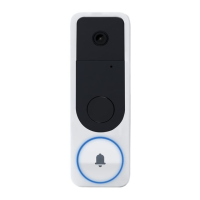
The V-4061DB serves as a smart doorbell with integrated video capabilities. It allows users to see and interact with visitors at their door from anywhere using their smartphone or tablet. The doorbell features a 2MP image sensor with a 2.4mm, F.2.25 lens, offering a wide field of view: 170 degrees vertical and 105 degrees horizontal. It records video in H.264 compression at 15 frames per second and has an IR distance of 25 ft for night vision. The device includes a microphone for two-way audio communication and a PIR motion detector to alert users to activity at their door. A ring button is prominently featured for visitors to press.
The V-4061DB can be installed as a replacement for a traditional wired 16-24VAC mechanical doorbell system or with a 16-24V wired transformer. Installation involves removing the existing doorbell, connecting the V-4061DB to the existing wiring, and securing it to the wall. A Power Kit is included for installation with an existing mechanical chime, ensuring proper power delivery and chime functionality. If using a 16-24V plug-in transformer, an included fuse must be installed. The doorbell is not compatible with digital chimes.
The device connects to Wi-Fi via the Virtual Keypad App. Users need to know their Wi-Fi SSID and password. The setup process involves scanning a QR code on the doorbell, configuring Wi-Fi settings in the app, and connecting the mobile device to the doorbell's temporary Wi-Fi network (HAP_SERIALNUMBER). Once connected, the doorbell will announce its Wi-Fi connection. Users can then name the doorbell and select the chime type (Mechanical Chime or No Chime).
The V-4061DB also supports connection to an NVR (Network Video Recorder). After setting up the doorbell in the Virtual Keypad app and obtaining its IP address, users can add it to an NVR using Manual mode, setting the protocol to Hikvision, Management Port to 8000, Channel Port to 1, and Transfer Protocol to Auto. The default username is "admin," and the password is the verification code found on the back of the doorbell.
The doorbell features an LED indicator that provides status updates:
The V-4061DB comes with a reversible screwdriver for installation, featuring a star bit for security screws on the faceplate and a Phillips-head bit for mounting screws. The package includes four different color faceplate options, allowing for customization. A Weather Gasket is provided to protect the device from the elements. In case of Wi-Fi SSID or password changes, the doorbell can be reconfigured by deleting it from the Virtual Keypad App, holding down the reset button for 25 seconds until it reboots, and then repeating the Wi-Fi connection process. The device also includes vertical, horizontal, and flat wedges to adjust the viewing angle during installation.
 General
| Brand | DMP Electronics |
|---|---|
| Model | V-4061DB |
| Category | Accessories |
| Language | English |

 To Next Page