
 Need help?
Do you have a question about the DOCKTECK 4-in-1 USB-C HUB and is the answer not in the manual?
Details the upstream connection type and its bandwidth capabilities.
Outlines the downstream ports and their respective functionalities and specifications.
Lists the items included in the product package.
Illustrates how to connect the hub to a host device and peripherals.
Specifies resolution limits for HDMI output based on DP Alt mode version.
Provides steps to resolve problems with the HDMI port functionality.
Advises on simultaneous port usage, current limits, and surface temperature.
Lists compatible and incompatible devices for the USB-C hub.
Details warranty, technical support, and customer service commitment.
This document describes the Dockteck 4-IN-1 USB-C HUB, a versatile adapter designed to expand the connectivity options of your Type-C or Thunderbolt 3 host device, such as a PC, laptop, or mobile phone. It is particularly useful for devices with a single Type-C port, offering a comprehensive solution for various peripheral connections.
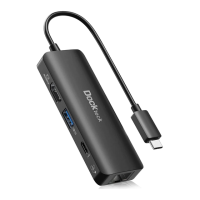
The Dockteck 4-IN-1 USB-C HUB acts as a multi-port expansion for your Type-C/Thunderbolt 3 host. It integrates four essential ports: an HDMI output, a USB-A 3.0 port, an RJ45 Ethernet port, and a Type-C female port that supports both Power Delivery (PD) charging and data transmission.
The primary function of the hub is to provide video output, data transfer, network connectivity, and power delivery through a single Type-C connection to your host device. It leverages the latest DP1.4 Alt mode supported IC, ensuring high-quality video output and efficient data handling.
The HDMI port allows you to connect an external display, supporting resolutions up to 4K at 60Hz. This is ideal for presentations, extending your desktop, or enjoying high-definition media on a larger screen. The hub is backward compatible with lower resolutions and refresh rates, ensuring flexibility with various monitors and setups. For optimal 4K@60Hz performance, your host device should support DisplayPort 1.4 with DSC format. If your host supports DisplayPort 1.2, the maximum resolution will be 4K@30Hz. The HDMI output also supports various color depths (6/8/10/12 bit), pixel formats (RGB4:4:4, YCbCr4:4:4, YCbCr4:2:2), and HDCP 2.2 & HDCP1.4 for protected content, as well as HDR for enhanced visual experience.
The USB-A 3.0 port provides a high-speed data transfer rate of up to 5Gbps, allowing you to connect various USB peripherals such as external hard drives, flash drives, keyboards, and mice. This port also supports BC 1.2 for downstream charging, delivering up to 7.5W (5V@1.5A) to connected devices.
The RJ45 Ethernet port enables your host device to access a super-fast wired Ethernet network, supporting speeds of 10M, 100M, and 1000M. This is particularly beneficial in environments where Wi-Fi is unreliable or a more stable and faster internet connection is required.
The Type-C female port is a dual-function port. When connected to a PD adapter, it supports Power Delivery 3.0, allowing up to 100W of charging power (20V/5A) to be passed through to your host device. This means you can charge your laptop or mobile phone while using the other ports on the hub. The hub itself reserves 7.5W for its own functioning, passing the remaining power (up to 92.5W) to the host. This port also features Fast Role Swap of PD 3.0, which prevents connected devices from disconnecting when you plug in or unplug the PD adapter. When connecting a Type-C device to this port, it supports data transmission up to 5Gbps and downstream charging up to 7.5W (5V/1.5A), sharing this charging power with the USB-A port.
The hub is designed to work seamlessly with all Type-C and Thunderbolt 3 hosts that support DP Alt mode, including both DP1.2 and DP1.4 Alt modes. When used with a Thunderbolt 3 host, the product efficiently transmits DP signals.
To use the Dockteck 4-IN-1 USB-C HUB, simply connect its Type-C male connector to the Type-C or Thunderbolt 3 port on your host device. Once connected, you can then attach your HDMI display, USB devices, Ethernet cable, and a Type-C PD adapter or Type-C device to the corresponding ports on the hub.
The hub supports the simultaneous use of all its ports, offering a comprehensive expansion solution. However, due to potential performance limitations of some laptops, it is recommended to connect only one hard drive or SSD at a time to ensure stable operation. To maintain a stable connection for all peripherals, it's advisable to avoid connecting devices with a total current draw exceeding 900 mA.
If you encounter issues with the HDMI port, several troubleshooting steps can be taken. First, verify that the USB-C port on your device supports DP Alt mode. You can also try using a different computer or HDMI cable to rule out external factors. Plugging your HDMI cable directly into your device can help determine if the issue lies with the cable or the hub. Finally, ensure your monitor is configured to the correct HDMI input.
The USB ports on the hub are primarily designed for data transfer. While they offer some downstream charging, they are not intended for high-power charging of devices like tablets.
It is normal for the hub to reach a surface temperature of around 121°F (approximately 49°C) when fully loaded, as this is typical for products of this type operating under heavy use.
The hub is widely compatible with a range of devices, including various MacBook Pro and MacBook Air models (M1 2020, 2019, 2018, 2017, 2016), iPad Pro models (M1 2021, 2020, 2019, 2018), iPad Air models (2020, 2018), and Pixelbook models (2017, 2018, 2019). However, it is incompatible with devices such as Nintendo Switch, Apple USB SuperDrive, Samsung Dex, and Chromecast. For specific models, it is always best to confirm compatibility.
The Dockteck 4-IN-1 USB-C HUB is designed for ease of use and reliability. No specific user maintenance is required beyond ensuring proper connection and handling.
The product comes with a 24-month worry-free warranty, providing peace of mind regarding its quality and performance. Lifetime technical support is also offered, ensuring that assistance is available should you encounter any issues or have questions about the product's operation.
For any concerns or suggestions, customer service is readily available to provide the best solution and enhance your shopping experience. This commitment to customer satisfaction underscores the manufacturer's dedication to supporting the product throughout its lifespan.
To ensure the longevity of the device, it is recommended to operate it within the specified environmental conditions: an operating temperature range of 0°C to +45°C and an operating humidity of 10% to 90% RH (non-condensing). For storage, the temperature range is -10°C to +70°C, with the same humidity recommendation. Adhering to these guidelines will help maintain the hub's performance and reliability over time.
 General
| Power Delivery | Up to 100W |
|---|---|
| USB 3.0 Speed | Up to 5Gbps |
| Material | Aluminum alloy |
| Ports | USB-C, HDMI, USB 3.0 |
| HDMI Output | 4K @ 30Hz |
| Compatibility | USB-C devices |

 To Next Page