Before using the terminal
20
For the first time you turn the power ON, a screen for
preparation before using the terminal (initial settings)
appears.
・
The settings can be changed later.
・
If you turn the power OFF with some settings not made
in the initial settings, unset items appear again when
you turn the power ON next time.
・
If you turn on the power without docomo nano UIM
card inserted, "
日付と時刻
(Day & time)" setting
appears. The initial setting screen for DOCOMO
services does not appear.
1
On the "
初期設定
(Initial settings)" screen, [
次
へ
(Next)]
2
Following the onscreen instructions, set
Text-to-speech
e
Setting my body
e
Security
code
e
One-touch buzzer
音声読み上げ設定
(Text-to-speech)
:
Set whether to
enable Text-to-speech function which lets the
terminal read information on the screen or
operation.
自分からだ設定
(Setting my body) :
Set basic
information for
自分からだ設定
(Setting my
body).
暗証番号
(Security code) :
Set security code for
using the security lock.
・
By default, "0000" is set. To change, enter "0000"
on the security code entry screen, then enter a
new security code.
ワンタッチブザー
(One-touch buzzer) :
Set whether
to enable one-touch buzzer.
3
On the "
ソフトウェア更新
(software update)"
screen, [
次へ
(Next)]
4
Follow the onscreen instructions to make
initial settings for DOCOMO services
アプリ一括インストール
(Install apps all at once) :
Install applications for subscribed DOCOMO
services all at once.
おサイフケータイの利用
(Use Osaifu-Keitai) :
Make
settings for using Osaifu-Keitai.
ドコモアプリパスワードの設定
(Set docomo apps
password) :
Set a password for DOCOMO
applications.
・
By default, "0000" is set for docomo apps
password.
位置提供設定
(Location information setting) :
Set
location information function settings.
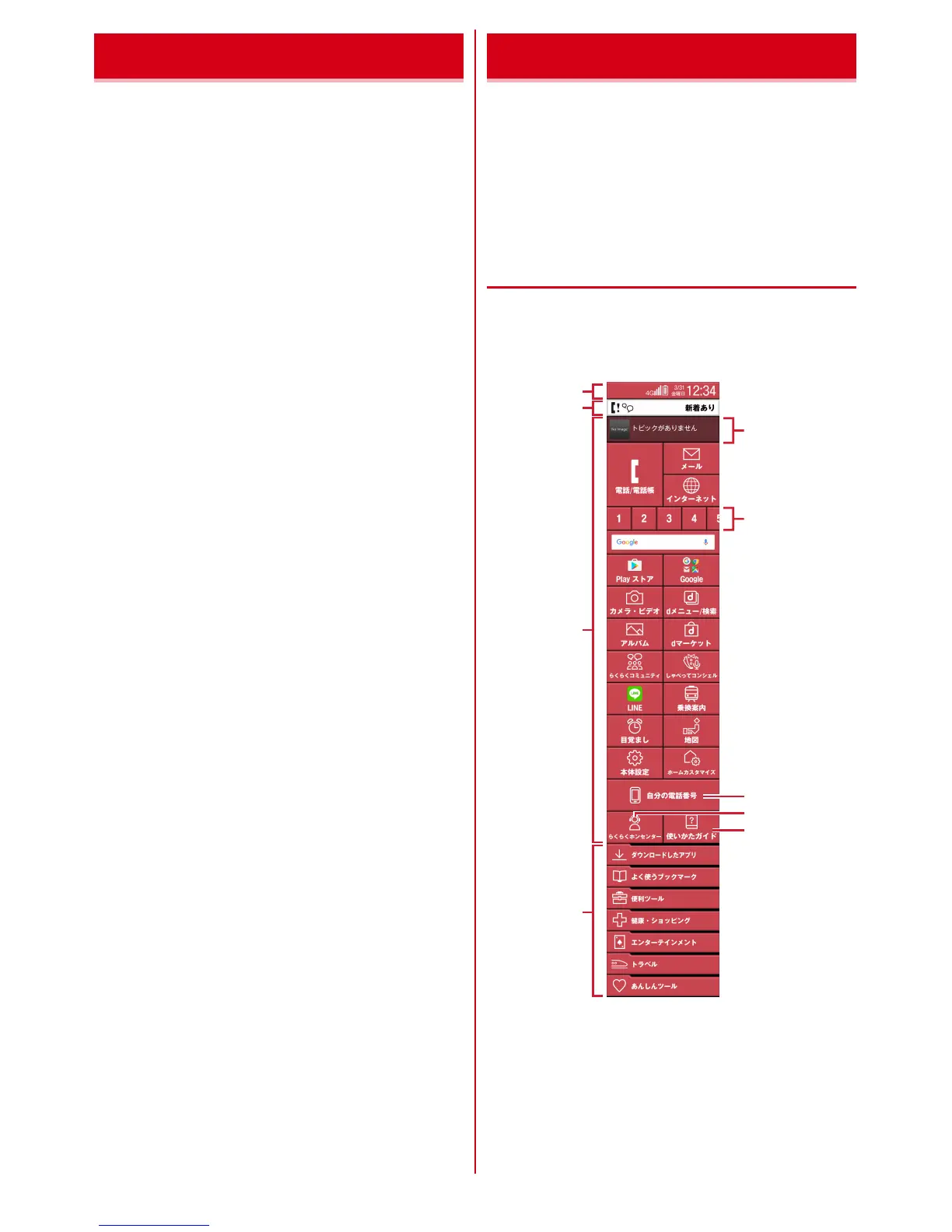
Home screen is a start screen to use applications. The
terminal has two types home screens; "
標準メニュー
(Standard menu)" and "
シンプルメニュー
(Simple
menu)".
・
To switch the home screen, operate from "
メニュー切
替
(Switch menu)" in the Settings menu.
◆
Learning the Home screen
【標準
(Standard)
】
On the Home screen in "
標準メニュー
(Standard menu)",
slide the screen up and down.
・
Press
H
key to return to the top position of the Home
screen.
a
Status area
→
p.22
Status icons, notification icons and date & time are
displayed. They are displayed at the bottom of the top
screen.
・
Touch and push the status area on the Home
screen, the notification panel (
→
p.22) appears.
Initial settings Home screen
g
h
i
c
d
a
f
e
b



 To Next Page