6
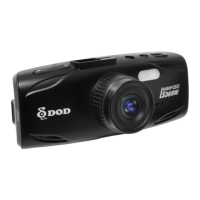
Camera Controls
1
2
3
4
5
6
7
8
9
Record / Select Button[ ]
Video Mode: Start/Stop Recording
Camera Mode: Takes a Photo
Video Playback Mode: Play / Pause Video
Settings Mode: Selects Highlighted Item
Power Button [ ]
Turn on/off the unit.
A/V Video Out Port
GPS Input Port
Connect with the G-mouse (optional).
USB Port
LED Flashlight
Speaker
LED Notification Light
Microphone
Arrow Keys/[ ] , [ ]
Used to navigate through menus and select
videos for playback
Menu/SOS Emergency File Lock/[ ]
Access the settings menu when not recording
video. Press while recording videos to lock the
current file from being overwritten.
Change Mode / Mutes Microphone[ ]
Changes mode while not recording videos.
Press and hold while recording to mute /
unmute the microphone.
LCD Screen
HDMI Port
Reset Button
If camera freezes, use a small pin to press button.
Micro SD Slot
11
12
13
14
10
15
16


 To Next Page