RADIO
To access the Radio mode:
• Press the “Radio” button at the lower left of the touchscreen.
Selecting Radio Stations
• Press the desired radio band (AM, FM or SXM) button on the touchscreen.
Seek Up
/Seek Down
• Press the “Seek arrow” buttons on the touchscreen for less than two seconds to seek
through radio stations.
• Press and hold either “Seek arrow” button on the touchscreen for more than two
seconds to bypass stations without stopping. The radio will stop at the next listenable
station once the “arrow” button on the touchscreen is released.
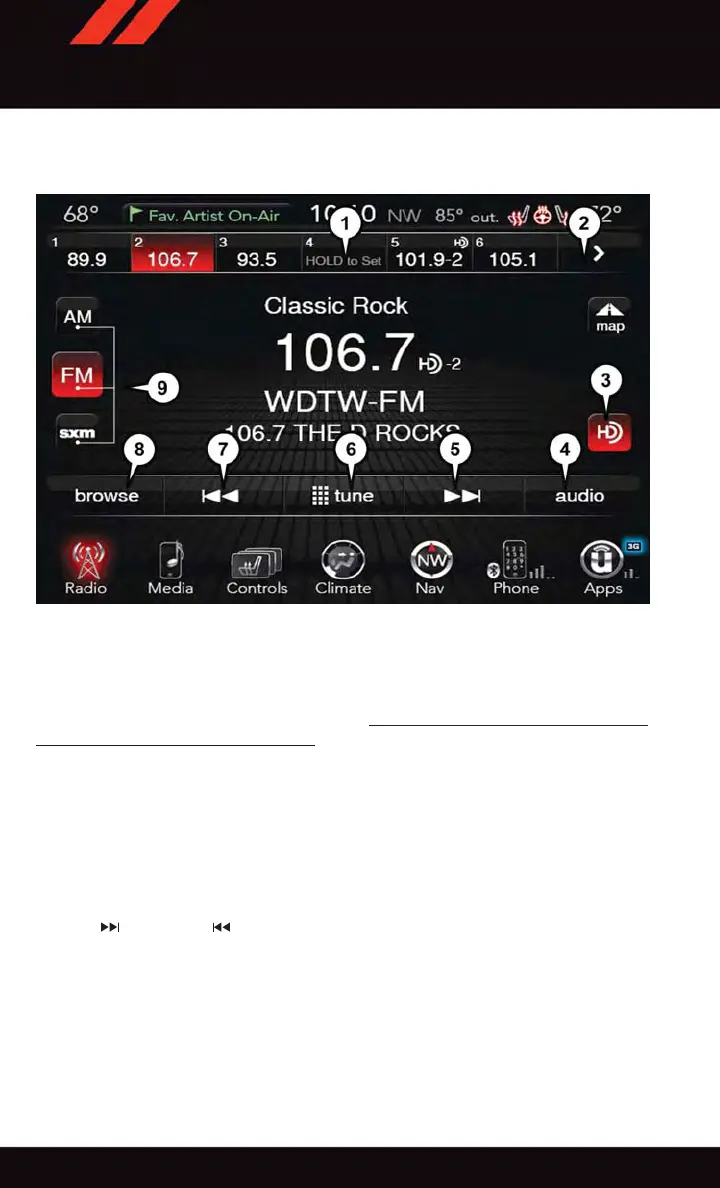
Uconnect® 8.4AN Radio
1 — Radio Station Presets
2 — Toggle Radio Station Presets
3 — HD Radio Available
4 — Audio Settings
5 — Seek Up
6 — Direct Tune To A Radio Station
7 — Seek Down
8 — Browse And Manage
9 — Choose Radio Band
ELECTRONICS
124















 To Next Page