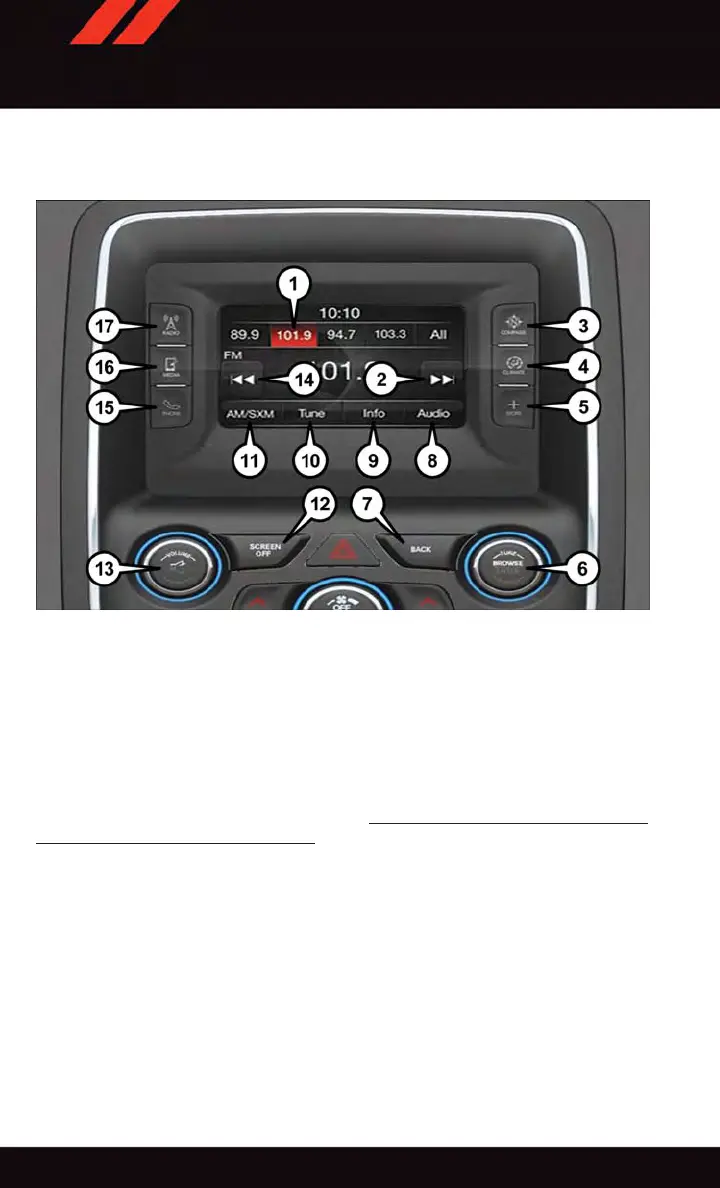
Uconnect® 5.0
1 — Preset Buttons
2 — SEEK Up Button
3 — Compass Information Button
4 — Climate Functions Button
5 — + MORE Functions Button
6 — Browse/Enter Button
7 — Back Button
8 — Audio Button
9 — Info Button
10 — Direct Tune Button
11 — AM/FM/SXM Button
12 — Screen Off Button
13 — V olume Knob/Mute Button
14 — SEEK Down Button
15 — Uconnect
®
Phone Button
16 — Media Mode Button
17 — Radio Mode Button
Clock Setting
To start the clock setting procedure:
1. Push the + MORE button on the faceplate. Next press the “Settings” button on the
touchscreen and then press the “Clock and Date” button on the touchscreen.
2. Press the “Set Time” button on the touchscreen.
3. Press the “Up” or “Down” arrows to adjust the hours or minutes, then select the “AM”
or “PM” button on the touchscreen. Y ou can also select 12hr or 24hr format by
pressing the desired button on the touchscreen.
Uconnect® 5.0
ELECTRONICS
82















 To Next Page