SPEED CONTROL
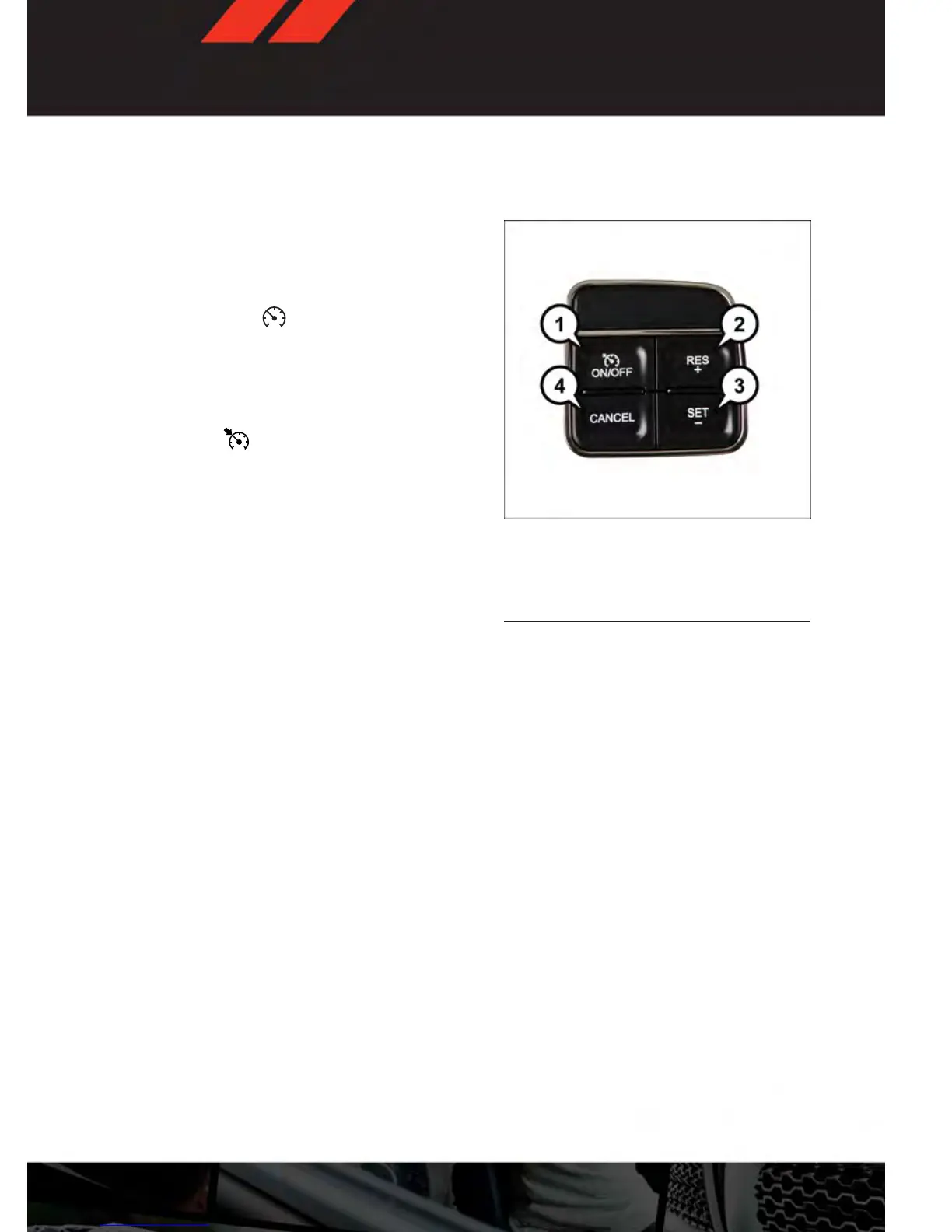
• The Speed Control switches are located on the steering wheel.
Cruise ON/OFF
• Push the ON/OFF button to activate the
Speed Control.
• CRUISE
will appear on the instru-
ment cluster to indicate the Speed Con-
trol is on.
• Push the ON/OFF button a second time to
turn the system off.
SET
• With the Speed Control on, push and re-
lease the SET – button to set a desired
speed.
Accel/Decel
To Increase Speed
• When the Electronic Speed Control is set,
you can increase speed by pushing the
RES + button.
• The speed increment shown is dependant on the speed of U.S. (mph) or Metric (km/h)
units:
U.S. Speed (mph)
• Pressing the RES + button once will result in a 1 mph increase in set speed. Each
subsequent tap of the button results in an increase of 1 mph.
• If the button is continually pressed, the set speed will continue to increase until the
button is released, then the new set speed will be established.
Metric Speed (km/h)
• Pressing the RES + button once will result in a 2 km/h increase in set speed. Each
subsequent tap of the button results in an increase of 2 km/h.
• If the button is continually pressed, the set speed will continue to increase until the
button is released, then the new set speed will be established.
1 — Push On/Off
2 — Push Resume/Accel
3 — Push Set/Decel
4 — Push Cancel
OPER ATING YOUR VEHICLE
23









 To Next Page