4. Once satisfied with the volume, touch the “SAVE” soft-key to save the settings. Touch the
“CANCEL” soft-key to exit the menu without saving the settings.
NOTE:
For your own safety and the safety of others, it is not possible to use certain features while
the vehicle is in motion.
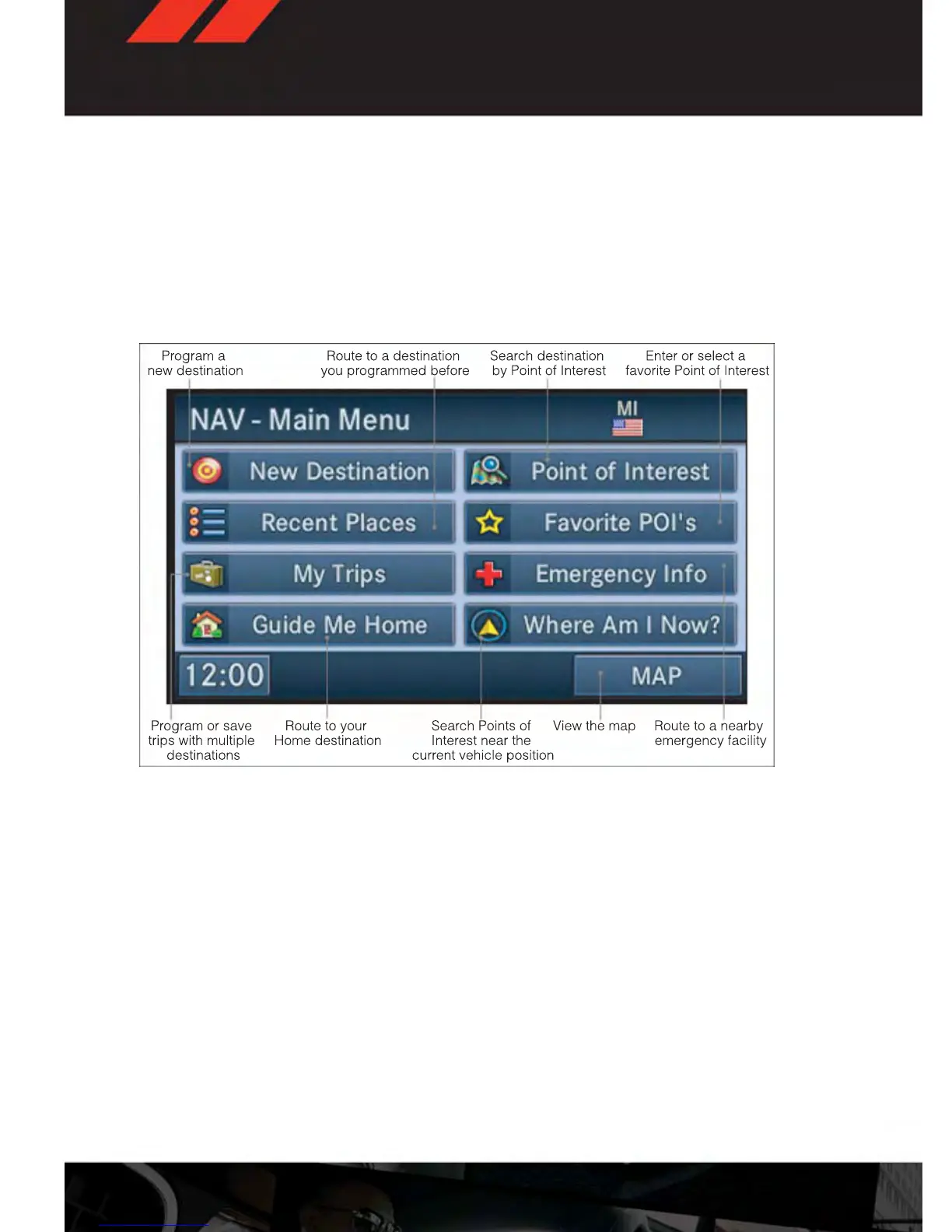
Main Navigation Menu
Finding Points Of Interest
• From the NAV main menu, touch the “Points of Interest” soft-key.
• Select a Category and then a subcategory, if necessary.
• Select your destination and touch “GO.”
Finding A Place By Entering The Street Address
NOTE:
Tip: Entering the city or zip code before entering the street name facilitates address entry.
If the State and/or Country displayed are incorrect, touch the corresponding soft-key to
make the correction.
• From the NAV main menu, touch “New Destination,” then touch “Street Address.”
• Once the Country and State are set and the Street Address screen is displayed, begin
spelling the street name in the speller. In the upper right corner the number of possible
roads decreases.
ELECTRONICS
54









 To Next Page