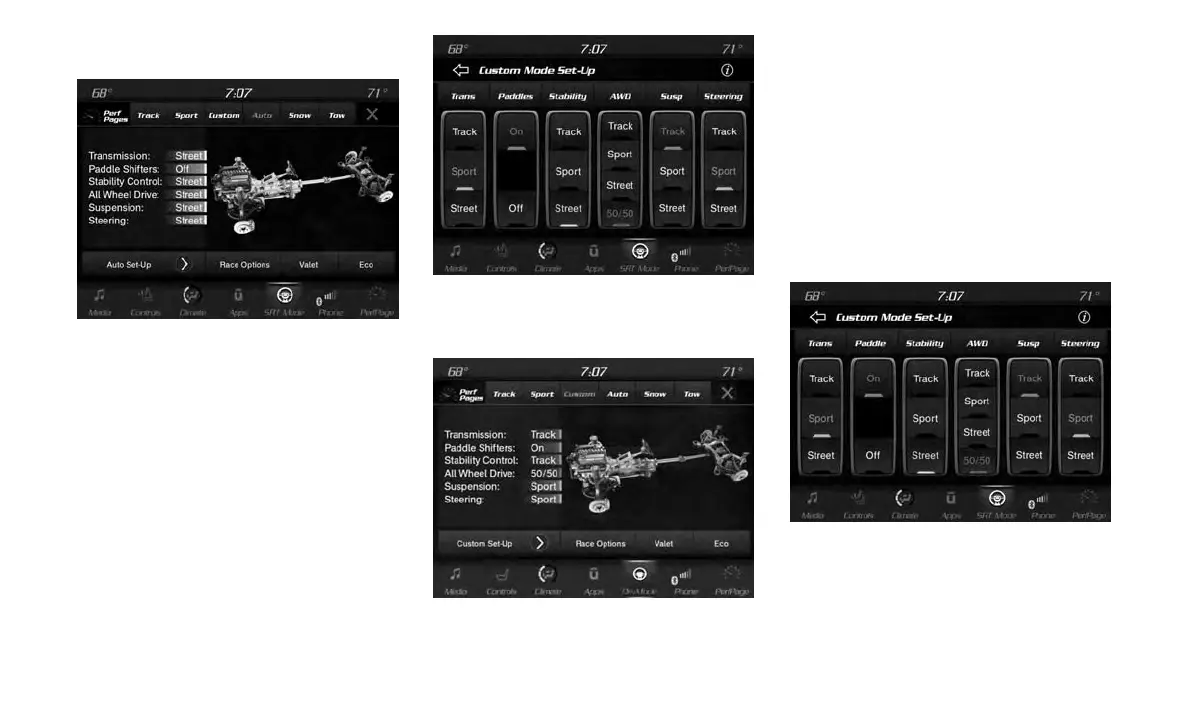
Auto Mode
Auto mode is enabled upon ignition on, or by
selecting “Auto” within the head unit. The Trans-
mission, Stability Control and All-Wheel Drive
modes are set to their “Street” settings high-
lighted in yellow. Steering and Suspension can
be configured in either the “Street,” “Sport,” or
“Track” and the Paddle Shifters may be enabled
or disabled while in auto set-up mode.
Custom Mode
Custom Mode may be selected by pushing the
“Custom” button on the head unit. Custom Mode
allows you to create a custom configuration that
is saved for quick selection of your favorite
settings. While in Custom Mode, the All-Wheel
Drive, Stability Control, Transmission, Steering,
Suspension, and Paddle Shifter settings are
shown in their current configuration.
While in the Custom Mode screen, press the
“Custom Set-Up” button on the touchscreen to
access the selectable options. Select which
mode suits your driving needs for a custom
driving experience.
Drive Mode Auto (Default)
Auto Mode (Default)
Custom Mode
Custom Mode Set-Up
286















 To Next Page